
Shelly Plug Manual
PDF manual · 20 Pages
English



Quick check
Incorrect answer, please try again.
Chat with your Shelly Plug manual using AI
Get instant AI answers from your Shelly Plug manual
Ask anything about the Shelly Plug. Answers come from this manual, with the pages they are based on.
Ask a Question
Do you recommend Plug?
Yes NoFrequently Asked Questions
Plug the Shelly into a socket, wait for the WiFi LED to turn blue (or hold the button 5 seconds until it blinks red then turns blue). Use the Shelly Cloud app to Add Device or connect to the device AP and open 192.168.33.1 in a browser to configure Client Mode with your WiFi credentials.
Is this answer helpful?
Yes. The plug has an embedded web interface and supports local control via HTTP/UDP. You can operate it in Client Mode on your local WiFi network or connect directly to its AP and use 192.168.33.1 to access settings and control the relay.
Is this answer helpful?
The device measures power and lets you set a maximum power limit (up to 3500W). If the preset current draw is exceeded, Shelly will turn the socket off. Follow installation cautions: do not exceed rated load, keep away from moisture, and disconnect power before any wiring changes.
Is this answer helpful?
Press and hold the power button for 10 seconds. After a successful factory reset the WiFi LED will turn blue. This restores default WiFi and device settings.
Is this answer helpful?
Shelly supports auto ON/OFF timers (delay on/off), scheduled on/off hours, sunrise/sunset-based triggers, power-on default behavior (ON/OFF/Restore Last State) and scenes via Shelly Cloud. It also supports HTTP-based control for integration with home automation systems.
Is this answer helpful?
The warranty is 24 months within the EU from purchase. It excludes damage from misuse, overload, water ingress, unauthorized repairs, nonstandard power supplies, mechanical damage, natural disasters and missing proof of purchase. Contact [email protected] for assistance.
Is this answer helpful?
Advantages and Disadvantages
Advantages

- Easy setup with AP/Client WiFi modes and embedded web UI for local control.
- Remote management via Shelly Cloud app (Android/iOS) and REST API for automation integration.
- Power monitoring, configurable max power cutoff and advanced scheduling (auto on/off, sunrise/sunset).
- Compact form factor with physical button and LED for local feedback and factory reset.
- Complies with EU safety and environmental standards and supports firmware upgrades.
Disadvantages

- Limited to 2.4 GHz WiFi (802.11 b/g/n), no 5 GHz support.
- Max load 16A/3500W may be insufficient for heavy appliances.
- Warranty and support limited by exclusions for misuse, water damage and unauthorized repairs.
- Requires basic network knowledge for advanced features like REST API and web UI.
- Operational temperature constrained to 0–40 °C, not suitable for extreme environments.
Product Specification
Type
Actuator
Standard
WLAN (802.11b/g/n)
Function
Smart plug (on/off), Power measurement function
Topology
Star
Dimensions
3.86x2.20x1.38in
Special features
Controllable via app (Android, iOS), Voice assistant (Amazon Alexa, Google Assistant)
Product Description
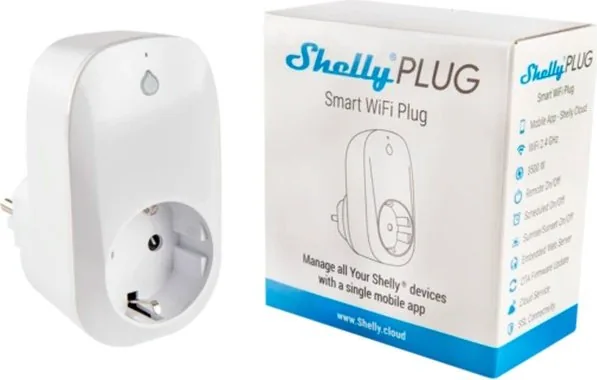
Shelly Wifi Smart Plug — Shelly Wifi Smart Plug Manual
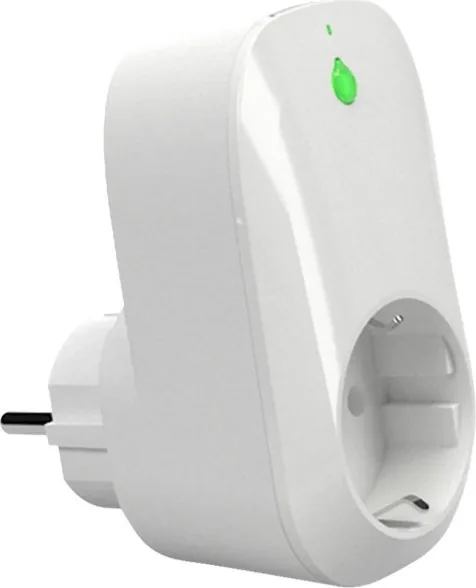
The Shelly WiFi Smart Plug is a compact, easy-to-use smart outlet designed to add remote control, scheduling and energy safety to everyday appliances. Compatible with standard Type F sockets, this plug connects over 802.11 b/g/n WiFi (2.4 GHz) and supports loads up to 16A/230V, making it suitable for lamps, small kitchen appliances and other household devices. It offers local control via a built-in button, an embedded web interface, and cloud access through the Shelly Cloud mobile app for Android and iOS.
Shelly can operate standalone on a local network or integrate with home automation systems via HTTP/UDP REST API. It supports Access Point and Client WiFi modes for simple initial pairing and can be included in the Shelly Cloud for remote monitoring and management. The embedded web UI (reachable at 192.168.33.1 when in AP mode) exposes settings like WiFi, authentication, cloud connection, firmware updates and power limits.
Key product features include power measurement and limit settings (up to 3500W), configurable power-on default (ON/OFF/Restore Last State), auto ON/OFF timers, sunrise/sunset triggers and scheduled on/off hours. An LED and physical button provide quick local feedback and factory reset functionality (hold button 10 seconds). Shelly also supports authentication for the web UI, firmware upgrades, device reboot and REST control for integration with custom automation controllers.
Installation is straightforward: plug the device into a socket, power it on and follow the mobile app or web UI inclusion steps. The mobile app walks through device discovery, network credentials and cloud registration; it also organizes devices into rooms, assigns names/icons and sets automation scenes. The plug’s small footprint (98 x 56 x 35 mm) and low idle consumption make it convenient for everyday use.
Safety and compliance are emphasized — the plug complies with EU directives (RED, LVD, EMC, RoHS2) and includes numerous installation cautions: avoid overloading beyond the rated current, keep away from children, and ensure power is disconnected before any wiring changes. The product carries a 24-month warranty within the EU, with exclusions for misuse, unauthorized repairs, water or environmental damage, nonstandard power supplies and missing proof of purchase.
Notes
- Factory reset: hold the button for 10 seconds until WiFi LED turns blue.
- Cloud service: optional — local control works without Shelly Cloud.
- Use only within specified temperature range (0–40 °C) and max load.
Search for 67,706 Manuals online


Type-in Brand or Model