
seca 703 Manual
PDF manual · 227 Pages
English



Quick check
Incorrect answer, please try again.
Chat with your seca 703 manual using AI
Get instant AI answers from your seca 703 manual
Ask anything about the seca 703. Answers come from this manual, with the pages they are based on.
Ask a Question
Do you recommend 703?
Yes NoFrequently Asked Questions
Use the 2 in 1 function. Have the adult stand on the scale, press hold for NET, then add child. The device subtracts adult weight automatically.
Is this answer helpful?
Requires six AA Mignon batteries, 1.5 Volts. Not rechargeable for standard type.
Is this answer helpful?
Yes via seca 360 wireless USB adapter and analytics software for automatic transmission.
Is this answer helpful?
Up to 330 lbs or 150kg in standard range. Higher weight capacity is 300kg available.
Is this answer helpful?
Use standard disinfectant or household detergent. Do not use spirit or petrol as chemicals damage surfaces.
Is this answer helpful?
Two years from delivery for defects. Does not cover moving parts or transport costs.
Is this answer helpful?
Advantages and Disadvantages
Advantages

- High precision accuracy with +/- 0.15 percent tolerance for medical use.
- Wireless integration reduces manual data entry errors significantly.
- BMI calculation simplifies patient health assessments quickly.
- Robust steel design withstands heavy daily clinic use well.
- Long battery life supports extended mobile usage scenarios.
Disadvantages

- Manual wireless setup required for network groups to work.
- Battery power drains faster when wireless module is activated.
- Requires authorized service partner for warranty compliance.
- Initial setup instructions require careful reading for safety.
- Only 2 inch screen size limits visibility from distance.
Product Specification
Color
black, white
Weight Capacity
661.39 lbs
Graduation
1.76 oz
Measurement Units
kg, lb, stone
Analysis Data
Body Mass Index
Display
Yes
Features
Tare Function, Child Mode, PC Interface, Auto Off
Smart Home
App Control (Wi-Fi)
Platform Size
14.17x20.47 in (WxD)
Product Description
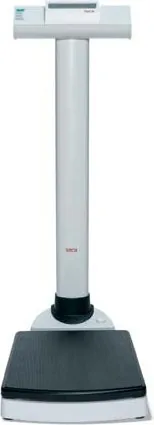
Welcome to the seca 703 Digital Column Scale
When healthcare providers invest in measurement tools reliability and longevity are paramount. This scale represents a pinnacle of industrial durability for clinical settings. It serves hospitals with consistent accuracy year after year. It is designed for high volume environments where trust in data is vital. Users often reference the seca 703 Digital Column Scale Manual standards for initial setup procedures to ensure correct operation. This device is robust and built for demanding medical conditions where precision matters most for patient care.
Comprehensive Measurement Capabilities
Operators switch between Kilograms Pounds and Stones for patient needs effortlessly. The system calculates BMI instantly when height is entered via the keypad. This feature supports health assessments directly on platform without extra steps or separate calculators for staff. Weighing infants is possible through the 2 in 1 function. This method subtracts adult weight to isolate child weight accurately. A stable reading displays rapidly within seconds ensuring efficiency. Maximum load handling allows up to 150kg in standard ranges. The device displays up to 300kg in partial ranges.
Wireless and Power Management
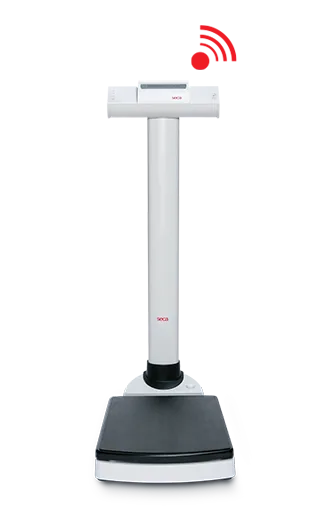
Modern clinics require seamless digital integration to records. The device integrates into the seca 360 wireless network environment. Data transmits to printers or PCs via USB adapters automatically. Portability is enhanced by transport rollers on the base frame. Users choose between six AA batteries or power supply unit. Battery life remains robust for many hours of operation. Power consumption stays low when wireless modules are disabled to extend runtime. Dimensions cover space efficiently at 520mm deep.
Maintenance and Safety Standards
Configuration relies on user defined settings to match environment needs. Cleaning involves standard disinfectants without abrasive chemicals that damage surfaces. Safety instructions emphasize avoiding force shocks and keeping radio equipment at a distance. Maintenance checks every three to five years are recommended for precision. A two-year warranty covers defects upon presentation of receipts. Maintaining the scale ensures longevity and precision for future years. Authorized service partners handle repairs to maintain calibration standards effectively. This equipment remains a gold standard for weight measurement worldwide. Its robust steel design withstands daily clinic use. The display offers clear visibility for patients and professionals alike. Understanding error codes helps quick troubleshooting when St0p appears or BAtt indicators show low power. Temperature range is between +10 and 40 Celsius. Flat stable surfaces are required to avoid force shunt errors during measurements. Menu provides options for damping and beep settings. The 17kg weight allows secure placement on the floor. Accessories include printer models 465 and 466 for data transfer. Cleaning must avoid spirit or petrol products to prevent surface damage. Moving parts like batteries exclude warranty coverage periods. Transport costs apply if device is moved for service requests. The 300kg tare range supports heavy object measurements effectively.
Search for 67,732 Manuals online


Type-in Brand or Model