
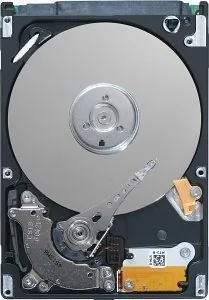
Seagate Momentus 7200 FDE.2 Manual
PDF manual · 60 Pages
English



Quick check
Incorrect answer, please try again.
Chat with your Seagate Momentus 7200 FDE.2 manual using AI
Get instant AI answers from your Seagate Momentus 7200 FDE.2 manual
Ask anything about the Seagate Momentus 7200 FDE.2. Answers come from this manual, with the pages they are based on.
Ask a Question
Do you recommend Momentus 7200 FDE.2?
Yes NoFrequently Asked Questions
Yes, it supports Full Disc Encryption using AES and DriveTrust or ATA Security modes.
Is this answer helpful?
Yes, though some systems may require a Microsoft hotfix for DriveTrust mode.
Is this answer helpful?
Use standard SATA mounting and cabling, ensure correct orientation and secure screws.
Is this answer helpful?
Select models have Free Fall Protection that parks heads to prevent damage.
Is this answer helpful?
Yes, use ATA Security Erase commands to cryptographically erase the drive instantly.
Is this answer helpful?
It uses +5V DC power through a native SATA connector with low power modes.
Is this answer helpful?
Yes, terms depend on the specific product, check the URL provided for validation.
Is this answer helpful?
Advantages and Disadvantages
Advantages

- H hardware Full Disc Encryption protects data if drive is stolen.
- 2 7200 RPM spindle speed provides fast performance for mobile use cases.
- 3 Free Fall Protection feature prevents damage during drops in selected models.
- 4 Low power consumption modes extend battery life in laptops.
- 5 Support for Native Command Queuing improves efficiency with multiple requests.
Disadvantages

- 1 Requires BIOS that supports ATA Security commands for full features.
- 2 Secure erase requires password authentication before execution.
- 3 Specific compatibility issues noted with older systems without hotfixes.
Product Specification
Capacity
250GB (approx. 232.83GiB, additional information regarding this)
Form Factor
2.5" (Width), 0.37" (Thickness/Height)
Interface
SATA 3Gb/s
RPM
7200 RPM
Cache
16MB
Power Consumption
2.2W (Operating)
Recording Method
Conventional Magnetic Recording (CMR)
Security Features
128-bit AES
Warranty
24 Months
Warning/Note/Trivia
Note: Unmarked OEM/System Builder hard drives are in circulation. Reduced warranty coverage possible. Manufacturer warranty checkable via serial number. Important: For use within a RAID array, hard drives with different recording methods (CMR, SMR) should not be combined. When using hard drives with SMR in a RAID array, ensure the RAID controller (or NAS system) is compatible with SMR drives to prevent the partially blocked recording behavior of SMR from being incorrectly interpreted as "Hardware Defect".
Product Description
Seagate Momentus 7200 FDE Performance Overview
The Seagate Momentus 7200 FDE series delivers high-speed storage for mobile computing environments. This drive operates at a consistent 7,200 RPM spindle speed, ensuring rapid data access and high throughput. Designed for reliability, it features a standard SATA 3Gb/s interface, allowing for seamless integration with modern systems. With capacities ranging up to 500GB, users have flexible options for data storage, including the 250GB variant ideal for balanced performance. The drive utilizes fluid dynamic bearings for quiet operation, reducing mechanical noise during intensive tasks.
Comprehensive Encryption Features
Security is paramount with the Full Disc Encryption technology. This hardware-based solution encrypts all data on write operations and decrypts on read operations without user intervention. Utilizing AES standards, the drive supports DriveTrust Security mode for enterprise management or ATA Security mode for standard pre-boot authentication. This ensures data remains inaccessible if the drive is stolen or repurposed. The encryption happens on the fly with negligible performance impact. Users can perform a secure erase instantly to return the drive to a factory state, ensuring data privacy. It prevents unauthorized access by requiring authentication at boot. This feature makes it ideal for corporate deployments requiring strict data governance policies and protection measures.
Installation and Configuration
Installation follows standard Serial ATA procedures without requiring jumpers. The drive fits into standard 2.5-inch bays with specific mounting dimensions of 9.4mm height. Compatible with Windows XP SP2 and later, it supports NCQ for improved efficiency. Configuration is straightforward via BIOS or software tools. You can set a master password or user password to lock the drive. Hot-plug compatibility is supported per the Serial ATA specification revision standards. The drive connects easily using standard SATA cables. It is crucial to handle the drive carefully to avoid static discharge damage.
Reliability and Power Management
The unit includes Free Fall Protection on specific models to safeguard data during drops. Power management modes like Active, Idle, Standby, and Sleep optimize battery life in laptops. The drive monitors health via S.M.A.R.T. technology, providing early warning of potential failures. A typical annualized failure rate stands at 0.5%. Warranty support is available through Seagate services. Environmental specifications ensure operation within specific temperature and humidity ranges. This drive is robust for demanding computing tasks in various conditions. It undergoes rigorous testing for electromagnetic compatibility and safety.
Search for 67,706 Manuals online


Type-in Brand or Model