
Sandberg Wireless Office DesktopSet 631-20 Manual
PDF manual · 1 Pages
English


Quick check
Incorrect answer, please try again.
Chat with your Sandberg Wireless Office DesktopSet 631-20 manual using AI
Get instant AI answers from your Sandberg Wireless Office DesktopSet 631-20 manual
Ask anything about the Sandberg Wireless Office DesktopSet 631-20. Answers come from this manual, with the pages they are based on.
Ask a Question
Do you recommend Wireless Office DesktopSet 631-20?
Yes NoFrequently Asked Questions
The product comes with a five-year warranty on your Sandberg product. Please read the warranty terms and register your new product at the official website.
Is this answer helpful?
Yes, the device is a Wireless Office DesktopSet. This allows freedom from cables while maintaining performance through a USB receiver.
Is this answer helpful?
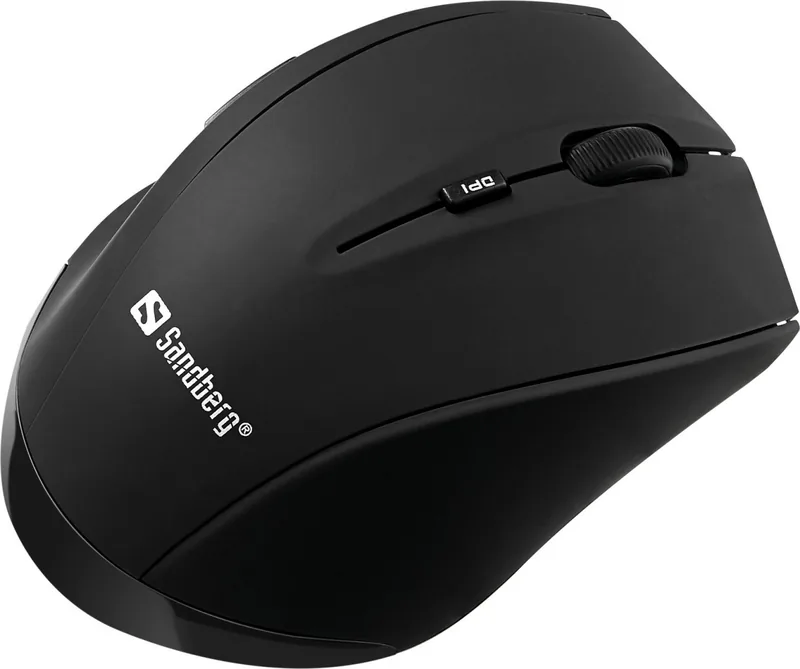
Yes, there is a DPI switch on the mouse to adjust sensitivity levels instantly for gaming or design work.
Is this answer helpful?
You can read the warranty terms and register your new Sandberg product at www.sandberg.it/warranty.
Is this answer helpful?
Hold down the Fn key to activate the shortcut functions available on the keyboard layout for quick access.
Is this answer helpful?
Yes, there are backwards and forward buttons to streamline your browsing experience without needing to use other gestures.
Is this answer helpful?
For information on handling electronic waste, see the guidelines at www.sandberg.it/weee.
Is this answer helpful?
Advantages and Disadvantages
Advantages

- Five-year warranty coverage provides long-term security for business investment
- Wireless design eliminates cable clutter and improves desk ergonomics significantly
- USB connectivity ensures universal compatibility across most modern computers
- DPI switch offers adjustable sensitivity for different precision tasks easily
- Backwards and forward mouse buttons enhance web navigation speed effectively
Disadvantages

- Wireless connection may require battery replacements periodically over time
- Manual setup can be more complex than plug-and-play software solutions
- Basic feature set lacks advanced customization for heavy users
Product Specification
Package Contents
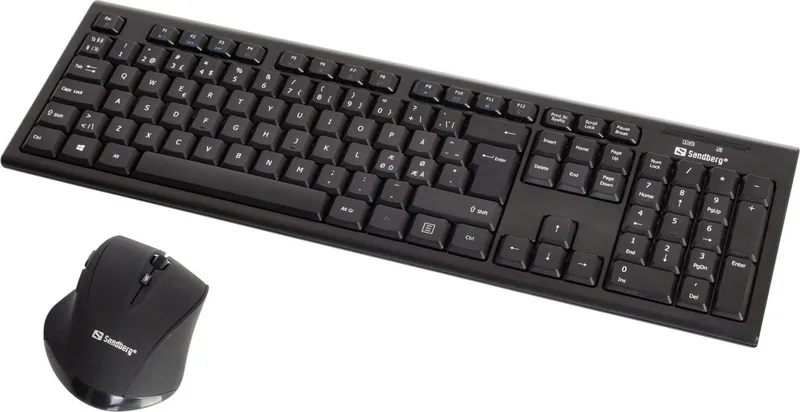
Mouse, Keyboard
Layout
US
Connection
Wireless (2.40GHz)
Resolution (Mouse)
LED-red/IR 1600 dpi, adjustable to 1200/1000 dpi
Features
Numeric Keypad
Product Description
Elevate Your Workspace with the Sandberg Wireless Office DesktopSet
Working efficiently requires tools that disappear into the background of your daily routine. The Sandberg Wireless Office DesktopSet brings this philosophy to life by offering a seamless connection between you and your computer. This black USB kit is designed for professionals who value clarity and speed in a wire-free environment. It represents the perfect blend of modern aesthetics and functional utility for the home or corporate office. In a modern office setting, distractions are minimized to improve output significantly. This device helps remove the tangle of wires.
Effortless Connectivity and Design
Setting up your new peripheral is incredibly straightforward. You simply plug the USB receiver into your computer, and the wireless link is established instantly. The sleek black finish ensures the set looks professional on any desk, complementing monitors of various sizes. There are no messy cables to trip over, allowing for a much cleaner workspace aesthetic. This wireless capability gives you the freedom to move your keyboard and mouse around without being tethered to a specific port on your laptop. Physical clutter can often distract from mental clarity during deep work sessions.
Mastering Mouse Functions for Productivity
The mouse provided in this set is intuitive and robust for daily use. You have full control with a precise left mouse click for primary actions and a right mouse click for accessing context menus. The scroll wheel allows for smooth navigation through long documents or endless web pages. For those who need precision, the DPI switch helps adjust sensitivity levels instantly for gaming or design work. There are also backwards and forward buttons to streamline your web browsing experience without needing to use trackpad gestures constantly.
Keyboard Shortcuts for Power Users
Productivity hinges on speed, and this set offers ways to accelerate your typing workflow. Holding down the Fn key activates special shortcut functions directly from your keyboard home row. This feature is useful for customizing settings or accessing quick commands without digging through complex software menus. It adds a layer of customization that standard office kits often lack and ensures you stay focused on your work instead of setup settings. Also check for firmware updates on their site. Contact support via email if needed.
Peace of Mind with Comprehensive Warranty Support
Sandberg stands behind its quality with a robust five-year warranty on your product. This level of support is rare in the competitive budget office equipment market today. You can read the full terms and register your new product at the official website to ensure your coverage remains valid. Electronic waste handling guidelines are also available online for environmentally conscious users looking for responsible disposal options. Overall, this set offers a balance of style, function, and reliable support for the modern office environment.
Quick Notes on Care and Setup
Remember to consult the instructions if issues arise regarding installation or troubleshooting. The instructions mention quick guide sections for both using the mouse and using the keyboard. Ensure you register via the provided URL to activate your warranty terms correctly.
Search for 67,706 Manuals online


Type-in Brand or Model