
Sandberg FireStorm Mech Manual
PDF manual · 1 Pages
English


Quick check
Incorrect answer, please try again.
Chat with your Sandberg FireStorm Mech manual using AI
Get instant AI answers from your Sandberg FireStorm Mech manual
Ask anything about the Sandberg FireStorm Mech. Answers come from this manual, with the pages they are based on.
Ask a Question
Do you recommend FireStorm Mech?
Yes NoFrequently Asked Questions
The keyboard utilizes Gaote Outemu BLUE mechanical switches known for their clicky sound and tactile bump.
Is this answer helpful?
You can change lighting modes using Fn key combinations or through the dedicated configuration software.
Is this answer helpful?
Yes, every Sandberg product comes with a five-year warranty upon registration at their official website.
Is this answer helpful?
The keyboard is primarily designed for Windows but functions as a standard input device on other operating systems with limited macro support.
Is this answer helpful?
The Win Lock key disables the Windows key to prevent accidental minimization of games or applications during use.
Is this answer helpful?
No, you must download the driver and configuration tool from the Sandberg website before using advanced features.
Is this answer helpful?
Absolutely, the mechanical switches and anti-ghosting technology make it ideal for fast-paced gaming scenarios.
Is this answer helpful?
Advantages and Disadvantages
Advantages

- High-quality Gaote Outemu BLUE switches provide excellent tactile feedback
- Extensive RGB lighting customization with multiple dynamic modes
- Durable construction backed by a comprehensive five-year warranty
- User-friendly software allows easy configuration of macros and lights
- Dedicated multimedia keys enhance productivity and entertainment control
Disadvantages

- Blue switches may be too loud for shared office environments
- Software installation required for full feature access
- Fixed UK layout limits international usability without modification
- Cable length may be restrictive for some desk setups
- No wireless connectivity option available in this model
Product Specification
Layout
UK
Type
Mechanical
Switch Name
Gaote Outemu Blue
Lighting
RGB, individual per key
Keycap Level
Raised, frameless
Keycap Format
Standard
Keycap Dome
Concave
Numpad
Standard
Cursor Block
Standard
Control Keys
Standard
Enter Key
Standard
Delete Key
Standard
Status Indicator
Caps Lock, Num, Scroll
Wrist Rest
Modular
Case
Metal
Case Color
Solid, Black
Keycap Finish
Solid, Black
Key Legend
Solid, White (Translucent)
Connection
Wired (5.9ft), USB-A 2.0
Power Supply
USB
Weight
2.2 lbs
Features
FN Key
Switch Manufacturer
Gaote
Switch Model
Blue
Actuation Type
Tactile
Feedback Type
Click
Damping
None
Actuation Force
13.2 oz (~3.7 gf Tolerance) ~ 13.4 oz (~3.8 gf Tolerance)
Travel Distance
0.16 in (~0.02 in Tolerance)
Pre-travel Distance
0.09 in (~0.02 in Tolerance)
Lifespan
50 Million
Product Description
Discover the Sandberg FireStorm Mechanical Keyboard
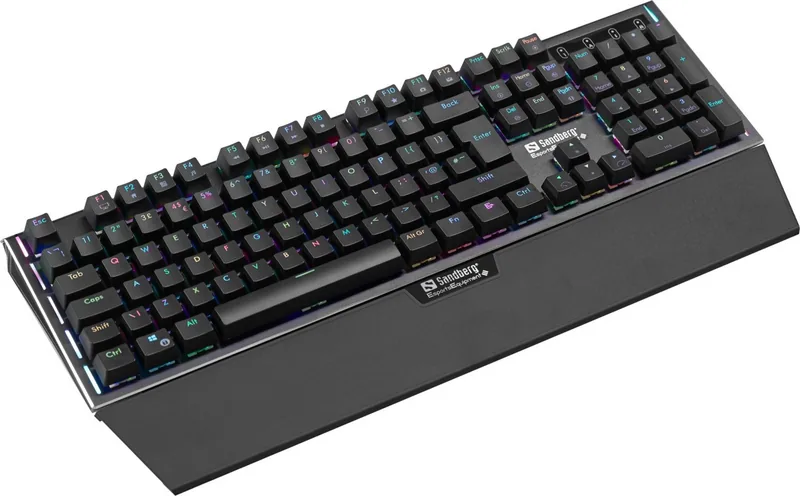
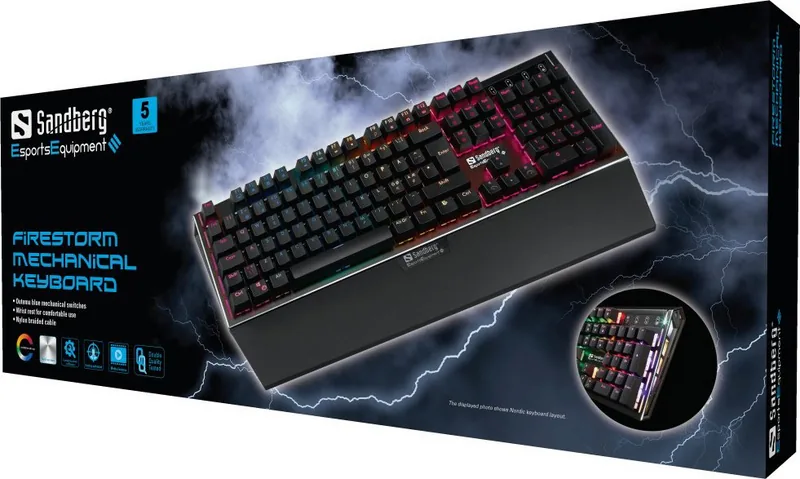
The Sandberg FireStorm Mech is a premium mechanical keyboard designed for enthusiasts who demand precision and style. Equipped with Gaote Outemu BLUE switches, this keyboard delivers a satisfying tactile click and a crisp actuation point that enhances typing speed and accuracy. Whether you are coding late into the night or dominating in competitive gaming sessions, the robust build quality ensures durability and consistent performance over time.
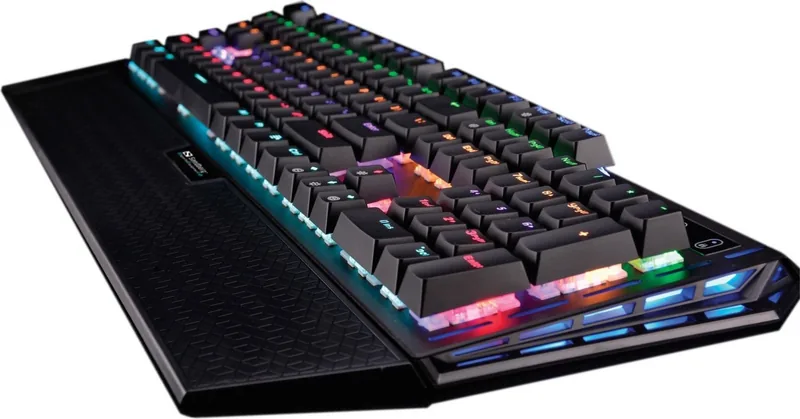
Designed with a UK layout, the FireStorm features intuitive multimedia keys that allow seamless control of your digital environment. The integrated software offers extensive customization options, letting you adjust lighting modes to match your mood or workspace aesthetic. From breathing light effects to flowing color transitions, the backlighting system adds a vibrant touch to your setup while maintaining functionality in low-light conditions.
Performance and Connectivity
Connecting via USB, the keyboard provides a stable and lag-free connection essential for high-performance tasks. The inclusion of a Win Lock key prevents accidental interruptions during intense gaming moments. Users can easily configure light modes using simple function key combinations, making it accessible for both beginners and power users. The five-year warranty underscores Sandberg's commitment to quality and customer satisfaction.
Notes on Usage
- Ensure drivers are installed from the official website before configuration.
- Use Fn key combinations to toggle between different lighting effects.
- Register your product online to activate the full warranty benefits.
Pros and Cons
Pros
- High-quality Gaote Outemu BLUE switches provide excellent tactile feedback.
- Extensive RGB lighting customization with multiple dynamic modes.
- Durable construction backed by a comprehensive five-year warranty.
- User-friendly software allows easy configuration of macros and lights.
- Dedicated multimedia keys enhance productivity and entertainment control.
Cons
- Blue switches may be too loud for shared office environments.
- Software installation required for full feature access.
- Fixed UK layout limits international usability without modification.
- Cable length may be restrictive for some desk setups.
- No wireless connectivity option available in this model.
Frequently Asked Questions
What type of switches does the Sandberg FireStorm use? The keyboard utilizes Gaote Outemu BLUE mechanical switches known for their clicky sound and tactile bump.
How do I customize the lighting effects? You can change lighting modes using Fn key combinations or through the dedicated configuration software.
Is there a warranty included with the purchase? Yes, every Sandberg product comes with a five-year warranty upon registration at their official website.
Can I use this keyboard with Mac computers? The keyboard is primarily designed for Windows but functions as a standard input device on other operating systems with limited macro support.
What is the purpose of the Win Lock key? The Win Lock key disables the Windows key to prevent accidental minimization of games or applications during use.
Does the keyboard come with pre-installed software? No, you must download the driver and configuration tool from the Sandberg website before using advanced features.
Is the keyboard suitable for gaming? Absolutely, the mechanical switches and anti-ghosting technology make it ideal for fast-paced gaming scenarios.
Search for 67,706 Manuals online


Type-in Brand or Model