
Samsung Galaxy Tab S9 Ultra Book Cover Keyboard Manual
PDF manual · 490 Pages
English


Quick check
Incorrect answer, please try again.
Chat with your Samsung Galaxy Tab S9 Ultra Book Cover Keyboard manual using AI
Get instant AI answers from your Samsung Galaxy Tab S9 Ultra Book Cover Keyboard manual
Ask anything about the Samsung Galaxy Tab S9 Ultra Book Cover Keyboard. Answers come from this manual, with the pages they are based on.
Ask a Question
Do you recommend Galaxy Tab S9 Ultra Book Cover Keyboard?
Yes NoFrequently Asked Questions
It is optimized for the Samsung Galaxy Tab S9, Galaxy Tab S9+, and Galaxy Tab S9 Ultra. Choose the correct cover model for your specific tablet size and configuration.
Is this answer helpful?
The keyboard attaches through the tablet connectors and is ready to use after proper attachment. Keeping both connector surfaces clean helps ensure reliable operation.
Is this answer helpful?
No. The EF-DX715, EF-DX815, and EF-DX915 versions include a touchpad. These models support gestures for scrolling, zooming, app switching, recent apps, Home, Back, and context menus.
Is this answer helpful?
Yes. The keyboard can cover the tablet display. The screen turns off when covered and turns on when the keyboard is opened.
Is this answer helpful?
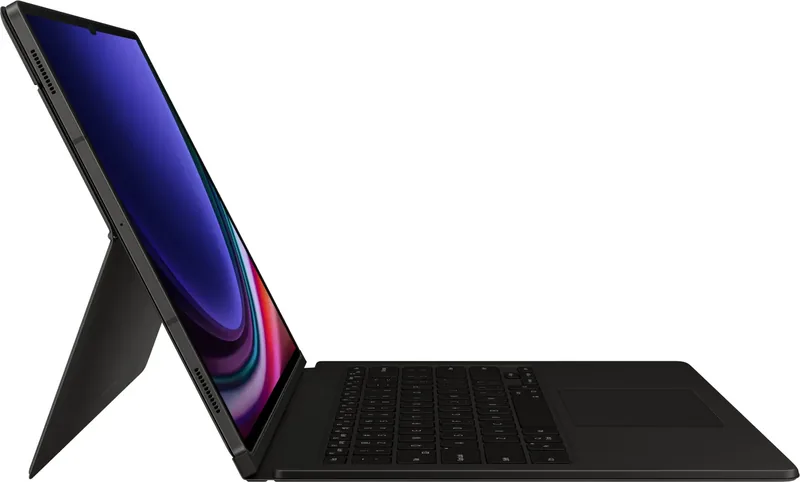
Models EF-DX715, EF-DX815, and EF-DX915 have an adjustable stand. Flip out the stand and set it to a comfortable angle, avoiding excessive tilt or pressure.
Is this answer helpful?
Attach the S Pen correctly to the tablet's S Pen charger, then close the S Pen cover over it. The S Pen cover is interchangeable on supported versions.
Is this answer helpful?
Avoid moisture, solvents, heat, direct sunlight, and sharp objects. Do not press heavily on the keyboard while it covers the screen. Because the product contains magnets, keep it away from magnetic-sensitive cards and more than 15 cm from implanted medical devices.
Is this answer helpful?
Advantages and Disadvantages
Advantages

- Direct connector attachment allows the keyboard to work immediately after installation.
- Keyboard cover protects the display and automatically turns the screen off when closed.
- Supports Samsung DeX, Google Assistant, language switching, navigation, and useful keyboard shortcuts.
- Touchpad and adjustable stand are available on EF-DX715, EF-DX815, and EF-DX915 models.
- Built-in S Pen cover helps protect and store the S Pen while it remains on the tablet charger.
Disadvantages

- Touchpad and adjustable stand are not included on every Book Cover Keyboard model.
- The product is optimized only for Galaxy Tab S9, Tab S9+, and Tab S9 Ultra tablets.
- Dirty connectors can prevent keyboard recognition or cause unreliable operation.
- Excessive pressure on the closed keyboard can damage the tablet display.
- Magnets may affect credit cards, implanted medical devices, and other sensitive equipment.
Product Specification
Compatibility
Samsung Galaxy Tab S9 Ultra
Product Description
Samsung Galaxy Tab S9 Ultra Book Cover Keyboard and Screen Protector - Read, Download & Print Free
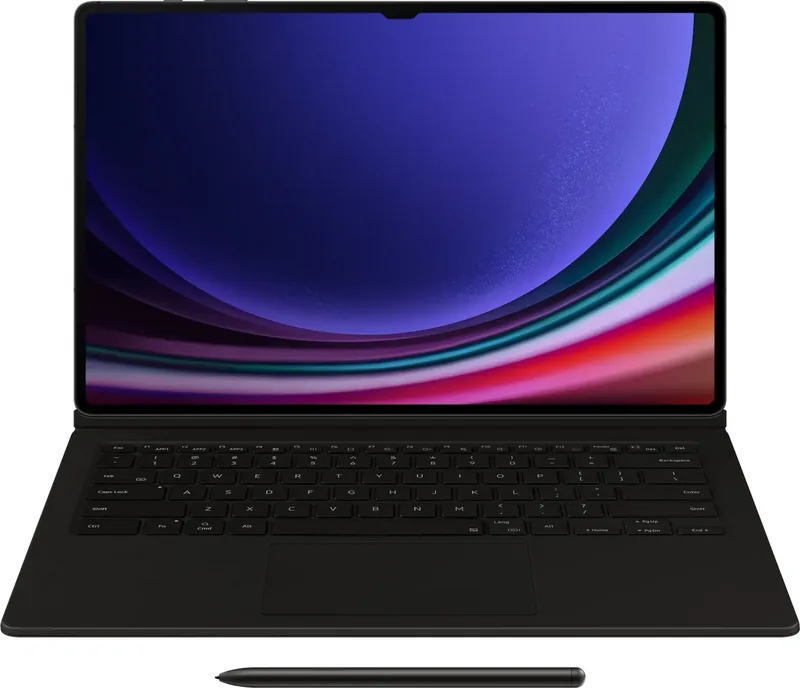
The Samsung Galaxy Tab S9 Ultra Book Cover Keyboard and Screen Protector is designed to turn a large Samsung tablet into a more practical mobile workspace. Built for the Galaxy Tab S9 series, including the Galaxy Tab S9 Ultra, this accessory combines a protective cover, dedicated keyboard, and convenient S Pen storage in one streamlined setup. It is ideal for writing, studying, browsing, replying to messages, and handling everyday productivity tasks without carrying a separate keyboard.
A Keyboard That Works When You Need It
The keyboard connects directly through the tablet's connectors, so it is ready to use after it is properly attached. There is no separate pairing process mentioned, helping users move quickly from tablet mode to typing mode. Dedicated keys support useful functions such as Samsung DeX, Google Assistant, input-language switching, cursor navigation, page controls, and the on-screen keyboard.
Selected models also include shortcut keys for favorite apps. This can make commonly used tools easier to reach, whether you are opening a notes app, email client, browser, or work platform. Samsung DeX support is particularly useful for people who prefer a desktop-style interface on their tablet.
Cover, Stand, and S Pen Storage
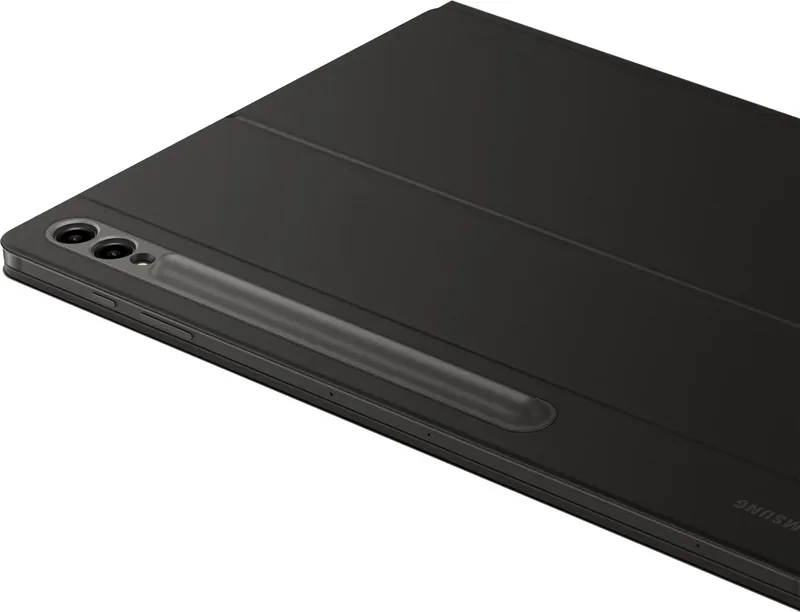
The keyboard folds over the display to act as a screen cover. Closing it turns the tablet screen off, while opening it wakes the screen, creating a simple protective routine for travel and storage. The cover includes a dedicated S Pen compartment, allowing the pen to remain attached to the tablet's charging area while protected by the S Pen cover.
For EF-DX715, EF-DX815, and EF-DX915 versions, an integrated stand lets you adjust the viewing angle. This makes the setup more flexible for desk work, video viewing, or typing. These versions also feature a touchpad, providing cursor control and gesture support for scrolling, zooming, switching apps, opening recent apps, returning, and accessing context menus.
Compatibility and Care Notes
This product is optimized for the Samsung Galaxy Tab S9, Galaxy Tab S9+, and Galaxy Tab S9 Ultra. Check the specific model code before choosing a version, because touchpad and stand features vary by model. Keep the tablet and keyboard connectors clean to help ensure reliable recognition and operation.
Notes
- Use the keyboard on a flat surface for better stability.
- Close the keyboard before moving the tablet to reduce the chance of detachment or damage.
- Avoid excessive pressure on the keyboard while it covers the display.
- The cover contains magnets. Keep it more than 15 cm away from implanted medical devices and away from cards or equipment affected by magnets.
Search for 67,706 Manuals online


Type-in Brand or Model