
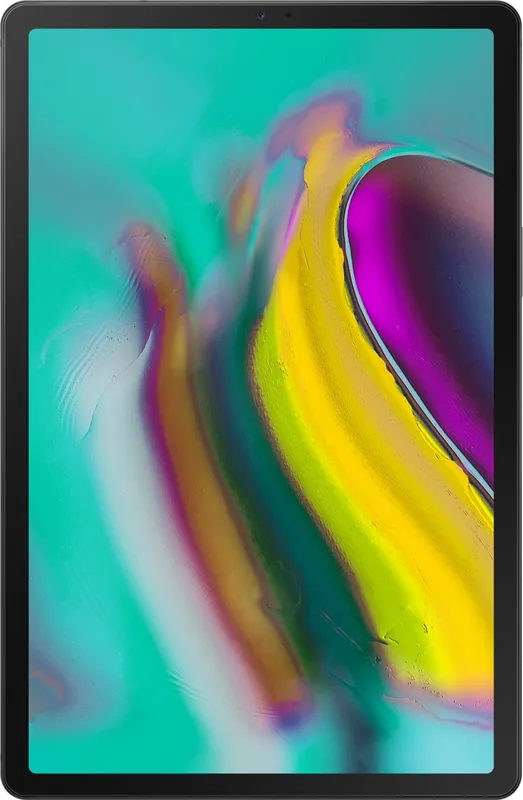
Samsung Galaxy Tab S5e SM-T720 / SM-T725 Manual
PDF manual · 134 Pages
English


Quick check
Incorrect answer, please try again.
Chat with your Samsung Galaxy Tab S5e SM-T720 / SM-T725 manual using AI
Get instant AI answers from your Samsung Galaxy Tab S5e SM-T720 / SM-T725 manual
Ask anything about the Samsung Galaxy Tab S5e SM-T720 / SM-T725. Answers come from this manual, with the pages they are based on.
Galaxy Tab S5e SM-T720 / SM-T725 Maintenance Schedule
Review the monthly free quota for Secure Wi-Fi protection and purchase additional quotas if needed to avoid bandwidth limits.
Use the Device Care function to optimize battery, storage, and memory, or enable daily automatic optimization in settings.
Free maintenance reminders
Timed to your purchase date. Always free, unsubscribe anytime.
Ask a Question
Do you recommend Galaxy Tab S5e SM-T720 / SM-T725?
Yes NoFrequently Asked Questions
It is well suited for browsing, streaming, note-taking, light productivity, and everyday communication. The lightweight design and Samsung DeX support make it useful for both casual and work-related tasks.
Is this answer helpful?
The SM-T720 is the Wi‑Fi model, while the SM-T725 adds LTE mobile network support. The LTE version is better if you want internet access away from Wi‑Fi hotspots.
Is this answer helpful?
Yes. It supports fingerprint recognition and face recognition, along with traditional lock methods like PIN, password, and pattern. Fingerprint unlock is built into the Side key.
Is this answer helpful?
Yes, the tablet supports microSD cards. Compatibility can vary depending on the card type and manufacturer, and cards should be formatted on the device for best results.
Is this answer helpful?
Yes. You can use split screen and pop-up view to run multiple apps at once. This is helpful for watching videos while messaging or browsing while taking notes.
Is this answer helpful?
Yes. Samsung DeX and Smart View let you connect to compatible external displays. DeX provides a desktop-like experience, while Smart View is useful for mirroring content.
Is this answer helpful?
Yes. Samsung Kids and parental controls help create a safer environment for children by limiting app access, managing usage time, and tracking activity.
Is this answer helpful?
Advantages and Disadvantages
Advantages

- Slim and lightweight design makes it easy to carry and use for long sessions.
- Wi‑Fi and LTE variants offer flexible connectivity for home or mobile use.
- Fingerprint and face recognition add quick, convenient security options.
- Samsung DeX and multitasking features improve productivity on a larger screen.
Disadvantages

- Some features are limited to specific models or supported regions.
- Battery life can drop faster during gaming, streaming, or heavy multitasking.
- Storage and memory card compatibility may vary by card type.
- Using unofficial accessories or modified software can cause performance issues.
Product Specification
CPU
Qualcomm Snapdragon 670 (SDM670), 2x 2.00GHz (ARM Cortex-A75) + 6x 1.70GHz (ARM Cortex-A55)
Graphics
Qualcomm Adreno 615 (iGPU)
Display
10.5", 2560x1600, 288ppi, Multi-Touch, AMOLED
Ports
1x USB-C 3.0 (5Gb/s, Power connector)
Wireless
Wi-Fi 5 (WLAN 802.11a/b/g/n/ac, 2x2), Bluetooth 5.0
Navigation
GPS, GLONASS, Beidou, Galileo, Compass
Card reader
microSDXC (up to 512GB)
Webcam
8 Megapixel (front), 13 Megapixel, AF (rear)
Operating system
Android 11 (via update)
Battery
Li-Ion, 7040mAh
Dimensions
9.65x6.30x0.22in
Weight
0.88lb (Tablet)
Special features
Orientation sensor, Accelerometer, Fingerprint reader, Light sensor, Hall sensor, Qualcomm Quick Charge 4.0, Docking connector, official support by LineageOS
Warranty
two years
Note
Different country versions possible.
Product Description
Samsung Galaxy Tab S5e SM-T720 Wi‑Fi / SM-T725 LTE Manual
The Samsung Galaxy Tab S5e SM-T720 Wi‑Fi and SM-T725 LTE stand out as slim, lightweight tablets built for everyday comfort. They are designed for users who want a balanced mix of entertainment, productivity, and portable convenience. The Samsung Galaxy Tab S5e SM-T720 Wi‑Fi / SM-T725 LTE Manual highlights a device that feels equally at home in a coffee shop, on the couch, or at a desk with a keyboard cover.
With a crisp touchscreen, fingerprint and face recognition, and an easy-to-use side key, the tablet focuses on practical security and smooth navigation. The interface supports familiar gestures, a clean home screen, and multitasking tools like split screen and pop-up view. For users who like flexibility, Samsung DeX transforms the tablet into a desktop-style workspace when paired with a monitor or keyboard accessory.
This tablet also leans strongly into media and communication. The camera system supports everyday photos, video capture, portrait effects, panorama, and fun options like stickers and filters. Gallery, Samsung Notes, Internet, Messages, Contacts, and Phone work together to create a mobile experience that is versatile without feeling complicated. For families, Samsung Kids and parental control tools add a safer digital environment.
Connectivity is another major strength. The Wi‑Fi model is ideal for home and office use, while the LTE version adds mobile freedom for on-the-go access. SmartThings, Smart View, Quick Share, and Music Share extend the tablet’s value beyond basic browsing, making it useful for connected homes and shared entertainment. Battery care, storage tools, and device optimization features help keep performance steady over time.
Overall, this tablet is best understood as a lightweight companion for work, study, streaming, and everyday organization. It is not trying to be a heavy laptop replacement, but it offers enough depth to handle many daily tasks with ease. If you are looking for a polished Samsung tablet experience, the Samsung Galaxy Tab S5e SM-T720 Wi‑Fi / SM-T725 LTE Manual reflects a device built around simplicity, mobility, and smart features.
Notes
- LTE support depends on the model and carrier.
- Some features may vary by region or software version.
- Samsung-approved accessories are recommended for best results.
Search for 67,706 Manuals online


Type-in Brand or Model