
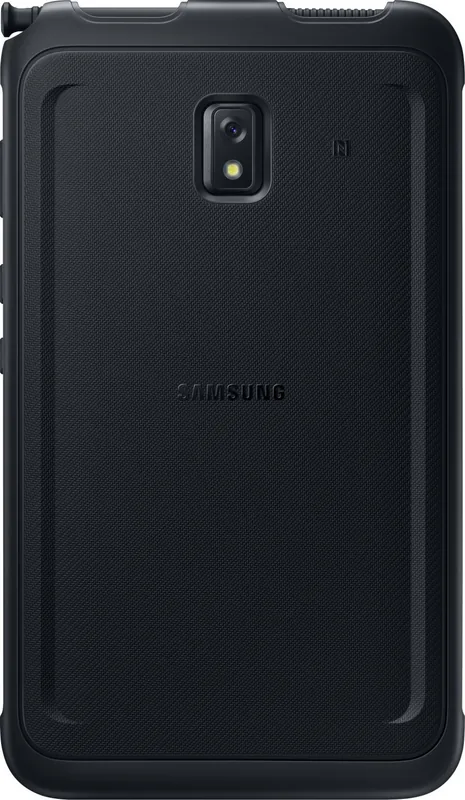
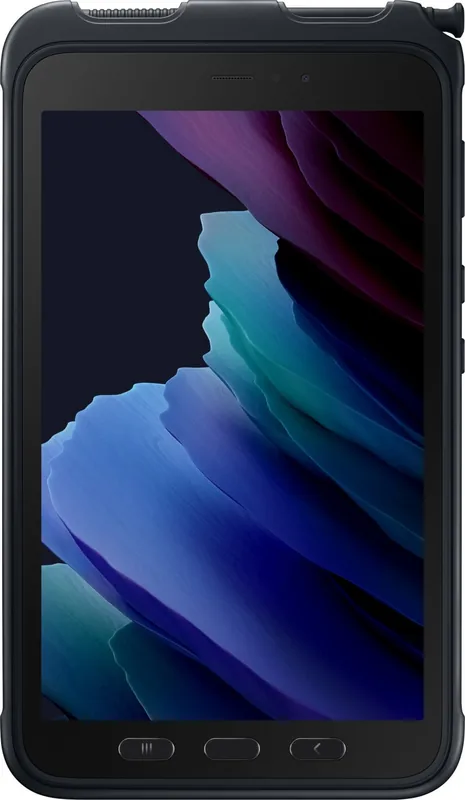
Samsung Galaxy Tab Active3 SM-T570 / SM-T575 Manual
PDF manual · 212 Pages
English


Quick check
Incorrect answer, please try again.
Chat with your Samsung Galaxy Tab Active3 SM-T570 / SM-T575 manual using AI
Get instant AI answers from your Samsung Galaxy Tab Active3 SM-T570 / SM-T575 manual
Ask anything about the Samsung Galaxy Tab Active3 SM-T570 / SM-T575. Answers come from this manual, with the pages they are based on.
Ask a Question
Do you recommend Galaxy Tab Active3 SM-T570 / SM-T575?
Yes NoFrequently Asked Questions
The SM-T570 is the Wi-Fi version of the Galaxy Tab Active3. The SM-T575 adds LTE mobile connectivity and uses a nano-SIM card, allowing supported cellular data features such as mobile hotspot and tethering.
Is this answer helpful?
Yes. It is certified IP68 under controlled conditions, including fresh water up to 1.5 meters for up to 30 minutes. Covers, trays, and seals must be properly closed, and the device should be dried carefully after exposure to liquids.
Is this answer helpful?
Yes. The tablet has a removable back cover and battery. Use Samsung-approved batteries and accessories, and ensure the back cover is fully closed after replacement to help maintain protection against water and dust.
Is this answer helpful?
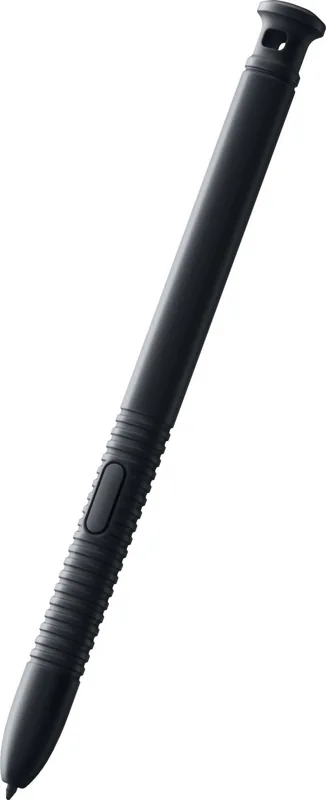
The S Pen supports handwriting, drawing, screenshots with annotations, smart selection, text translation, screen-off notes, live messages, and access to Air Command shortcuts. It can also help with precise navigation and content selection.
Is this answer helpful?
Yes. The Tab Active3 supports microSD cards. Card compatibility and maximum capacity can vary, so check Samsung specifications for the intended model. Unmount the card before removal to help prevent data corruption.
Is this answer helpful?
The tablet includes multi-window, Samsung Notes, Calendar, Reminder, Samsung Flow, SmartThings, Smart Switch, and Samsung DeX. These tools can support note-taking, task planning, device connections, data transfers, and multitasking.
Is this answer helpful?
Advantages and Disadvantages
Advantages

- IP68-rated water and dust resistance helps support use in challenging work environments.
- Replaceable battery and USB Type-C fast charging support longer shifts and flexible power management.
- Included S Pen enables notes, screen markup, selection, translation, and quick actions.
- microSD support adds flexible storage for media, work materials, and transferred content.
- SM-T575 LTE adds mobile data, hotspot, and tethering options where supported.
Disadvantages

- Water resistance has limits and relies on covers, seals, and trays being properly closed.
- LTE functions require the SM-T575 model, a compatible nano-SIM, and carrier service.
- High-demand apps, long recording, streaming, or multitasking can cause temporary heating.
- Some features, services, and apps vary by region, provider, model, or network connection.
- Memory cards must be handled and unmounted correctly to reduce risk of data loss.
Product Specification
CPU
Samsung Exynos 9810, 4x 2.70 GHz (Exynos M3) + 4x 1.70 GHz (ARM Cortex-A55)
RAM
4 GB LPDDR4X
Graphics
ARM Mali-G72 MP18 (iGPU)
Display
8 in, 1920x1200, 283 ppi, multi-touch, digitizer, PLS
Ports
1x USB-C 3.0 (5 Gbps, power connector), 1x 3.5 mm headphone jack
Wireless
Wi-Fi 6 (WLAN 802.11a/b/g/n/ac/ax), Bluetooth 5.0, NFC, ANT+
Card Reader
microSDXC (up to 1 TB)
Webcam
5 megapixels (front), 13 megapixels, AF, LED flash (rear)
Operating System
Android 13 (via update)
Battery
Li-ion, 5,050 mAh
Dimensions
8.42 x 4.99 x 0.39 in
Color
black
Features
Proximity sensor, accelerometer, orientation sensor, light sensor, Hall sensor, barometer, stylus (S Pen), MIL-STD-810H certified, IP68 certified, replaceable battery, fingerprint reader, docking connector, No Battery Mode, protective case
Warranty
three years
Note
Different country versions possible.
Product Description
Samsung Galaxy Tab Active3 SM-T570 Wi-Fi / SM-T575 LTE - Read, Download & Print Free
The Samsung Galaxy Tab Active3 is a rugged Android tablet designed for people who need dependable mobility in demanding environments. Available as the SM-T570 Wi-Fi model and the SM-T575 LTE model, it combines practical durability with tools that support field work, logistics, retail, education, and everyday productivity.
Built for active workdays
A protective case is designed to help safeguard the tablet during daily use, while the device carries IP68-rated water and dust resistance under specified test conditions. Its removable back cover and replaceable battery are especially useful for teams that need to keep working without waiting near a power outlet. The tablet also supports fast charging through USB Type-C.
The display is made for quick interaction with fingers or the included S Pen. The pen supports writing, drawing, selecting content, translating text, capturing screen areas, and creating notes without fully opening the screen. Features such as Air Command, Screen Write, Smart Select, and Screen Off Memo make it easier to record information while moving between tasks.
Connectivity and flexible storage
Choose the SM-T570 for Wi-Fi-focused use, or select the SM-T575 LTE version when mobile connectivity is important. The LTE version supports a nano-SIM card for cellular data and includes options such as mobile hotspot and tethering. Both configurations support microSD storage, giving users a convenient way to expand space for photos, videos, project materials, and other content.
Samsung tools help the Tab Active3 fit into an existing workflow. Smart Switch can assist with moving eligible content from a previous device, while Samsung DeX offers a more desktop-like work environment when supported accessories and setups are used. Samsung Notes, Calendar, Reminder, Samsung Flow, SmartThings, and multi-window features help organize tasks and handle several activities at once.
Practical features for communication and creativity
The tablet includes front and rear cameras for photos, video, scanning, and visual tasks. Camera modes include panorama, food, night, live focus, hyperlapse, and Pro mode. Bixby Vision can recognize QR codes, extract or translate text, and search for related visual information when a network connection is available.
Security options include screen locks, face recognition, fingerprint recognition, Samsung Pass, Secure Folder, and permission controls. Device Care provides tools for monitoring battery, storage, memory, and overall optimization.
Notes
- Water and dust resistance depends on properly closed covers and careful handling.
- LTE services, app availability, and certain features can vary by region, carrier, and software version.
- Use Samsung-approved accessories and follow charging, battery, and temperature guidance for reliable operation.
Search for 67,706 Manuals online


Type-in Brand or Model