

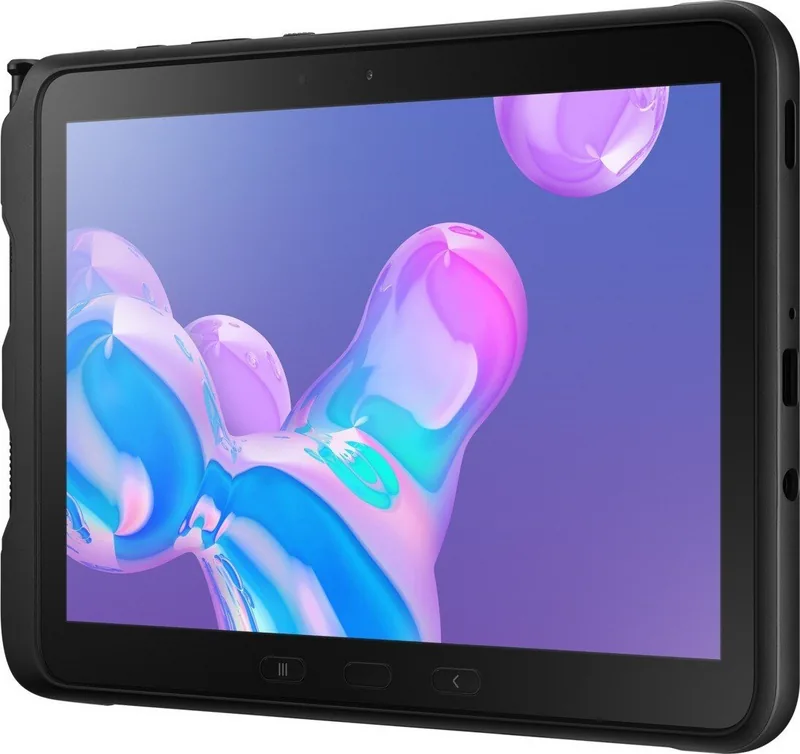

Samsung Galaxy Tab Active Pro SM-T540 / SM-T545 Manual
PDF manual · 182 Pages
English


Quick check
Incorrect answer, please try again.
Chat with your Samsung Galaxy Tab Active Pro SM-T540 / SM-T545 manual using AI
Get instant AI answers from your Samsung Galaxy Tab Active Pro SM-T540 / SM-T545 manual
Ask anything about the Samsung Galaxy Tab Active Pro SM-T540 / SM-T545. Answers come from this manual, with the pages they are based on.
Galaxy Tab Active Pro SM-T540 / SM-T545 Maintenance Schedule
Wipe with a clean, soft cloth. If exposed to liquids other than fresh water, rinse with fresh water and dry carefully.
Tap Settings > Device care > Now optimize to free storage, close background apps, and manage battery usage.
Use Device care to delete cache files, unused files, or uninstall unused applications.
Tap Settings > Device care > Security > Scan tablet to check for malware.
Clean gold contacts if the battery does not charge properly or if the device fails to turn on.
Free maintenance reminders
Timed to your purchase date. Always free, unsubscribe anytime.
Ask a Question
Do you recommend Galaxy Tab Active Pro SM-T540 / SM-T545?
Yes NoFrequently Asked Questions
The SM-T540 is the Wi-Fi model. The SM-T545 is the LTE model and supports a nano-SIM card for mobile network access. Carrier availability, data charges, and supported services depend on the region and provider.
Is this answer helpful?
It has IP68-rated water and dust resistance under controlled conditions, including fresh water up to 1.5 meters for 30 minutes. It should not be exposed to strong water flow, salt water, pool water, oils, or chemicals. Keep covers tightly closed.
Is this answer helpful?
Yes. The tablet uses a removable battery behind the rear cover. Carefully reseal the cover after replacement to help maintain resistance against water and dust.
Is this answer helpful?
The S Pen can write, draw, select content, create screen-off notes, annotate screenshots, extract text through Smart Select, create Live Messages, and preview content with Air View.
Is this answer helpful?
Yes. A microSD card can be installed for additional storage. Safely unmount the card before removal, and back up important data before formatting it.
Is this answer helpful?
Close unused apps, lower screen brightness, disable Wi-Fi, Bluetooth, and GPS when not needed, use power saving mode, avoid direct heat, and use approved cables and chargers.
Is this answer helpful?
Advantages and Disadvantages
Advantages

- IP68-rated water and dust resistance supports use in challenging work environments when covers and seals are secured.
- Removable battery and wired fast charging help reduce downtime during long shifts.
- Included S Pen supports notes, screen-off writing, selections, annotations, and creative tools.
- SM-T545 LTE variant accepts a nano-SIM card for mobile connectivity away from Wi-Fi.
- Programmable Active key, microSD expansion, USB Type-C, NFC, and Samsung DeX add flexibility.
Disadvantages

- Water resistance applies only under defined fresh-water test conditions and can be affected by impacts or loose covers.
- The SM-T540 Wi-Fi model does not provide direct mobile-data connectivity.
- Some Bixby, Bixby Vision, carrier, and location features vary by region, language, or service provider.
- High-demand apps, extended video recording, multitasking, and weak signal conditions can cause heat and reduced performance.
- Using unofficial software, incompatible accessories, or damaged cables may cause faults and affect warranty coverage.
Product Specification
CPU
Qualcomm Snapdragon 670 (SDM670), 2 x 2.00 GHz (ARM Cortex-A75) + 6 x 1.70 GHz (ARM Cortex-A55)
RAM
4 GB
Storage
64 GB Flash (eMMC)
Graphics
Qualcomm Adreno 616 (iGPU)
Display
10.1 in, 1920 x 1200, 224 ppi, multi-touch, digitizer
Ports
1 x USB-C 3.0 (5 Gb/s, power input), 1 x 0.14 in audio jack
Wireless
Wi-Fi 5 (WLAN 802.11a/b/g/n/ac), Bluetooth 5.0, NFC, ANT+
Card Reader
microSDXC (up to 512 GB)
Webcam
8 megapixel (front), 13 megapixel, AF, LED flash (rear)
Operating System
Android 11 (via update)
Battery
Lithium-ion, 7,600 mAh, 15 h runtime
Dimensions
9.59 x 6.70 x 0.39 in
Weight
1.44 lb (tablet)
Color
Black
Features
Proximity sensor, accelerometer, orientation sensor, light sensor, Hall sensor, barometer, stylus (S Pen), MIL-STD-810G certified, IP68 certified, replaceable battery, fingerprint reader
Note
Different country versions possible.
Product Description
Samsung Galaxy Tab Active Pro SM-T540 Wi-Fi / SM-T545 LTE Manual
The Samsung Galaxy Tab Active Pro SM-T540 Wi-Fi / SM-T545 LTE is designed for people who need a dependable tablet beyond the office or home. Built for demanding daily use, it combines a durable exterior with practical productivity tools, making it suitable for field teams, warehouses, retail operations, travel, and outdoor work.
Its reinforced construction offers IP68-rated water and dust resistance under specified test conditions. The tablet can withstand fresh water immersion up to 1.5 meters for 30 minutes, but covers must be properly closed and the device should be dried carefully after exposure. This rugged focus is supported by the Protective Cover+ and a dedicated storage position for the included S Pen.
Built for work and mobility
The Galaxy Tab Active Pro has a responsive touchscreen that can be operated with fingers or the S Pen. The stylus supports writing, drawing, selection, screen-off notes, Smart Select, annotated screenshots, and animated Live Messages. These tools can help workers capture details quickly, mark up images, extract text, and create notes without interrupting their workflow.
A programmable Active key provides fast access to a chosen app or function. Physical navigation controls, volume keys, a configurable function key, fingerprint recognition through the Home key, and face recognition offer convenient ways to use and secure the tablet. USB Type-C connectivity, a headset jack, cameras, speakers, GPS support, and NFC broaden its usefulness in professional environments.
Choose Wi-Fi or LTE connectivity
The SM-T540 version is intended for Wi-Fi connectivity, while the SM-T545 adds support for a nano-SIM card and mobile data. The LTE model can be especially useful for staff who work away from fixed networks and need access to online services, communication, navigation, or cloud-based tools. Availability of mobile features depends on the carrier, region, and service plan.
Storage can be expanded with a microSD card, helping users carry photos, documents, media, and project data. The removable battery is another practical advantage for extended shifts, while wired fast charging can reduce downtime when compatible charging equipment is used.
Smart features for everyday tasks
Samsung software includes Multi Window for multitasking, Samsung DeX for a desktop-style workspace, Samsung Notes, SmartThings, Samsung Flow, Bixby, and Smart Switch for moving data from a previous device. Security controls include screen lock options, fingerprint and face recognition, Samsung Pass, Secure Folder, and account backup settings.
Note: Water resistance is not permanent and may be reduced by drops, impacts, worn seals, or incorrect cover installation. Use Samsung-approved accessories and keep ports, seals, and covers clean.
The Samsung Galaxy Tab Active Pro SM-T540 Wi-Fi / SM-T545 LTE Manual is a useful reference for exploring these durable hardware features, connectivity options, S Pen controls, battery care, security settings, and productivity tools.
Search for 67,706 Manuals online


Type-in Brand or Model