

Samsung Galaxy M53 5G Manual
PDF manual · 140 Pages
English


Quick check
Incorrect answer, please try again.
Chat with your Samsung Galaxy M53 5G manual using AI
Get instant AI answers from your Samsung Galaxy M53 5G manual
Ask anything about the Samsung Galaxy M53 5G. Answers come from this manual, with the pages they are based on.
Ask a Question
Do you recommend Galaxy M53 5G?
Yes NoDo you recommend Galaxy M53 5G?
Yes NoFrequently Asked Questions
Go to Settings, tap Connections, then Mobile Networks. Select Network mode and choose 5G/LTE/3G/2G (auto connect). Ensure your SIM plan supports 5G.
Is this answer helpful?
Yes, the device supports dual Nano-SIM cards. You can insert two active lines to manage personal and work numbers simultaneously.
Is this answer helpful?
Use the Smart Switch app available on both devices. Connect them via USB cable or Wi-Fi Direct and follow the on-screen instructions to migrate contacts and files.
Is this answer helpful?
Yes, the device includes a multifunction USB Type-C port that supports audio output, though a 3.5mm jack is not present on this specific model.
Is this answer helpful?
Press the Power button and Volume Down button simultaneously. Alternatively, swipe your hand horizontally across the screen if the gesture is enabled.
Is this answer helpful?
You can expand storage using a microSD card. Check the official specifications for the exact supported capacity limit.
Is this answer helpful?
Advantages and Disadvantages
Advantages

- Supports 5G networks for extremely fast data transfer speeds
- Versatile camera system includes Night Mode and Pro settings
- Long battery life with fast charging capability
- Includes advanced security features like fingerprint scanner and Secure Folder
Disadvantages

- Some advanced camera features may not be available in all regions
- Battery drains faster when using 5G continuously
- No dedicated macro lens included in the camera setup
- Charger speed depends heavily on the specific adapter used
Product Specification
Operating System
Android 14.0 (via Update), Android 12.0 (out of the box)
Display
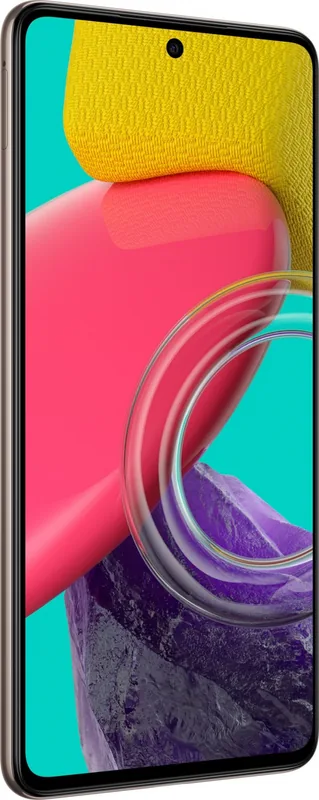
6.7", 2400x1080 pixels, 16 million colors, AMOLED, capacitive touchscreen, Gorilla Glass 5, camera hole, 120Hz refresh rate, 393ppi
Rear Camera
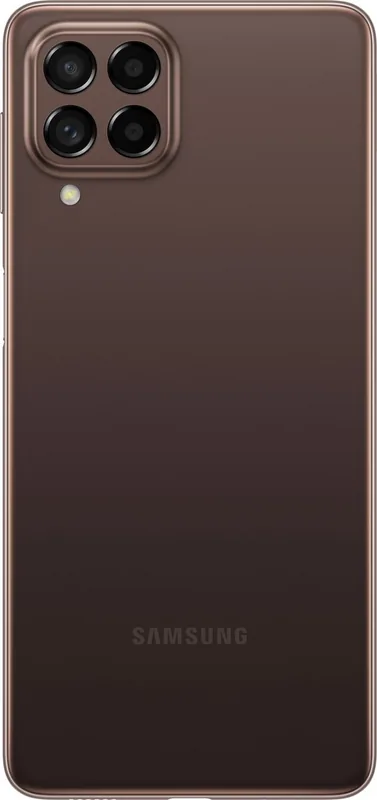
108.0MP, f/1.8, Phase Detection AF, LED flash, videos @2160p/30fps (Camera 1); 8.0MP, f/2.2, wide-angle lens (Camera 2); 2.0MP, f/2.4, macro lens (Camera 3); 2.0MP, f/2.4, depth sensor (Camera 4)
Front Camera
32.0MP, f/2.2, videos @1080p/30fps
Interfaces
USB-C 2.0 (480Mb/s, OTG), Wi-Fi 5 (WLAN 802.11a/b/g/n/ac), Bluetooth 5.2, NFC
Sensors
Accelerometer, gyroscope, proximity sensor, light sensor, compass, fingerprint sensor (side-mounted)
SoC
Mediatek MT6877 Dimensity 900, 64-bit
CPU
2x 2.40GHz Cortex-A78 + 6x 2.00GHz Cortex-A55
GPU
Mali-G68 MC4
RAM
6GB
Storage
128GB, microSD slot (shared, up to 1TB)
Navigation
A-GPS, GLONASS, BeiDou, Galileo, QZSS
Modem
GSM (0.2Mbps/0.1Mbps), UMTS (42Mbps/5.76Mbps), LTE, 5G
Frequency Bands
2G (850/900), 3G (B1/B2/B4/B5/B8), 4G (B1/B2/B3/B4/B5/B7/B8/B12/B17/B20/B26/B28/B38/B40/B41/B66), 5G (n1/n2/n3/n5/n7/n8/n20/n28/n38/n40/n41/n66/n78)
Battery
5000mAh, non-removable
Charging Power
25W (Samsung AFC)
Talk Time
39h (LTE)
SAR Value
0.60W/kg head, 1.53W/kg body
Form Factor
Bar
Housing Material
Plastic (back), plastic (frame)
SIM Form Factor
Nano-SIM (1x shared)
Features
Dual-SIM
Dimensions
6.48x3.03x0.29 inches
Weight
6.21 oz
Screen-to-Body Ratio
85.5%
Product Description
Discover the Samsung Galaxy M53 5G: A Comprehensive Guide
The Samsung Galaxy M53 5G stands as a formidable mid-range smartphone, blending powerful performance with versatile features designed for the modern user. This device is not just about making calls; it is a hub for productivity, creativity, and entertainment. With its sleek design and robust hardware, it caters to those who demand reliability without compromising on style.
At the heart of the experience lies an immersive display that brings content to life. Whether you are streaming high-definition videos, editing photos, or gaming, the screen delivers vibrant colors and sharp details. The camera system is another highlight, offering a suite of modes including Pro, Night, and Single Take, allowing users to capture professional-looking shots in any lighting condition. The AR Zone adds a layer of fun, enabling creative expression through emojis and stickers.
Connectivity is seamless with 5G support, ensuring fast data speeds for browsing and downloading. The battery life is optimized to last through long days, featuring fast charging capabilities that get you back up and running quickly. Managing your digital life is effortless with Samsung Pay for secure transactions, Samsung Health for fitness tracking, and Bixby Routines to automate daily tasks based on your habits.
Security is paramount, with multiple layers including fingerprint recognition, face unlock, and a Secure Folder to protect sensitive data. The interface is intuitive, allowing for easy customization of the home screen and navigation styles. From transferring data via Smart Switch to utilizing Multi Window for multitasking, every feature is designed to enhance user convenience. This phone represents a complete ecosystem where technology serves your lifestyle efficiently.
Key Highlights
- Advanced 5G connectivity for ultra-fast internet.
- Versatile camera modes for professional photography.
- Long-lasting battery with adaptive fast charging.
- Robust security features including biometric locks.
- Integrated apps like Samsung Health and Pay.
Important Notes
Always use approved chargers and cables to prevent damage. Keep the SIM card tray dry to avoid internal moisture issues. Ensure the touch screen remains free from water and sharp objects for optimal performance.
Search for 67,732 Manuals online


Type-in Brand or Model