

Samsung Galaxy Book S Manual
PDF manual · 95 Pages
English


Quick check
Incorrect answer, please try again.
Chat with your Samsung Galaxy Book S manual using AI
Get instant AI answers from your Samsung Galaxy Book S manual
Ask anything about the Samsung Galaxy Book S. Answers come from this manual, with the pages they are based on.
Galaxy Book S Maintenance Schedule
Regularly clean the power cord and socket with a dry cloth to prevent dust accumulation which could cause electric shock or fire.
Replace the internal battery with an original part if safety checks indicate end of life or capacity is halved compared to new condition.
Free maintenance reminders
Timed to your purchase date. Always free, unsubscribe anytime.
Ask a Question
Do you recommend Galaxy Book S?
Yes NoFrequently Asked Questions
The Galaxy Book S is optimized for energy-efficient, everyday tasks—web browsing, document editing, streaming, and video calls. It uses low-power components for long battery life and quiet operation, but it is not intended for intensive gaming or heavy video rendering.
Is this answer helpful?
Battery life varies by usage, but the device emphasizes extended run-times via power-efficient hardware and battery saver modes. You can extend battery life by enabling Battery Saver, lowering screen brightness, disabling unused wireless radios, and using Samsung’s battery calibration tool if charge reporting becomes inaccurate.
Is this answer helpful?
Yes. The laptop supports external displays via its USB-C port using a compatible USB-C display cable or adapter. Display modes include duplicate and extend. Required cables or adapters are sold separately.
Is this answer helpful?
Use Windows Hello fingerprint sign-in for quick secure access, set strong Windows passwords and PINs, and utilize Samsung Security features like the Privacy Folder and Secret Screen. Regularly back up important data using Samsung Recovery or external storage.
Is this answer helpful?
Use Samsung Recovery (if available on your model) to restore factory settings or revert to a backup point. If Samsung Recovery is not provided, use Windows’ recovery function (Settings → Update & Security → Recovery → Reset this PC). Back up data before restoring.
Is this answer helpful?
No. The internal battery is not user-serviceable. To replace or remove the battery, take the device to an authorized Samsung Service Center; a service fee may apply.
Is this answer helpful?
Not necessarily. Touchscreen capability and memory card support vary by model and region. Check the specific model’s specifications to confirm included features before purchasing.
Is this answer helpful?
Advantages and Disadvantages
Advantages

- Very lightweight and thin design ideal for travel and mobile use.
- Long battery life with battery saver modes and calibration options.
- Quiet fanless operation reduces noise and heat output.
- Secure sign-in via built-in fingerprint sensor and Windows Hello.
- Integrated Samsung utilities for updates, security, and system cleanup.
Disadvantages

- Not suitable for high-spec gaming or heavy content creation workloads.
- Limited or non-user-replaceable internal battery; service center replacement required.
- Some features like touchscreen or memory card slot may vary by model or region.
- May have reduced storage shown in Windows due to recovery partition usage.
- Requires separate adapters/cables for certain external display connections.
Product Specification
CPU
Intel Core i5-L16G7, 1C+4c/5T, 1.40-3.00GHz, 4MB+1.5MB Cache, 7W SDP, Codename "Lakefield" (Sunny Cove + Tremont, Intel 10nm+ + Intel 22nm)
RAM
8GB LPDDR4X-2133
Graphics
Intel UHD Graphics (iGPU), 64EU/512SP, 0.20-0.50GHz, Architecture "Gen 11" (Lakefield GT2)
Display
13.3", 1920x1080, 166ppi, Multi-Touch, 600cd/m²
Ports
1x USB-C 3.0 (5Gb/s, Power connection), 1x USB-C 3.0 (5Gb/s), 1x 3.5mm Jack
Wireless
Wi-Fi 6 (WLAN 802.11a/b/g/n/ac/ax, 2x2, Intel AX200), Bluetooth 5.2
SIM
N/A
Cellular
N/A
Networks
N/A
Card reader
microSDXC
Webcam
0.9 Megapixel (front), N/A (rear)
Operating system
Windows 10 Home 64bit
Battery
Li-Ion, 42Wh, 17h runtime
Dimensions
12.02x8.00x0.46in
Weight
2.10 lb (Tablet)
Special features
Light sensor, Dock (Keyboard, Touchpad, Fingerprint reader, non-detachable)
Note
Despite its special design, this device was positioned by the manufacturer as a tablet computer. For better comparability, also considering performance and weight, this device is therefore also listed by us as a tablet computer.
Product Description
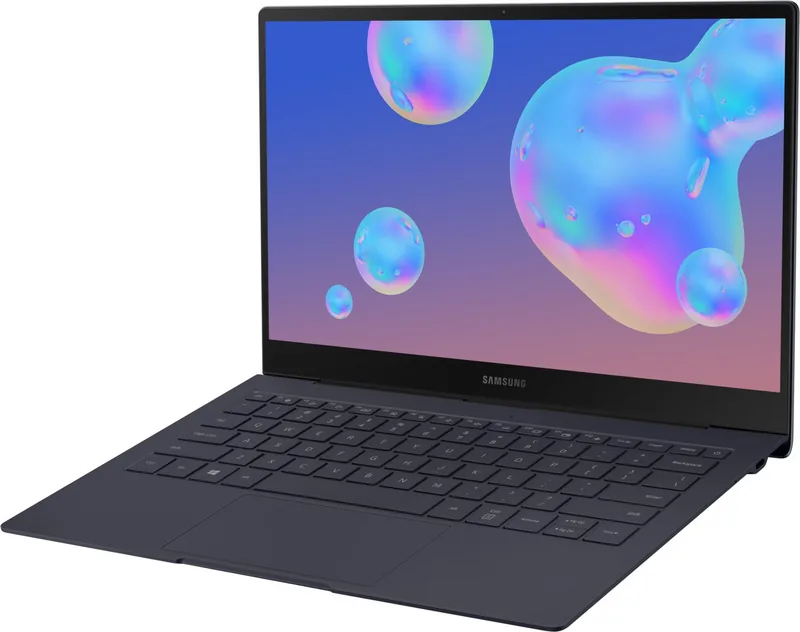
Samsung Galaxy Book S 13.3" — Lightweight Productivity with Long Battery Life
The Samsung Galaxy Book S 13.3" is a thin, ultraportable laptop built for mobile professionals and everyday users who prioritize portability without sacrificing essential features. Its 13.3-inch display offers clear visuals for productivity, streaming, and light creative work, while the fanless design keeps operation quiet and comfortable. The device emphasizes long battery life and efficient performance, making it suitable for all-day use whether commuting, traveling, or working from cafés and coworking spaces.
Under the hood, the Galaxy Book S leverages low-power components to balance energy efficiency and responsiveness. This approach reduces heat and enables a slim chassis, while still supporting everyday tasks like web browsing, document editing, video conferencing, and media playback. Multiple connectivity options, including USB-C ports for charging and external displays, headphone jack support, and optional memory card expansion, add practical flexibility for users who need to connect peripherals or expand storage on the go.
The keyboard and touchpad are tuned for comfortable typing and navigation, and the built-in fingerprint sensor enables secure, quick sign-in via Windows Hello. A bright, touch-capable screen (on touch models) supports intuitive gestures like pinch-to-zoom and multi-finger gestures on the touchpad. Samsung’s bundled software — such as Samsung Settings, Samsung Update, Samsung Security, and Samsung PC Cleaner — helps manage system settings, updates, privacy features like a privacy folder and secret screen, and system optimization tasks.
Battery management features, including battery saver modes and BIOS battery calibration tools, help maximize the device’s usable hours. When needed, Samsung Recovery and Windows recovery functions offer system restore and backup options to recover from software issues. The Galaxy Book S also includes wireless capabilities like Wi‑Fi and Bluetooth for connecting to networks and accessories, with guidance and configuration tips provided in the system settings.
Ergonomics and safety are considered in the design and documentation: guidance on posture, display distance, and volume helps reduce strain during long sessions. Hardware care recommendations (screen cleaning, protecting the touch surface, and safe charging practices) and regulatory, recycling, and battery disposal instructions round out the product’s support ecosystem.
Overall, the Samsung Galaxy Book S 13.3" is aimed at users seeking a highly portable Windows laptop with long battery life, quiet operation, practical connectivity, and integrated Samsung utilities for security and maintenance.
Notes
- Ideal for light-to-moderate productivity and media consumption; not suited for high-end gaming or intensive content creation.
- Supports USB-C display output; necessary cables/adapters are sold separately.
- Certain features (touchscreen, memory card slot, bundled apps) may vary by model or region.
- Regular backups and using Samsung Recovery/Windows recovery are recommended to prevent data loss.
Search for 67,706 Manuals online


Type-in Brand or Model