Manual.ly Logo

Roccat Isku FX Manual

0.0 · 0 Ratings

PDF manual · 2 Pages

English

M: OA-GPT-54-NAN
page

/ 2

Loading...
a4061baabc2c9faddf417cbbd7280a274466 page 2
h
ROCCAT™ EASY-SHIFT
[
+
]™
THE DUAL KEY ASSIGNMENT FUNCTION
EASY-SHIFT[+]
TM
: ASSIGNING DUAL KEY FUNCTIONS
The Isku FX comes standard with Easy-Shift[+]™ technology, which offers you the
convenience of 36 easily-customizable macros strategically positioned in 3 spots
in the easy-to-fi nd WASD zone. This means you can fi re off customized commands
without ever having to re-adjust your hand position – so you won’t have to take your
eyes off the screen to look for keys. Simple and ingenious.
And because the Easy-Shift[+]™ key works just like the standard shift key,
activating your macros is as simple as typing an uppercase letter.
The Easy-Shift[+]™ zone gives you an impressive 28 macros keys – including 8
dedicated keys that can be doubly programmed. Plus, the ability to instantly
switch between 5 profi les lets you enjoy up to a whopping 180 macros – enough
customization to meet even the most demanding warrior’s needs.
MASTERFUL MACRO CONTROLS
If recording macros using a menu-based system is your style, then our
world-famous Macro Manager software is just what you want. The award-winning-
program lets you record and fi ne-tune your macros with incredible precision and
with intuitive ease thanks to a gorgeous and simple-to-use interface. The Loop
Function even lets you repeat settings up to an incredible 255 times. And the
internationally-adored program even comes with presets for top games and offi ce
apps
–
so you can enjoy your favorites with notttttt wait.
FR PL PT RU
1. Für einen ergonomischeren Stand klappe die Füße an der
Unterseite der Tastatur aus.
2. Verbinde den USB-Stecker der ROCCAT™ Isku FX mit
einer freien USB-Schnittstelle.
3. Starte deinen Computer und stelle eine Verbindung mit
dem Internet her.
4. Gebe in die Adresszeile deines Webbrowsers die folgende
URL ein „www.roccat.org/support“ und drücke Enter.
5. Klicke in der linken Navigationsleiste auf den Punkt
„ROCCAT Isku FX“. Lade dir auf der sich öffnenden Seite
die neueste Treiber-Software herunter.
6. Starte die Treiber-Installation und folge bitte den weiteren
Anweisungen auf dem Bildschirm.
1. Til ergonomisk opstilling klappes fødderne på tastaturets
bund ud.
2. Forbind ROCCAT™ Isku FX’s USB-stik med et ledigt
USB-interface.
3. Start din computer og forbind den med Internettet.
4. Indtast følgende URL i adresselinjen af din webbrowser
„www.roccat.org/support“ og tryk så Enter.
5. Klik i venstre navigantionslinje på punkt
„ROCCAT Isku FX“. Frau den åbnede side overfører du den
nyeste driversoftware.
6. Start driver-installationen og følg anvisningerne på
billedskærmen.
1. For a more ergonomic position, fold out the stands on the
base of the keyboard.
2. Plug the ROCCAT™ Isku FX’s USB connector into any
free USB port.
3. Boot your computer and connect to the internet.
4. Enter ‘www.roccat.org/support’ in your browser and
hit the return key.
5. In the navigation bar on the left, go to ‘ROCCAT Isku FX’.
Download the latest driver from the webpage that opens.
6. Start the driver installation process and follow the
on-screen instructions.
1. Para un equilibrio más ergonómico, saca las patas que
están debajo del teclado.
2. Enchufa el conector USB del ROCCAT™ Isku FX a un
puerto libre USB.
3. Inicia tu ordenador y establece la conexión de Internet.
4. Escribe en tu navegador Web la siguiente URL:
www.roccat.org/support y pulsa Enter.
5. En la barra izquierda de navegación haz clic en el
punto “ROCCAT Isku FX”. En la página que se abre a
continuación descárga el software de controlador más
actualizado.
6. Inicia la instalación del controlador y sigue las instruccio-
nes que aparecen en pantalla.
1. Käännä näppäimistön alla olevat jalat ulos ergonomista
asentoa varten.
2. Liitä ROCCAT™ Isku FX:n USB-pistoke vapaaseen
USB-liitäntään.
3. Käynnistä tietokoneesi ja luo Internet-yhteys.
4. Kirjoita verkkoselaimesi osoiteriville seuraava URL-osoite
„www.roccat.org/support“ ja paina Enter.
5. Napsauta vasemmassa navigaatiopalkissa kohtaa
„ROCCAT Isku FX“. Lataa avautuvalta sivulta uusin
ajuriohjelmisto.
6. Käynnistä ajurin asennus ja noudata näytöllä näkyviä
lisäohjeita.
DE DK EN ES FI
SE
1. Déplie les pieds sur la face inférieure du clavier pour une
plus grande ergonomie.
2. Relie la fi che USB de la souris ROCCAT™ Isku FX à une
prise USB libre.
3. Démarre ton ordinateur et connecte-toi à Internet.
4. Entre dans la barre d’adresse de ton navigateur l’URL
« www.roccat.org/support » et appuie sur Enter.
5. Clique dans le menu de navigation de gauche sur
« ROCCAT Isku FX ». Télécharge la dernière version du
pilote sur la page qui s’ouvre alors.
6. Lance l’installation du pilote et suis les instructions qui
s’affi chent à l’écran.
1. Aby uzyskać pozycję ergonomiczną, rozłóż nóżki po
spodniej stronie klawiatury.
2. Podłącz wtyk USB ROCCAT™ Isku FX do wolnego
złącza USB.
3. Uruchom komputer i nawiąż połączenie z Internetem.
4. W wierszu adresowym przeglądarki wpisz adres URL
„www.roccat.org/support“ i naciśnij Enter.
5. W lewym pasku nawigacji kliknij punkt „ROCCAT Isku FX“.
Z nowo otwartej strony pobierz najnowsze sterowniki.
6. Rozpocznij instalację sterowników i postępuj zgodnie z
instrukcjami na ekranie.
1. Para um apoio mais ergonómico, abre os pés de apoio
na parte inferior do teclado.
2. Liga a fi cha USB do ROCCAT™ Isku FX a uma interface USB
livre.
3. Inicia o teu computador e estabelece uma ligação
à internet.
4. Introduz o seguinte URL "www.roccat.org/support"
na barra de endereços do teu navegador de internet
e pressiona Enter.
5. Clica na barra de navegação à esquerda no ponto
"ROCCAT™ Isku FX". Na página que abre, faz o download
do mais recente software de driver.
6. Inicia a instalação do driver e segue as instruções
1. Для обеспечения эргономичного положения открой
ножки на нижней стороне клавиатуры.
2. Соедини USB-штекер ROCCAT™ Isku FX со свободным
USB-портом.
3. Запусти компьютер и выйди в интернет.
4. Введи в адресной строке браузера адрес
„www.roccat.org/support“ и нажми Enter.
5. Нажми на левой навигационной панели пункт
„ROCCAT Isku FX“. Загрузи с открывшейся страницы
самые последние драйвера.
6. Запусти инсталляцию драйвера и следуй дальнейшим
указаниям на экране.
1. Fäll ut fötterna under tangentbordet så att det står i en
ergonomisk ställning.
2. Sätt ROCCAT™ Isku FX USB-kontakt i en ledig USB-port.
3. Starta datorn och koppla upp dig på Internet.
4. Skriv in följande URL i adressfältet på din webbläsare:
www.roccat.org/support. Tryck på Enter.
5. Klicka på ROCCAT Isku FX i det vänstra navigationsfältet.
Ladda ner den senaste programvaran med drivrutin på
den sida som öppnas.
6. Starta installationen av drivrutin och följ anvisningarna
på skärmen.
ANLEITUNG INSTRUKTIONER INSTRUCTIONS INSTRUCCIONES OHJEET
INSTRUCTIONS INSTRUKCJA
INSTRUÇÕES
ИНСТРУКЦИИ
INSTRUKTIONER
EASY-SHIFT[+]™ EXAMPLES:
HOW TO USE MACRO LIVE! RECORDING
START LIVE! RECORDING ASSIGN A MACRO KEY
STOP LIVE! RECORDING
O
L
L
H E
+ + +
+
O
L
L
H E
+ + +
+
1 2
4
TYPE YOUR OWN MACRO
3
EXAMPLE: “HELLO”
EXAMPLE: M1PRESS “M-REC” BUTTON
PRESS “M-REC” BUTTON AGAIN
PLEASE NOTE:
DELAYS WILL ALSO BE RECORDED.
Easy-Shift[+]
TM
WoW:
[+] + 1 = Mount up [+] + A = Use hearthstone
[+] +
2 = Dismount [+] + S = Autorun
[+] +
3 = Pet attack [+] + D = Hotbar slot #1
[+] +
4 = Pet passive [+] + F = Hotbar slot #2
[+] +
5 = Pet follow [+] + G = Start timer
[+] +
Q = Yell chat [+] + Z = Your macro #1
[+] +
W = World map [+] + X = Your macro #2
[+] +
E = Trade chat [+] + C = Your macro #3
[+] +
R = Raid chat [+] + V = Your macro #4
[+] +
T = Party chat [+] + B = Your macro #5
Easy-Shift[+]
TM
Multimedia: Easy-Shift[+]
TM
Browser:
[+] + M1 = Play or pause [+] + M1 = New tab
[+] +
M2 = Stop playback [+] + M2 = New window
[+] +
M3 = Play the previous item [+] + M3 = Switch to previous tab
[+] +
M4 = Play the next item [+] + M4 = Switch to next tab
[+] +
M5 = Rewind [+] + M5 = Switch to full screen & back
[+] +
T1 = Volume up [+] + T1 = Page back
[+] +
T2 = Volume down [+] + T2 = Page forward
[+] +
T3 = Mute volume [+] + T3 = Minimize window
Use the Easy-Shift[+]™
key (assignable to
Caps Lock, M1-M5
and T1-T3) to program
2nd level functions on
all highlighted keys.
This means you
virtually double your
Macro keys – for easy
access to up to
36 powerful functions.
Easy-Shift[+]
TM
key:
Caps Lock, Macro keys
(M1-M5) and Thumbster keys
(T1-T3) can also be assigned
as the Easy-Shift[+]
TM
key.
Thumbster keys (T1-T3)
Easy Zone keys:
20 additional, easy-to-
reach macros & functions
via Easy-Shift[+]
TM
additional Macro
keys (M1-M5)
[+] = Easy-Shift[+]
TM
key

Chat with your Roccat Isku FX manual using AI

Get instant AI answers from your Roccat Isku FX manual

Ask anything about the Roccat Isku FX. Answers come from this manual, with the pages they are based on.

Ask a Question

0/1000

Do you recommend Isku FX?

Yes No

Frequently Asked Questions

A

It adds gaming-focused features like Easy-Shift[+], macro recording, programmable keys, and customizable lighting. These options let users create more commands and personalize the keyboard for gaming or daily use.

Is this answer helpful?

A

Yes, but beginners may need time to learn the software and macro layers. The keyboard is usable right away, yet its full value comes from customization, which rewards users willing to explore the settings.

Is this answer helpful?

A

Easy-Shift[+] acts like a second function key layer. When activated, selected keys can trigger alternate commands, allowing more macros and shortcuts without changing hand position.

Is this answer helpful?

A

Yes. It supports both live macro recording and software-based macro management. This makes it easier to assign repeated actions, game commands, or productivity shortcuts to different keys.

Is this answer helpful?

A

It features full-color illuminated lighting with millions of color options. Users can personalize the look of the keyboard and match it to their gaming setup or mood.

Is this answer helpful?

A

The keyboard uses a USB connection and includes a 2-meter cable. That keeps installation simple and provides a stable wired link for responsive input.

Is this answer helpful?

M: OA-GPT-54-NAN

Advantages and Disadvantages

Advantages

  • Easy-Shift[+] adds a second function layer and greatly expands the number of usable commands.
  • Macro Live! recording makes it simple to create in-game or work shortcuts quickly.
  • 16.8-million-color lighting gives the keyboard a vivid, customizable appearance.
  • Anti-ghosting and 1000 Hz polling help support fast, reliable input during gameplay.
VS

Disadvantages

  • Many advanced features depend on driver software, so setup is less plug-and-play than basic keyboards.
  • It is a wired USB model, so there is no wireless flexibility.
  • The layout and macro system may feel complex for users who only need a simple keyboard.
  • Compatibility is centered on older Windows versions, which may limit appeal on newer systems.
M: OA-GPT-54-NAN

Product Specification

Layout

DE

Type

Rubber Dome

Lighting

RGB

Keycap Profile

regular, with frame

Keycap Size

regular

Keycap Top

concave

Numpad

Standard

Arrow Keys

Standard

Control Keys

Standard

Enter Key

Standard

Delete Key

Standard

Status Indicator

Caps Lock, Num Lock, Scroll Lock

Palm Rest

fixed

Case

Plastic

Connection

wired (78.74 in), USB-A 2.0

Power Supply

USB

Special Features

18 multimedia keys, Anti-Ghosting (N-Key Rollover)

M: OA-GPT-54-NAN

Product Description

Roccat Isku FX White, USB, DE: a practical gaming keyboard with personality

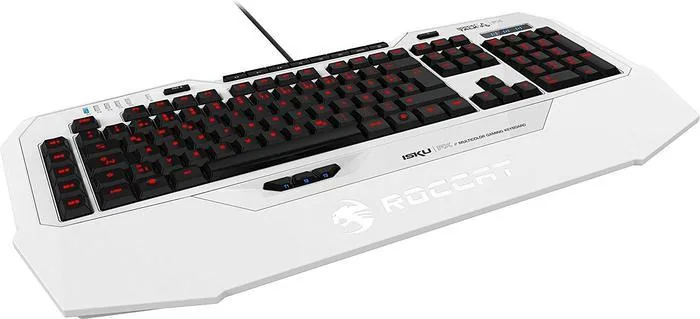
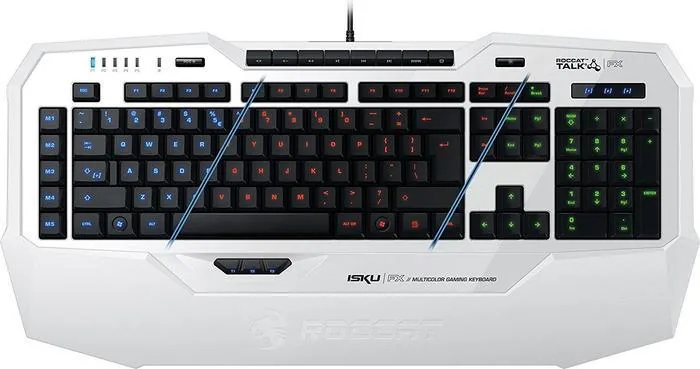
The Roccat Isku FX white, USB, DE Manual highlights a keyboard built for players who want speed, control, and a clean white look on the desk. The Roccat Isku FX combines a full-size layout with gaming-focused features that make it feel more advanced than a standard keyboard. Its German layout, USB connection, and strong emphasis on customization make it especially appealing for users who enjoy tailoring every key to their habits.

One of the most interesting ideas behind the Isku FX is Easy-Shift[+]. This feature adds a second function layer to selected keys, letting you assign many more commands without stretching your hand across the keyboard. In the WASD area alone, Roccat places several easy-to-reach zones for macros and shortcuts, which can be a real advantage in fast-paced games. Instead of hunting for extra keys, you can keep your fingers in a natural position and react faster.

Macro support is another major strength. With Macro Live! recording, commands can be captured quickly and adjusted through software for more detailed control. That makes the keyboard useful not only for gaming, but also for repetitive office actions or productivity workflows. The included driver software adds another layer of personalization, giving users access to profiles, lighting adjustments, and other settings that help the keyboard fit different games or tasks.

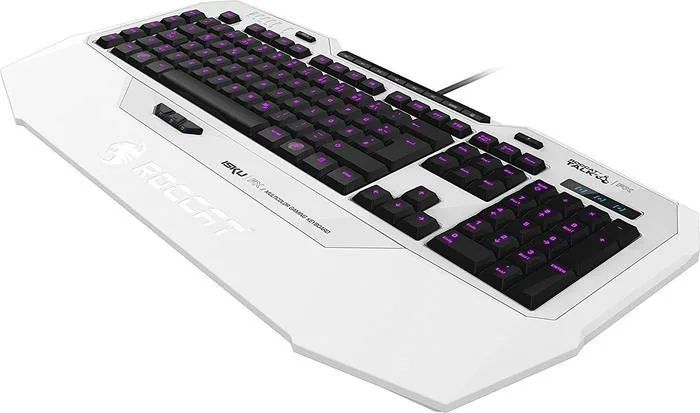
Visually, the Isku FX stands out thanks to its 16.8-million-color lighting. The illuminated key layout gives the keyboard a modern look and allows users to match their setup or create a more immersive gaming atmosphere. Combined with Roccat Talk and Talk FX support, the keyboard is designed to work as part of a wider ecosystem of compatible devices.

The hardware itself also feels thoughtfully built. With anti-ghosting, a 1000 Hz polling rate, and multiple programmable keys, it aims to deliver quick and reliable input. The adjustable feet help create a more comfortable typing angle, while the wired USB connection keeps setup straightforward and stable.

Notes

  • Best suited for users who like deep customization.
  • Strong for gaming macros, shortcuts, and profile switching.
  • The software adds power, but also means setup matters.
  • A good fit for players who prefer a bright white keyboard with RGB-style lighting.
M: OA-GPT-54-NAN

© Copyright 2026 Manual.ly