
Roccat Burst Core Manual
PDF manual · 12 Pages
English



Quick check
Incorrect answer, please try again.
Chat with your Roccat Burst Core manual using AI
Get instant AI answers from your Roccat Burst Core manual
Ask anything about the Roccat Burst Core. Answers come from this manual, with the pages they are based on.
Ask a Question
Do you recommend Burst Core?
Yes NoFrequently Asked Questions
It uses a Pro-Optic Sensor R8 based on PixArt PMW3331 technology supporting up to 8500 DPI.
Is this answer helpful?
Plug into USB, connect to internet, download Swarm from the roccat website, and follow on screen prompts.
Is this answer helpful?
Requires Windows 7 8 or 10 with USB 2.0 or higher and an internet connection for driver software access.
Is this answer helpful?
Yes, standard button assignments work without software installed using on board memory presets.
Is this answer helpful?
The device maintains a 1000Hz polling rate for efficient data handling and reduced input lag.
Is this answer helpful?
Do not throw in unsorted trash. Recycle at official points due to harmful substances in electrical devices.
Is this answer helpful?
ROCCAT Titan Switch Optical switches offer 35g acceleration and fast actuation for consistent performance.
Is this answer helpful?
Advantages and Disadvantages
Advantages

- Lightweight 66 gram design ensures comfortable extended gaming sessions without fatigue.
- High sensitivity 8500 DPI sensor with adjustable steps allows precise tracking control.
- Titan Switch Optical technology provides rapid actuation and long term durability for users.
- Onboard memory stores profiles directly on device for portability across different computers.
- 1000Hz polling rate minimizes latency to deliver competitive responsive gameplay experience.
Disadvantages

- PVC USB cable material may feel stiff compared to braided alternatives on the market.
- Full customization requires installation of Swarm software which adds dependency for features.
- Fixed cable length of 1.8 meters may not suit every desk setup preference.
- Default DPI steps are limited before needing manual adjustment in software settings.
Product Specification
Handedness
Right Hand
Buttons
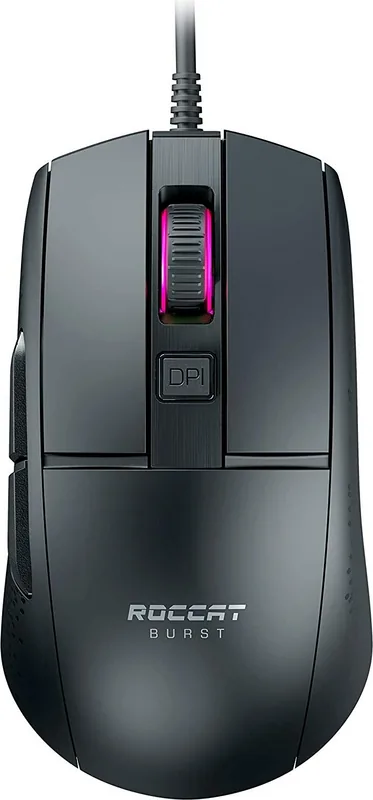
6 (total), 2 (main), 1 (top), 2 (left), 1 (scroll wheel click)
Scroll Wheel
1x 2-Way
Tracking
Red LED / IR
Resolution
8500 DPI, reducible to 3200/1600/1200/800/400 DPI, adjustable in 100 DPI steps
Sensor
PixArt PMW 3331 (Roccat Pro-Optic Sensor R8, based on PixArt PMW 3330)
Switches
mechanical-optical switches, Roccat Titan Switch Optical, 100 million clicks
Polling Rate
1000Hz (wired USB)
Lighting
RGB
Connection
Wired (5.91 ft), USB-A 2.0
Power Supply
USB
Dimensions (WxHxD)
2.28x1.54x4.72 in
Approximate Volume
4.33 in³ (approximate shape)
Weight
2.40 oz
Features
Onboard Memory
Product Description
Elevate Your Gaming Setup With the Roccat Burst Core USB
A Review of Precision and Speed
The Roccat Burst Core USB stands as a testament to modern gaming peripherals engineered for competitive advantage. Gamers seeking reliability look for specific resources to understand the capabilities of their gear fully. This mouse delivers exceptional responsiveness suitable for fast-paced action titles. The onboard memory allows users to save profiles directly. This ensures consistent performance across different systems.
Many professional players prioritize weight reduction without sacrificing durability. At only 66 grams, this model offers a lightweight experience that enhances maneuverability during intense sessions. The Pro-Optic Sensor R8 PixArt PMW3331 ensures accurate tracking on various surfaces. Up to 8,500 DPI can be adjusted in precise steps. Default steps include 400, 800, 1200, 1600, and 3200. Whether you prefer high resolution, settings adapt to your style.
Installation and Configuration Process
Setting up the device involves straightforward steps. Users plug the USB connector into a free port. After booting the computer and connecting to the internet, downloading the Swarm software package manages button assignments. The Titan Switch Optical technology contributes to rapid actuation speeds. It is designed for longevity and tactile feedback during clicks.
When consulting the instructions titled the Roccat Burst Core USB Manual, you will find detailed technical facts regarding system requirements. The USB cable measures 1.8 meters. The polling rate stays at 1000Hz, reducing latency significantly. ARM Cortex-M0 processing power sits inside the unit. Angle snapping features can be toggled On or Off. Standard button assignments function without software.
Understanding Technical Capabilities and Safety
Keeping this equipment maintained is easy with accessible support channels available globally. Technical support teams offer assistance via email. If issues arise, contacting support ensures quick resolution. Always follow safety guidelines regarding disposal. Electrical devices contain substances needing separate recycling. The crossed-out bin symbol indicates separation from unsorted household waste. This product complies with EU directives. Remember to remove batteries before disposal to ensure safety protocols are followed.
Final Thoughts
Overall, this peripheral provides a solid foundation for gaming enthusiasts seeking value. The balance of features makes it a compelling choice for budget-conscious gamers. Enjoy seamless gameplay with robust hardware support. The lightweight design ensures comfort during extended play sessions. Precision tracking guarantees every movement is recorded accurately. You will find the software easy to navigate. Ensure you have a compatible computer setup.
Search for 67,732 Manuals online


Type-in Brand or Model