

Roadstar HRA-310BT Manual
PDF manual · 24 Pages
English



Quick check
Incorrect answer, please try again.
Chat with your Roadstar HRA-310BT manual using AI
Get instant AI answers from your Roadstar HRA-310BT manual
Ask anything about the Roadstar HRA-310BT. Answers come from this manual, with the pages they are based on.
Ask a Question
Do you recommend HRA-310BT?
Yes NoFrequently Asked Questions
Press the function button until the LED turns blue, indicating Bluetooth mode. On your smartphone, search for devices named HRA-310BT, select it, and confirm the connection. Once paired, the LED will stop blinking.
Is this answer helpful?
The Roadstar HRA-310BT operates on a 9V DC power supply. Ensure you use a compatible adapter matching the rating plate specifications on the rear of the unit.
Is this answer helpful?
Yes, use a 3.5mm stereo audio cable to connect your external device's headphone jack to the AUX-IN port on the Roadstar unit. Select AUX-IN mode using the function button.
Is this answer helpful?
No, the Roadstar HRA-310BT does not have a built-in rechargeable battery. It must be connected to a 9V DC power source via the DC socket to operate.
Is this answer helpful?
Switch the ON/OFF switch to the OFF position. If no sound is produced, the unit will automatically enter standby mode after 15 minutes of inactivity.
Is this answer helpful?
Yes, the unit comes with an FM antenna that should be extended and positioned for optimal signal reception while tuning into radio stations.
Is this answer helpful?
To resume playback or reset the unit, switch it OFF for 5 seconds and then switch it back ON. This clears any temporary software glitches.
Is this answer helpful?
Advantages and Disadvantages
Advantages

- Supports multiple input modes including FM, Bluetooth, and AUX-IN for maximum flexibility
- Features an intuitive LED color system to indicate the current active mode instantly
- Includes automatic standby mode to conserve energy when no sound is playing
- Compact design suitable for various settings from home offices to outdoor picnics
- Easy volume control and simple navigation between different audio sources
Disadvantages

- Requires a separate 9V DC power adapter which is not included in the box
- Do not come with an audio cable for AUX-IN connections requiring additional purchase
- Bluetooth controls are limited to the mobile device rather than physical buttons on the unit
- No built-in rechargeable battery; must remain plugged into a power source continuously
- Plastic construction may feel less durable compared to higher-end metal chassis models
Product Specification
Power
8W RMS, 128W Peak
Tuner
FM
Display
No
Audio Connections
AUX In (3.5mm Jack)
Wireless
Bluetooth
Power Supply
Mains
Color
White, Gold
Dimensions
9.84x6.50x5.91in (WxHxD)
Weight
3.53lbs
Product Description
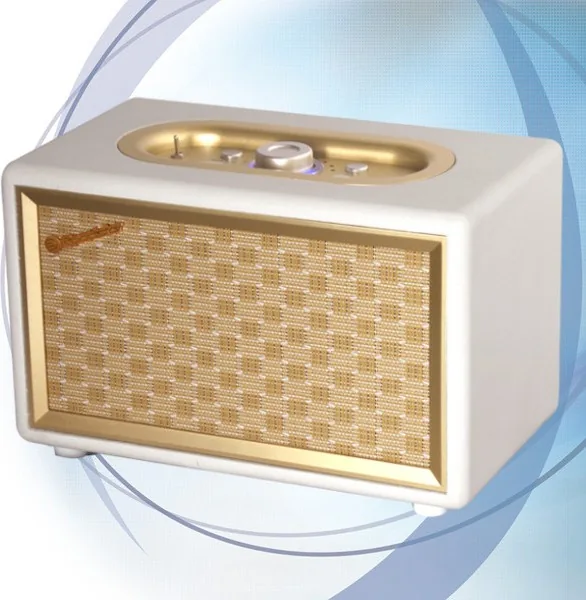
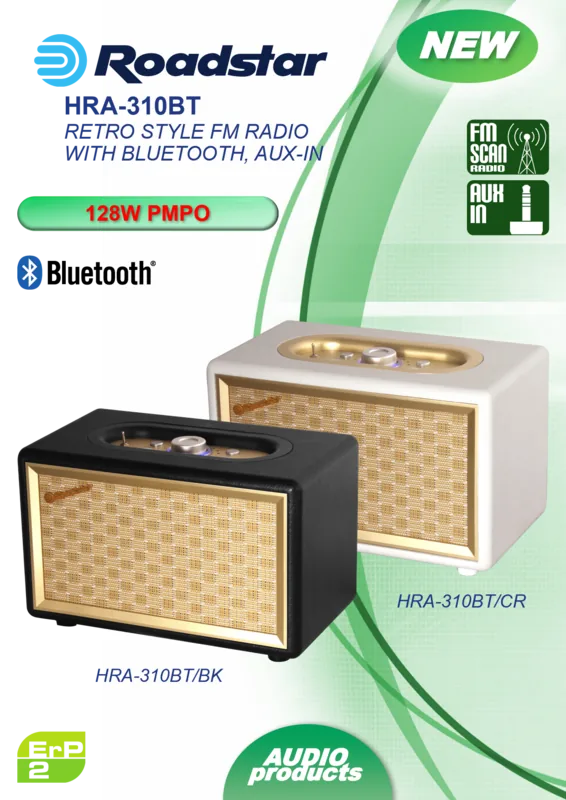
Roadstar HRA-310BT Cream: Your Ultimate Portable Audio Companion
Discover the versatility of the Roadstar HRA-310BT cream, a compact audio solution designed for music lovers on the go. This device combines classic radio tuning with modern wireless connectivity, ensuring your favorite tunes are always within reach. Whether you are relaxing at home or enjoying an outdoor gathering, the HRA-310BT delivers clear sound through its built-in speakers.
The unit features a user-friendly interface with clearly labeled controls. A dedicated mode button allows you to switch effortlessly between FM radio, Bluetooth streaming, and auxiliary input modes. The LED indicator provides visual feedback, glowing red for FM, blue for Bluetooth, and purple for AUX-IN connections. Volume control is intuitive, managed by a simple knob that adjusts levels precisely to your preference.
Bluetooth operation makes pairing seamless. Simply select HRA-310BT from your smartphone or tablet, confirm the connection, and start transferring music instantly. Once paired, all playback controls can be managed directly from your mobile device. For traditional listening, the built-in FM tuner covers a wide frequency range, allowing you to scan for stations quickly using the skip buttons. Long pressing these buttons automatically searches up or down the dial until a station is found.
Powering this unit is straightforward with a 9V DC supply. The device includes an automatic standby mode that activates after 15 minutes of silence to save energy. To resume playback, simply cycle the power switch off and on again. Safety warnings emphasize keeping the unit dry and well-ventilated, avoiding direct sunlight or heat sources to ensure longevity.
Important Notes
Ensure all cables are connected properly before turning on the unit. Do not expose the device to rain or moisture. Always recycle this electronic product responsibly according to local regulations.
Pros and Cons
Pros
- Supports multiple input modes including FM, Bluetooth, and AUX-IN for maximum flexibility.
- Features an intuitive LED color system to indicate the current active mode instantly.
- Includes automatic standby mode to conserve energy when no sound is playing.
- Compact design suitable for various settings from home offices to outdoor picnics.
- Easy volume control and simple navigation between different audio sources.
Cons
- Requires a separate 9V DC power adapter which is not included in the box.
- Does not come with an audio cable for AUX-IN connections requiring additional purchase.
- Bluetooth controls are limited to the mobile device rather than physical buttons on the unit.
- No built-in rechargeable battery; must remain plugged into a power source continuously.
- Plastic construction may feel less durable compared to higher-end metal chassis models.
Search for 67,732 Manuals online


Type-in Brand or Model