
Ricoo TS6111 Manual
PDF manual · 20 Pages
English



Quick check
Incorrect answer, please try again.
Chat with your Ricoo TS6111 manual using AI
Get instant AI answers from your Ricoo TS6111 manual
Ask anything about the Ricoo TS6111. Answers come from this manual, with the pages they are based on.
Ask a Question
Do you recommend TS6111?
Yes NoFrequently Asked Questions
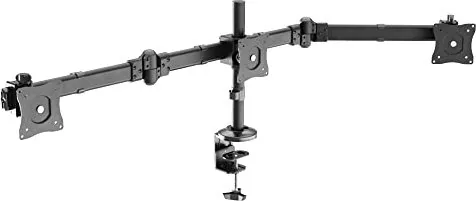
It is a desk mount solution for displays, designed to help users position monitors more securely and ergonomically on a workspace. It is especially useful for office and home desk setups.
Is this answer helpful?
The mount supports VESA patterns of 75x75 mm and 100x100 mm. Users should always measure the mounting hole spacing on the display before starting installation.
Is this answer helpful?
The manual specifies a maximum of 8 kg per screen. It is important not to exceed the rated load, as doing so may lead to damage or safety risks.
Is this answer helpful?
The guide indicates a clamping range from 10 mm minimum to 80 mm maximum, making it compatible with many standard desks and tabletops.
Is this answer helpful?
No, the product is intended for indoor use only. Outdoor exposure may cause product failure or create safety issues.
Is this answer helpful?
The instructions recommend contacting customer support or the local distributor for a replacement part instead of returning the full item right away. Keep your order details and part numbers ready.
Is this answer helpful?
Advantages and Disadvantages
Advantages

- Supports common VESA 75x75 and 100x100 mounting patterns.
- Works with desk thicknesses from 10 mm to 80 mm.
- Clear safety instructions help reduce installation mistakes.
- Suitable for lightweight monitor setups up to 8 kg per screen.
Disadvantages

- Not intended for outdoor use.
- Requires careful pre-checks for VESA spacing and load limits.
- May need extra help or tools during installation.
- Included screws may not fit every monitor model perfectly.
Product Specification
Type
Desk mount
Number of monitors
3
Screen size
13-27"
Mobility
tiltable (-30°, +30°), rotatable (360°), swivelling (60°), height adjustable
Max. load capacity
52.91 lbs
VESA
75x75, 100x100
Special features
Cable management
Color
black
Weight
14.55 lbs
Product Description
Ricoo TS6111 Manual
The Ricoo TS6111 Manual introduces a practical desk mount solution for users who want a cleaner, more flexible monitor setup. Designed for displays with VESA 75x75 and 100x100 mounting patterns, this mount focuses on everyday usability while keeping the installation process structured and safe. It is especially suited for workstations, home offices, and shared desks where better screen positioning can improve comfort and productivity.
One of the key strengths of the TS6111 is its clear emphasis on stability. The instructions repeatedly highlight the importance of checking the load limit, matching the VESA hole spacing, and making sure the desk or support surface can safely carry the total weight. The mount is intended for indoor use only, and the guide warns against over-tightening screws or attempting installation without proper care. These details show that the product is built with safety and long-term reliability in mind.
Another useful point is its compatibility with a range of desk thicknesses. The manual notes a clamping range from 10 mm to 80 mm, which gives users flexibility when choosing where to install it. This makes the TS6111 a convenient option for many common desk types. The included parts list and assembly steps help users verify the package contents before starting, reducing the chance of missing hardware slowing down the setup.
For multi-screen users, the TS6111 stands out as a functional support system that can hold displays up to the specified limit of 8 kg per screen. That makes it a smart choice for lightweight monitors used in productivity setups, editing work, or general office tasks. The design encourages careful alignment and step-by-step assembly, helping create a steady and organized display arrangement.
Beyond the hardware, the manual also reflects a customer-friendly approach. It advises users to contact support if any parts are missing or damaged instead of returning the entire item immediately. That can save time and make replacement handling easier. Overall, the Ricoo TS6111 appears to be a straightforward, dependable desk mount for users who value secure installation, desk compatibility, and practical screen positioning.
Notes
- Check VESA spacing before installation.
- Keep within the listed weight limit.
- Use only indoors.
- Verify all parts before assembly.
Search for 67,732 Manuals online


Type-in Brand or Model