
Ricoo TS3311 Manual
PDF manual · 24 Pages
English



Quick check
Incorrect answer, please try again.
Chat with your Ricoo TS3311 manual using AI
Get instant AI answers from your Ricoo TS3311 manual
Ask anything about the Ricoo TS3311. Answers come from this manual, with the pages they are based on.
Ask a Question
Do you recommend TS3311?
Yes NoFrequently Asked Questions
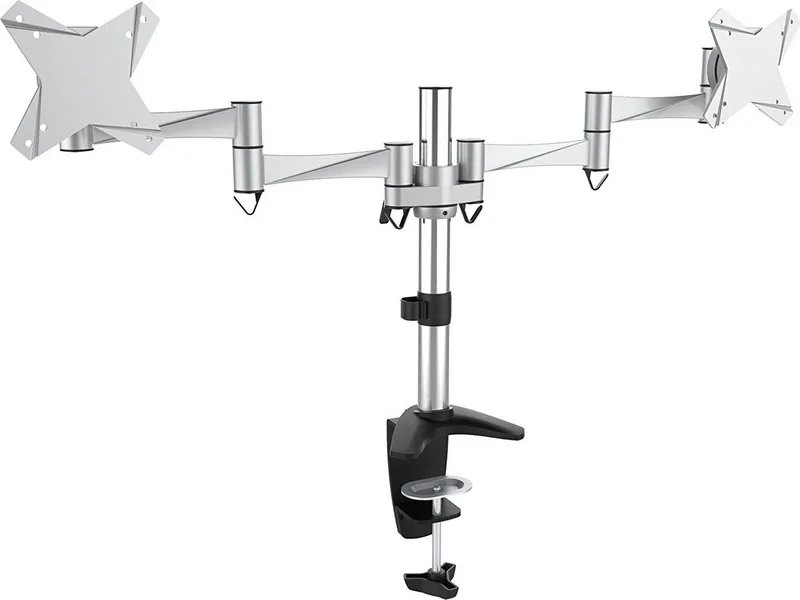
It is a desk mount for displays, designed to hold two monitors and provide flexible positioning, cleaner cable routing, and a more ergonomic workspace.
Is this answer helpful?
Yes. It supports both desk edge clamping and desk-hole mounting, which makes it adaptable to different desk styles and workspace layouts.
Is this answer helpful?
The clamp is designed for desks from 10 mm to 90 mm thick. For hole installation, the opening should be between 10 mm and 70 mm.
Is this answer helpful?
The mount supports swivel, tilt, and rotation, giving users a wide range of adjustment options for comfortable viewing and better screen placement.
Is this answer helpful?
Not necessarily. It supports common VESA patterns, but the included screws may not fit every monitor model exactly, so compatibility should be checked first.
Is this answer helpful?
The instructions recommend checking all screws and connections at least every three months to make sure the mount remains secure and safe to use.
Is this answer helpful?
Advantages and Disadvantages
Advantages

- Supports both desk edge clamping and desk-hole mounting for better installation flexibility.
- Offers useful screen movement with swivel, tilt, and rotation for ergonomic positioning.
- Includes cable clips to help keep the workspace neat and organized.
- Rubber pad protection is helpful for glass tabletops and delicate surfaces.
Disadvantages

- Installation is intended for technical staff, which may be inconvenient for beginners.
- Some monitor screw lengths may not match every screen model perfectly.
- The mount is for indoor use only, so it is not suitable for outdoor setups.
- The weight limit is strict, so heavier displays cannot be used safely.
Product Specification
Type
Desk mount
Number of monitors
2
Screen size
13-27"
Mobility
tiltable (-15°, +15°), rotatable (360°), swiveling (180°), extendable, height adjustable
Max. load capacity
35.27 lbs
VESA
75x75, 100x100
Special features
Cable management
Color
black, silver
Weight
8.60 lbs
Product Description
Ricoo TS3311 Manual: A Practical Dual Display Desk Mount
The Ricoo TS3311 Manual describes a versatile desk mount made for users who want a cleaner, more organized workspace without giving up screen flexibility. Built for indoor use, this display holder is designed to support two monitors and help create a more ergonomic viewing position for work, gaming, study, or content creation.
One of the strongest points of the TS3311 is its flexible installation style. It can be mounted either with a desk clamp at the edge of the table or through a desk hole, so it adapts well to different desk types. The clamp is intended for tabletops between 10 mm and 90 mm thick, while the hole installation supports openings from 10 mm to 70 mm. That makes the mount practical for many common office and home setups.
The design also focuses on everyday usability. The monitor plates support standard VESA patterns, which helps the mount work with many modern displays. Once installed, the screens can be adjusted with a combination of swivel, tilt, and rotation, giving users room to fine-tune the angle for comfort and visibility. This is especially useful when multiple people share a workspace or when a screen needs to be moved between tasks.
Assembly guidance in the Ricoo TS3311 Manual is clear and safety-driven. It emphasizes checking all parts before installation, choosing the correct screws for the display, and tightening everything securely without over-tightening. The instructions also remind users that the mount should be installed by technical personnel and that the weight limit must never be exceeded. These warnings may sound strict, but they reflect the importance of stability when supporting valuable screens overhead.
Cable management is another thoughtful detail. The included clips help guide wires along the mount, keeping the desk area tidier and reducing strain on connections. A self-adhesive rubber pad can also be used on glass tables to protect the surface and improve grip. These small touches make the TS3311 feel well suited to modern workspaces where both function and appearance matter.
Overall, the Ricoo TS3311 is a solid solution for anyone seeking a dual-screen desk mount with dependable support, practical adjustability, and a clean finish. It is especially appealing for users who value flexibility, neat cable routing, and a setup that can be adapted to different desks over time.
Notes
- Indoor use only.
- Check the load limit before setup.
- Re-tighten screws regularly.
- Confirm VESA compatibility before mounting.
Search for 67,732 Manuals online


Type-in Brand or Model