


Ricoo S2911 Manual
PDF manual · 2 Pages
English



Quick check
Incorrect answer, please try again.
Chat with your Ricoo S2911 manual using AI
Get instant AI answers from your Ricoo S2911 manual
Ask anything about the Ricoo S2911. Answers come from this manual, with the pages they are based on.
Ask a Question
Do you recommend S2911?
Yes NoFrequently Asked Questions
The Ricoo S2911 supports horizontal and vertical VESA hole distances of 50 mm, 75 mm, and 100 mm. Verify your TV or monitor’s hole spacing before starting the installation.
Is this answer helpful?
Yes. The package provides anchors suitable for solid concrete and instructions for wood stud mounting. Note that the supplied plastic anchors should only be used on solid concrete; use appropriate wood screws or consult a professional for stud installations.
Is this answer helpful?
Yes. The mount includes several screw sizes and small spacers to accommodate flat and curved TV backs or recessed mounting points. Choose the screws that match your display and use spacers if screws are too long.
Is this answer helpful?
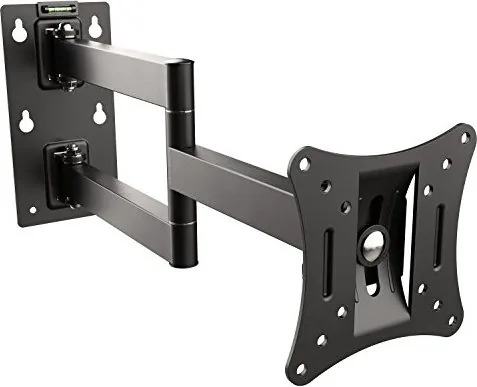
The Ricoo S2911 offers a tilt adjustment of approximately +15° to -15°, with a lock screw to secure the chosen angle. It also permits rotation to help achieve the desired viewing orientation but is designed primarily for compact displays.
Is this answer helpful?
While a skilled installer is recommended—especially to ensure secure anchoring and correct wall type selection—careful DIYers can follow the step-by-step guidance. Use proper tools, verify VESA spacing, and select correct fasteners for your wall and TV.
Is this answer helpful?
A bubble level is included in the package to aid alignment, but the manual recommends using a professional spirit level for the most accurate results.
Is this answer helpful?
Confirm your TV’s VESA hole spacing, choose the correct screws and spacers provided, verify your wall type (concrete vs. stud), use suitable anchors, and ensure all components are present before drilling or mounting.
Is this answer helpful?
Advantages and Disadvantages
Advantages

- Supports common VESA patterns: 50, 75, 100 mm.
- Includes multiple screw sizes and spacers for different TV backs.
- Works on both solid concrete and wood stud installations.
- Compact design with +/-15° tilt adjustment and rotation capability.
- Comes with a bubble level to simplify alignment during installation.
Disadvantages

- Supplied plastic anchors are only suitable for solid concrete.
- May require different screws not included for some TV models.
- Limited tilt range (±15°) compared with more adjustable mounts.
- Installation recommended for skilled personnel, which may increase cost.
- Not suitable for larger TVs or heavier displays beyond its specification.
Product Specification
Type
Wall mount
Number of monitors
1
Screen size
17-33"
Mobility
tiltable (-15°, +15°), swiveling (180°), extendable
Distance to wall
2.36-16.93"
Max. load capacity
44.09lbs
VESA
50x50, 75x75, 100x100
Special features
Spirit level
Color
black
Weight
5.29lbs
Product Description
Ricoo S2911 — Reliable TV Wall Mount with Simple Installation
The Ricoo S2911 is a versatile TV wall mount designed for small to medium displays, offering a sturdy, practical solution for mounting monitors and TVs with VESA hole patterns of 50, 75, and 100 mm. Built for both solid concrete and timber-stud walls, this mount emphasizes safety and ease of use by including the essential fittings and a spirit level to help you achieve a correct installation with minimal fuss.
Compact and dependable, the S2911 supports both flat and slightly curved display backs. It ships with multiple screw sizes and small spacers so you can match the mounting hardware to your screen’s backplate. The package also contains anchors intended specifically for solid concrete; if mounting to wood studs, alternative fasteners are provided and the instructions show the required hole distances and drill diameters for each wall type.
Installation follows a clear step-by-step approach: first verify the VESA hole spacing on your display, then attach the appropriate bracket pieces to the TV using the supplied screws or spacers as needed. Next, secure the wall anchors or stud screws at the correct spacing and hang the bracket assembly on those screws. Finally, tighten all fasteners, set the tilt angle within a range of +/-15 degrees, and lock the tilt adjustment screw to secure the position. The mount also allows the display to rotate for optimal viewing orientation.
Safety and proper fitment are prioritized: the manual advises checking hole distances before starting, using the matching screws for your screen, and warns that the supplied plastic anchors are suitable only for solid concrete. The instructions recommend professional-grade tools—particularly a professional spirit level—even though a simple bubble level is included to aid placement.
The Ricoo S2911 is an economical, no-frills option for users who need a reliable wall mount that covers common VESA patterns. Its compact footprint and straightforward adjustment make it well suited for bedrooms, offices, kitchens, or small living areas where space and budget are considerations.
Notes
- Verify VESA spacing (50/75/100 mm) before installation.
- Use supplied anchors only for solid concrete; for timber studs use appropriate wood screws.
- Small spacers are included for displays with curved backs or recessed mounting holes.
- Included bubble level is handy, but a professional level is recommended for best results.
Search for 67,732 Manuals online


Type-in Brand or Model
nisi77
8 months ago
Is this wall mount really suitable and sturdy enough for a small TV?
Manual.ly
8 months ago
Yes. Reviewers describe it as a very good wall mount specifically for small TVs, noting that it feels secure and is easy to use. If your TV is within the mount's supported size and weight range, it should fit well and provide stable wall installation. For best results, confirm your TV's dimensions and weight before purchase and follow the included mounting instructions.