
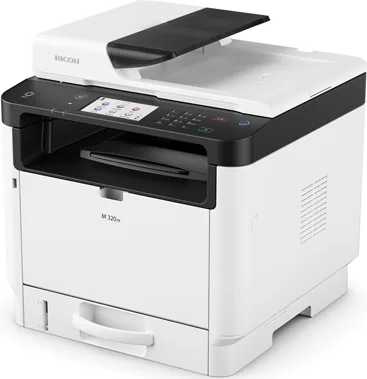
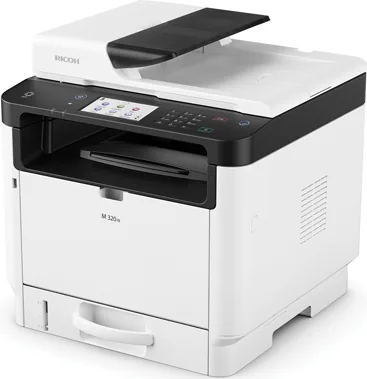
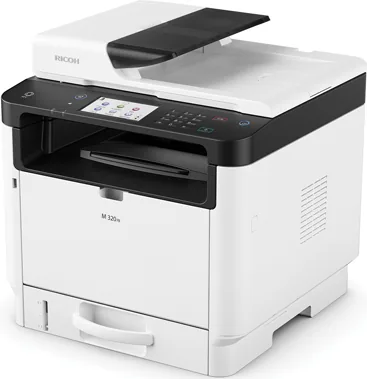
Ricoh M 320 Manual
PDF manual · 516 Pages
English



Quick check
Incorrect answer, please try again.
Chat with your Ricoh M 320 manual using AI
Get instant AI answers from your Ricoh M 320 manual
Ask anything about the Ricoh M 320. Answers come from this manual, with the pages they are based on.
M 320 Maintenance Schedule
Unplug the power cord at least once a year to remove dust or dirt from contacts and the outlet to prevent fire hazards.
When Low Humidity Mode is enabled, the device automatically performs self-maintenance every 10 minutes to prevent black lines on prints.
Replace the toner cartridge when the screen displays a message indicating it is empty or needs replacement soon.
Clean these parts with a damp cloth if multiple sheets are fed or paper feed errors occur.
Wipe the platen glass and ADF parts with a soft damp cloth followed by a dry cloth to maintain copy and scan quality.
Free maintenance reminders
Timed to your purchase date. Always free, unsubscribe anytime.
Ask a Question
Do you recommend M 320?
Yes NoFrequently Asked Questions
You can connect your smartphone using NFC technology. Install the appropriate app on your device, then touch your phone to the NFC symbol on the printer panel. Alternatively, scan the QR code displayed on the status screen to download the app and configure the connection manually.
Is this answer helpful?
While driver installation is recommended for full functionality, basic printing is possible via standard network protocols if the printer is correctly configured on the network. However, advanced features like duplex printing and specific paper tray selection usually require the official driver software.
Is this answer helpful?
When the toner is low, the warning light will blink. Once empty, the light will stay on, and the printer will stop accepting new jobs. You must replace the drum cartridge with a new one to resume operation. Always use original Ricoh toner for best results.
Is this answer helpful?
Yes, the M 320 is designed for medium to high-volume office environments. Its durable components and efficient cooling system allow it to handle continuous printing cycles without overheating, making it ideal for busy workspaces.
Is this answer helpful?
Configure the secure print function in your computer's print dialog or via the device settings. Assign a PIN code to the job. When the document arrives at the printer, enter the PIN on the control panel to release and print the page, preventing others from seeing sensitive data.
Is this answer helpful?
Yes, the Ricoh M 320 supports scanning directly to email addresses. You must first configure SMTP server settings in the device menu or Web Image Monitor. Once set up, you can select recipients and send scanned documents instantly from the control panel.
Is this answer helpful?
The Touch Panel model features a large graphical interface allowing direct interaction with menus and customization of the home screen. The four-line LCD model uses physical buttons and a smaller display, offering a more traditional navigation experience with fewer customization options.
Is this answer helpful?
Advantages and Disadvantages
Advantages

- High-speed monochrome printing with excellent text quality
- Flexible paper handling with optional feed units
- Advanced security features for confidential documents
- NFC support for easy mobile printing connections
- Multi-function capability including scanning and copying
Disadvantages

- Limited color output as it is monochrome only
- Optional Wi-Fi module required for wireless connectivity
- Initial setup may require administrator password configuration
- Touch panel models have different interfaces than LCD versions
- No built-in automatic two-sided scanning without additional settings
Product Specification
Format
A4 (Print), A4 (Scan)
Color System
1-color, 1x Toner
1200x1200dpi - 32 ppm (A4)
Scan
600x600dpi - 13.5 ppm (A4)
Paper Input
250 sheets, RADF (35 sheets), Duplex Unit
Network
Gb LAN, NFC, Wi-Fi Direct, AirPrint, Mopria
Display
Color, 4.3", Touchscreen
Emulation
PCL 6, PCL 5e, PostScript 3
Dimensions
15.9x16.0x15.4 in
Weight
39.7 lbs
Features
Direct Print
Product Description
Ricoh M 320 Laser Monochrome - Read, Download & Print Free
The Ricoh M 320 Laser Monochrome printer stands as a robust solution for modern office environments where efficiency and clarity are paramount. This versatile machine is designed to handle high-volume printing tasks with precision, ensuring that every document produced meets professional standards. Whether you are managing a small team or a large department, the M 320 adapts seamlessly to your workflow needs.
At the heart of this device lies a sophisticated print engine capable of delivering crisp text and sharp graphics. The unit features multiple paper handling options, including standard cassettes and optional extensions like the Paper Feed Unit PB1130. This flexibility allows users to manage various paper sizes and types without constant reloading, minimizing downtime during busy workdays. The ability to load envelopes and custom media further expands its utility for diverse business requirements.
Connectivity is another standout feature of the Ricoh M 320. It supports seamless integration into networked environments through Ethernet and optional Wi-Fi modules. Users can easily send documents from computers, laptops, or mobile devices using advanced protocols. The inclusion of Near Field Communication (NFC) technology simplifies the connection process for smartphones and tablets, enabling quick printing directly from hand-held devices. This level of connectivity ensures that everyone in the office can access the printer effortlessly.
For enhanced productivity, the M 320 offers multi-function capabilities beyond simple printing. It functions as a reliable copier and scanner, supporting both flatbed and automatic document feeder operations. The scanner component facilitates digital archiving by sending files directly to email addresses, shared folders, or FTP servers. Advanced security features allow administrators to restrict access to specific functions or require authentication before releasing sensitive print jobs, protecting confidential information from unauthorized viewing.
Maintenance is straightforward thanks to intuitive design elements. The toner cartridge is easily accessible and replaceable, while clear error messages guide users through troubleshooting steps when issues arise. Regular cleaning of internal rollers and glass surfaces ensures consistent performance over time. With its durable construction and user-friendly interface, the Ricoh M 320 remains a top choice for organizations seeking a dependable monochrome laser solution that balances power with ease of use.
Key Notes
- Supports duplex printing to save paper.
- Compatible with Smart Organizing Monitor for remote management.
- Includes NFC for instant mobile device pairing.
- Offers customizable home screen shortcuts on touch models.
Search for 67,706 Manuals online


Type-in Brand or Model