
Razer Viper V3 HyperSpeed Manual
PDF manual · 30 Pages
English



Quick check
Incorrect answer, please try again.
Chat with your Razer Viper V3 HyperSpeed manual using AI
Get instant AI answers from your Razer Viper V3 HyperSpeed manual
Ask anything about the Razer Viper V3 HyperSpeed. Answers come from this manual, with the pages they are based on.
Ask a Question
Do you recommend Viper V3 HyperSpeed?
Yes NoFrequently Asked Questions
It connects wirelessly through the included Razer HyperSpeed Wireless USB Type-A adapter. Insert the AA battery, plug the adapter into a USB-A port, turn on the mouse, and wait for the green LED to confirm pairing.
Is this answer helpful?
The default DPI stages are 400, 800, 1600, 3200, and 6400. The 1600 DPI stage is the default setting. You can cycle through them with the DPI button and customize sensitivity stages in Razer Synapse.
Is this answer helpful?
Battery life can reach up to 280 hours using HyperSpeed Wireless at a 1,000 Hz polling rate. At 4,000 Hz HyperPolling Wireless, battery life can reach up to 75 hours. Actual runtime depends on settings and use.
Is this answer helpful?
Yes. Razer Synapse supports remapping the eight programmable buttons to mouse functions, keyboard commands, sensitivity controls, macros, multimedia actions, Windows shortcuts, text input, and program launches.
Is this answer helpful?
When battery level falls below 5 percent, the indicator LED flashes red twice at regular intervals. This sequence continues until the AA battery is replaced or becomes fully depleted.
Is this answer helpful?
No. The Razer Viper V3 HyperSpeed does not include RGB lighting, and it is not dock compatible. It uses a replaceable AA battery rather than an internal rechargeable battery.
Is this answer helpful?
Advantages and Disadvantages
Advantages

- Focus Pro 30K optical sensor delivers precise tracking, up to 30,000 DPI, 750 IPS speed, and 50G acceleration.
- HyperSpeed Wireless via USB Type-A offers a responsive cable-free connection for gaming and desktop use.
- Up to 280 hours of battery life at 1,000 Hz helps reduce frequent battery changes.
- Eight programmable buttons, Hypershift, profiles, and Synapse controls enable extensive customization.
- 100% PTFE feet and a lightweight claw/fingertip-focused shape support fast, smooth movement.
Disadvantages

- Requires an AA battery, and the included battery is not rechargeable.
- The mouse has no RGB lighting for users who want illuminated visual customization.
- Only one onboard memory profile is available.
- No wired mode, tilt wheel, or dock compatibility is included.
- Advanced Synapse configuration requires Windows 10 64-bit or later and an internet connection for installation.
Product Specification
Handedness
right-handed
Buttons
6 total, 2 primary, 1 top, 2 left, 1 scroll wheel click
Scroll wheel
1x 2-way
Tracking
red LED/IR
Resolution
30,000 dpi, adjustable down to 6,400/3,200/1,600/800/400 dpi
Sensor
PixArt PAW 3950 (Razer Focus Pro 30K)
Switches
mechanical switches, Razer 2nd Gen Mechanical, 60 million clicks
Polling rate
1,000 Hz, adjustable to 500/250/125 Hz; 8,000 Hz (with optional Razer HyperPolling Wireless Adapter, upgrade from 4,000 Hz to 8,000 Hz via firmware update)
Lighting
N/A
Connection
wireless (2.40 GHz), USB-A (USB-A receiver)
Power supply
1x AA battery
Dimensions (W x H x D)
2.52 x 1.57 x 5.00 in
Approximate volume
5.19 in3 (approximate shape)
Weight
2.89 oz (including battery)
Color
solid, black, logo
Special features
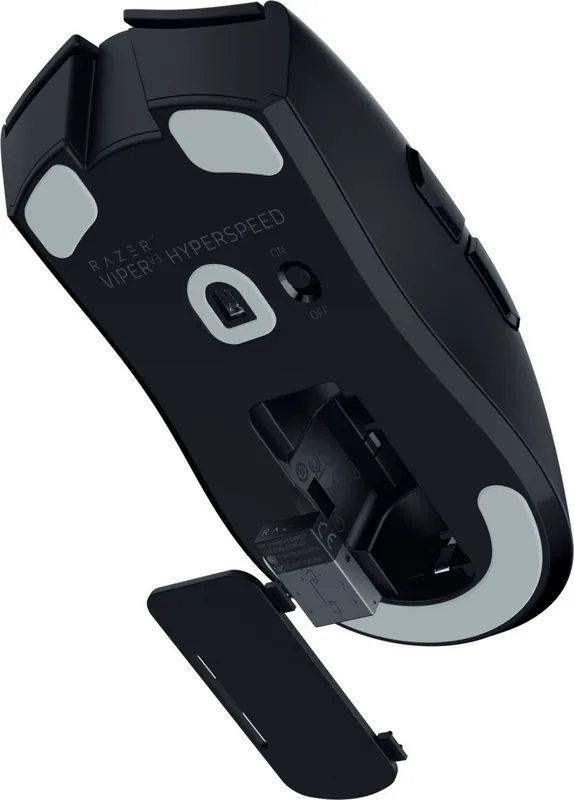
battery level indicator, onboard memory, stowable receiver
Product Description
Razer Viper V3 HyperSpeed Black, USB Manual
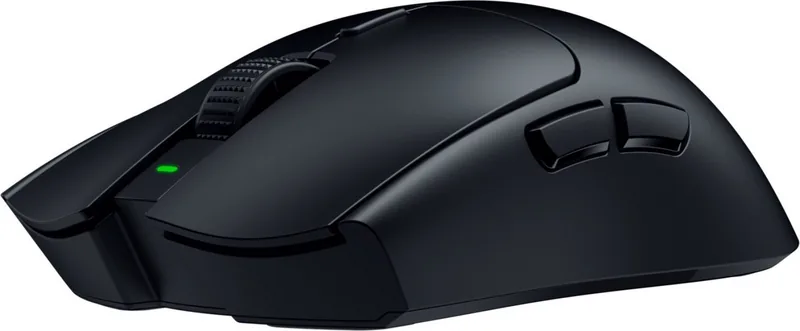
The Razer Viper V3 HyperSpeed Black, USB is a wireless gaming mouse designed for players who value speed, control, and a clean competitive setup. Its symmetrical shape is optimized for right-handed use and supports claw and fingertip grip styles, making it a strong choice for fast-paced shooters, esports practice, and everyday desktop work. The black finish keeps the design understated, while the lightweight wireless construction helps reduce fatigue during long sessions.
At its core, the mouse uses a Razer Focus Pro 30K optical sensor with sensitivity up to 30,000 DPI, tracking speeds up to 750 IPS, and acceleration up to 50G. These specifications provide accurate movement across a broad range of play styles. Five default DPI stages - 400, 800, 1600, 3200, and 6400 - can be selected with the dedicated DPI button. An indicator LED briefly shows the active stage by color, so sensitivity changes remain easy to follow during play.
Wireless performance and battery operation
The Razer Viper V3 HyperSpeed Black, USB connects through a Razer HyperSpeed Wireless USB Type-A adapter. Installation is straightforward: insert the included AA battery, connect the adapter to a compatible computer port, switch the mouse on, and wait for the green status light to confirm pairing. The mouse can deliver up to 280 hours of battery life at a 1,000 Hz polling rate, or up to 75 hours when using 4,000 Hz HyperPolling Wireless. A red LED warning indicates when battery capacity falls below 5 percent.
Control built for customization
Eight programmable buttons give players room to tailor controls for games, shortcuts, media commands, macros, and application launches. Razer Synapse expands the setup options with button remapping, DPI adjustment, polling-rate settings, calibration tools, power controls, and profile management. Razer Hypershift can add a second layer of button assignments when a chosen key is held. Profiles may also be linked to specific games for automatic switching.
The Razer Viper V3 HyperSpeed Black, USB Manual highlights practical details that matter in competitive use. Second-generation mechanical mouse switches are rated for up to 60 million clicks, while 100% PTFE mouse feet support smooth gliding. The mouse has one onboard memory profile, no RGB lighting, no tilt wheel, and no dock compatibility, keeping the focus on essential performance.
Note: Use a fresh AA battery, keep the sensor and feet clean, and consider adjusting lift-off settings in Razer Synapse for your preferred mouse surface.
Note: Razer Synapse requires Windows 10 64-bit or later and an internet connection for installation and cloud-based features.
Search for 67,706 Manuals online


Type-in Brand or Model