
Razer Viper V2 Pro Manual
PDF manual · 31 Pages
English



Quick check
Incorrect answer, please try again.
Chat with your Razer Viper V2 Pro manual using AI
Get instant AI answers from your Razer Viper V2 Pro manual
Ask anything about the Razer Viper V2 Pro. Answers come from this manual, with the pages they are based on.
Ask a Question
Do you recommend Viper V2 Pro?
Yes NoFrequently Asked Questions
It uses a Razer Focus Pro optical sensor with up to 30,000 DPI sensitivity, 750 IPS maximum speed, and 70G maximum acceleration.
Is this answer helpful?
Battery life is rated for up to 70 hours when using a 1,000 Hz polling rate. Actual runtime can vary with settings and usage.
Is this answer helpful?
Yes. Connect the included USB Type-C Speedflex cable to use the mouse in wired mode while it charges.
Is this answer helpful?
The mouse has five programmable buttons. Razer Synapse can assign mouse actions, keyboard commands, macros, multimedia controls, shortcuts, and other functions.
Is this answer helpful?
The default DPI stages are 400, 800, 1600, 3200, and 6400. Razer Synapse lets users customize sensitivity levels and switch between up to five stages.
Is this answer helpful?
No. This model does not include RGB lighting, emphasizing a lightweight, competition-oriented design instead.
Is this answer helpful?
Advantages and Disadvantages
Advantages

- Ultra-lightweight esports-focused design supports fast movement and reduced fatigue during long sessions.
- Focus Pro optical sensor reaches 30,000 DPI, 750 IPS, and 70G for highly responsive tracking.
- HyperSpeed Wireless and USB-C wired operation provide flexible connectivity options.
- Up to 70 hours of battery life at 1,000 Hz supports extended cable-free play.
- Five programmable buttons, Hypershift, profiles, and sensor calibration offer broad customization.
Disadvantages

- Only one onboard memory profile is available for saving settings away from Synapse.
- The design is symmetrical but specifically intended for right-handed users.
- No RGB lighting may disappoint users seeking visual customization.
- It does not support a charging dock or a tilting scroll wheel.
- Full software customization requires Windows 10 64-bit or later and an internet connection.
Product Specification
Handedness
right-handed
Buttons
5 (total), 2 (primary), 2 (side), 1 (scroll wheel click)
Scroll Wheel
1x 2-way
Tracking
red LED/IR
Resolution
30,000 dpi, reducible to 6,400/3,200/1,600/800/400 dpi
Sensor
PixArt PAW 3950 (Razer Focus Pro 30K)
Switches
mechanical-optical switches, Razer Optical 90M Mouse Switch Gen-3, 90 million clicks
Polling Rate
1,000 Hz, adjustable to 500/250/125 Hz (wired USB); 8,000 Hz (wireless 2.4 GHz, with Razer HyperPolling Wireless Adapter, optional, upgrade from 4,000 Hz to 8,000 Hz via firmware update)
Lighting
N/A
Connection
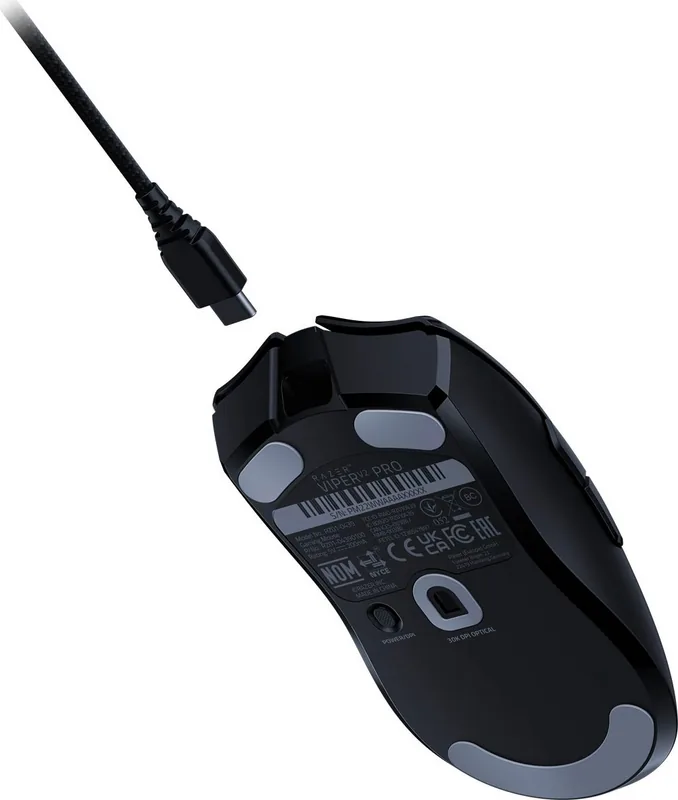
wired (5.91 ft), USB-A 2.0, or wireless (2.4 GHz), USB-A (USB-A receiver), detachable cable (USB-C port)
Power Supply
rechargeable battery (built-in), charging cable (USB-C)
Dimensions (W x H x D)
2.64 x 1.50 x 5.00 in
Approximate Volume
5.19 in3 (approximate shape)
Special Features
battery level indicator, onboard memory, braided cable
Note
includes 1x grip tape set
Product Description
Razer Viper V2 Pro Ultra-lightweight Wireless Esports Mouse - Read, Download & Print Free
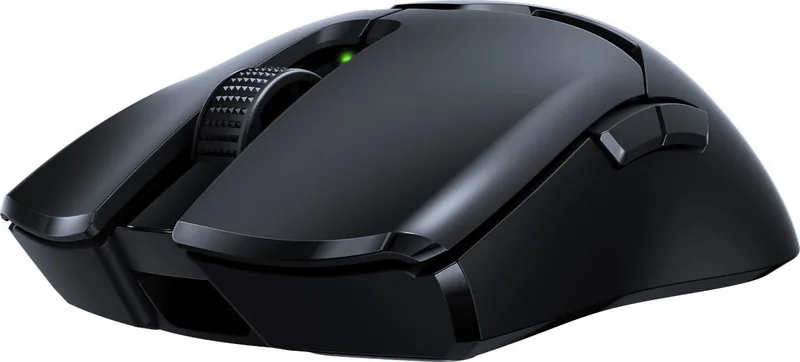
The Razer Viper V2 Pro Ultra-lightweight Wireless Esports Mouse is built for competitive players who value rapid movement, dependable tracking, and a clean, focused design. As the successor to the Razer Viper Ultimate, this right-handed symmetrical mouse delivers a notably lighter feel while retaining the high-end features expected from an esports-ready peripheral. Its streamlined shape supports quick swipes, controlled flicks, and long gaming sessions without unnecessary bulk.
Precision for Fast-Paced Play
At its core, the mouse uses a Razer Focus Pro optical sensor with sensitivity up to 30,000 DPI, a maximum speed of 750 IPS, and acceleration up to 70G. These specifications help deliver accurate cursor response across demanding shooters, battle royale games, and tactical titles. Five preset DPI levels - 400, 800, 1600, 3200, and 6400 - can be switched directly from the mouse, while Razer Synapse allows deeper sensitivity adjustments.
The optical switches are rated for up to 90 million clicks and are designed to provide responsive input during intense competition. With five programmable buttons, players can assign mouse functions, keyboard inputs, macros, multimedia controls, shortcuts, or application launches. Razer Hypershift can also provide a secondary layer of commands when assigned to a button.
Wireless Freedom and Wired Flexibility
Razer HyperSpeed Wireless connectivity provides a 2.4 GHz connection for cable-free gameplay. The included USB adapter can also support a compatible additional HyperSpeed device, helping reduce the number of occupied USB ports. When charging is needed, the USB Type-C Speedflex cable lets the mouse operate in wired mode, so play can continue without waiting for the battery.
Battery life reaches up to 70 hours at a 1,000 Hz polling rate. A status indicator warns when power falls below 5%, and a fully depleted battery takes approximately four hours to recharge. The mouse supports polling rates of 125 Hz, 500 Hz, and 1,000 Hz, allowing users to balance responsiveness and power use.
Built for Control
The Viper V2 Pro features 100% PTFE feet for smooth gliding and includes optional grip tape for users who prefer extra hold. Smart Tracking settings in Razer Synapse can help tune lift-off and landing behavior for different surfaces. One onboard memory profile offers convenient access to core settings away from the usual setup.
Notes
- Razer Synapse requires Windows 10 64-bit or later and an internet connection for installation and updates.
- The mouse has no RGB lighting, tilt wheel, or dock compatibility.
- Regular cleaning with a soft cloth helps maintain smooth movement and sensor performance.
Search for 67,706 Manuals online


Type-in Brand or Model