
Razer Stream Controller Manual
PDF manual · 18 Pages
English


Quick check
Incorrect answer, please try again.
Chat with your Razer Stream Controller manual using AI
Get instant AI answers from your Razer Stream Controller manual
Ask anything about the Razer Stream Controller. Answers come from this manual, with the pages they are based on.
Ask a Question
Do you recommend Stream Controller?
Yes NoFrequently Asked Questions
The Razer Stream Controller supports Windows 10 (64-bit) and later, and macOS 10.14 and later where Loupedeck Software compatibility exists. Internet access is required for software installation and updates.
Is this answer helpful?
Yes. The Loupedeck Software is required for the controller’s full functionality and for Razer Synapse to control application-specific profiles. Ensure Dynamic Mode is turned off in Loupedeck for Synapse profile control.
Is this answer helpful?
Connect the device using the included Type-C to Type-A cable directly to a PC USB Type-A port. A direct Type-A connection is required for proper operation and recognition by Razer Synapse.
Is this answer helpful?
You can customize workspaces, the functions of tactile dials, Switchblade keys, and create multi-page key layouts. Razer Synapse and Loupedeck let you assign app-specific profiles, global shortcuts, and map device inputs to tailored workflows.
Is this answer helpful?
Avoid liquids, moisture, and extreme temperatures. Maintain at least 15 cm distance from implanted medical devices. Clean monthly with a soft cloth or cotton swab; do not use harsh chemicals. Do not disassemble the device to avoid voiding the warranty.
Is this answer helpful?
Yes. The controller includes a one-year limited warranty. Warranty terms and region-specific restrictions apply; register your product on Razer’s site for benefits and check razer.com/warranty for current terms.
Is this answer helpful?
Yes. The controller offers native integrations and pre-configured profiles for supported applications via Loupedeck and Razer Synapse. Additional plugin support and profile behavior may vary by software version and installed modules.
Is this answer helpful?
Advantages and Disadvantages
Advantages

- Compact, lightweight form factor with detachable stand for ergonomic placement.
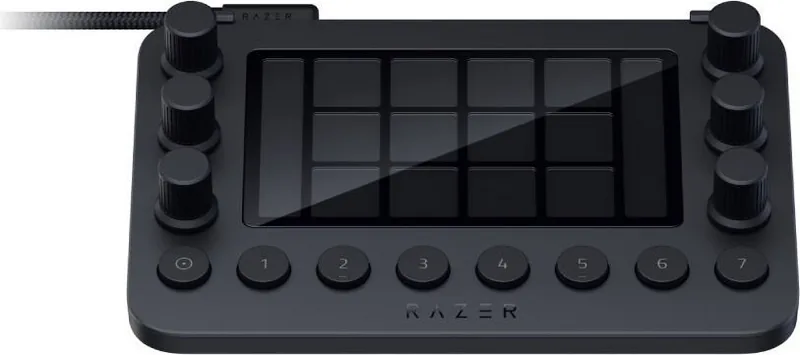
- Highly customizable: 7 workspaces, 12 haptic keys, 6 tactile analog dials with contextual displays.
- Deep software integration via Razer Synapse and Loupedeck for app-specific profiles.
- Quick setup with included Type-C to Type-A cable and native presets for popular apps.
- Haptic feedback and multi-page keys improve control and on-the-fly adjustments.
Disadvantages

- Requires both Razer Synapse and Loupedeck Software for full functionality, adding setup steps.
- Direct Type-A connection needed; no wireless option limits flexible placement.
- Limited warranty of one year; region restrictions may apply to coverage.
- Small device size may feel cramped for users who prefer larger control surfaces.
- Some advanced features depend on supported app plugins and current software versions.
Product Specification
Type
Keypad
Compatibility
PC, Mac OS
Key Type
Rubber Dome
Keys
20 (total), 12 LCD touch keys, 8 multifunctional keys
Analog Sticks
N/A
D-pad
N/A
Lighting
Multi-Color (RGB), each key individually
Key Height
flat
Key Shape
straight
Palm Rest
N/A
Housing
Plastic
Housing Color
solid color, black
Connectivity
wired (78.74 in), USB-A 2.0
Power Supply
USB
Dimensions (WxHxD)
5.94x1.19x4.00in
Weight
0.46 lbs
Special Features
Display (LCD keys), 6 rotary knobs, detachable USB cable (USB-C), textile cable
Product Description
Razer Stream Controller — Sleek Black USB Hub for Streamers
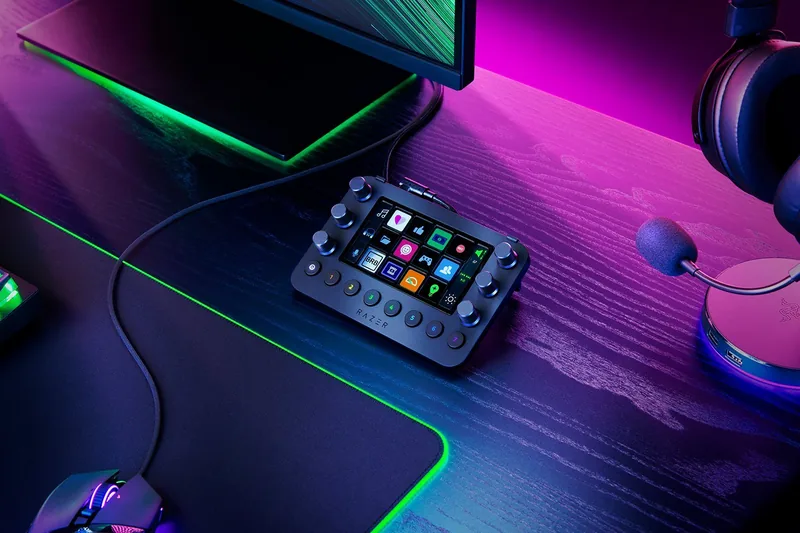
The Razer Stream Controller in black is a compact, USB-connected control surface built to simplify streaming and content creation. Combining tactile analog dials, haptic Switchblade keys, and a customizable touchscreen-like interface, it centralizes common production tasks so creators can focus on delivering engaging content. The controller ships with a Type-C to Type-A cable and a detachable stand, making setup quick for desktop workstations.
What it brings to creators
Designed for live streamers, editors, and multi-app workflows, the Stream Controller maps frequently used functions—scene switching, audio levels, media control, and app shortcuts—onto physical controls and programmable workspaces. Seven workspace buttons let you switch toolsets on the fly, while six dials and twelve haptic keys change behavior per workspace, displaying their context on small dial panels. Integration with Razer Synapse and the required Loupedeck software enables ready-made profiles for supported apps and highly granular customization for advanced users.
Setup and daily use
Getting started is straightforward: connect via the included Type-C to Type-A cable, install Razer Synapse (and Loupedeck Software where required), then choose or build profiles that match your preferred streaming and creative applications. The device is lightweight and small (151 × 101.5 × 30.2 mm), and its detachable stand provides a stable inclined position for comfortable use. The dials include press functions for resets or toggles, and the Switchblade keys support multiple pages accessible via swipe gestures.
Software and profiles
Razer Synapse serves as the hub for device management, module installs, and profile linking. The Loupedeck Software is necessary to access full controller features and must be used alongside Synapse for profile control. Synapse’s Profiles tab allows you to associate profiles with games or apps and manage device-linked effects, while settings let you configure language, startup behavior, and perform factory resets when needed.
Durability, warranty, and care
The Stream Controller ships with a one-year limited warranty and guidelines for safe use—avoid liquids and extreme temperatures, keep medical devices clear of close proximity, and don’t disassemble the device to preserve warranty. Routine monthly cleaning with a soft cloth is recommended; avoid harsh chemicals.
Notes
- Requires Razer Synapse and Loupedeck Software for full functionality.
- Works on Windows 10+ and macOS 10.14+ where supported.
- Keep a stable, direct Type-A USB connection for best performance.
Search for 67,706 Manuals online


Type-in Brand or Model