
Razer Katana Chroma Manual
PDF manual · 9 Pages
English



Quick check
Incorrect answer, please try again.
Chat with your Razer Katana Chroma manual using AI
Get instant AI answers from your Razer Katana Chroma manual
Ask anything about the Razer Katana Chroma. Answers come from this manual, with the pages they are based on.
Ask a Question
Do you recommend Katana Chroma?
Yes NoFrequently Asked Questions
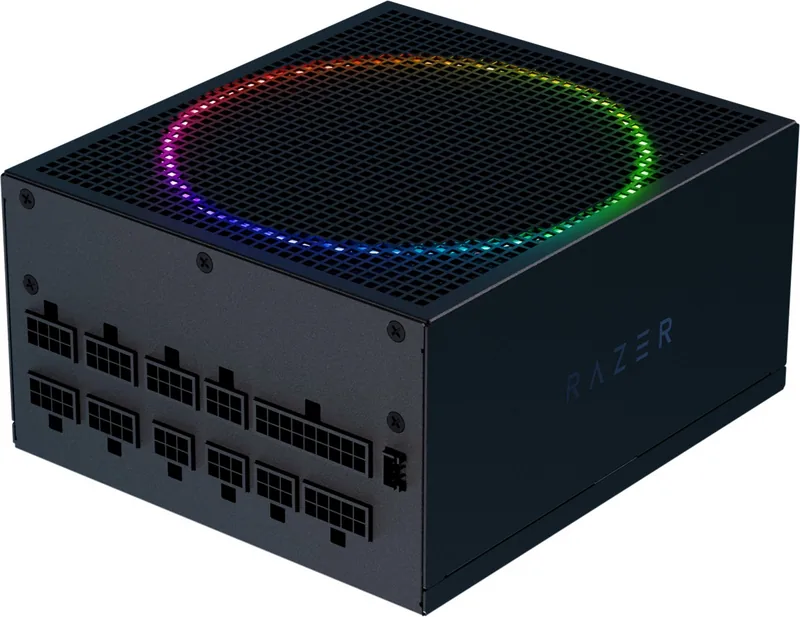
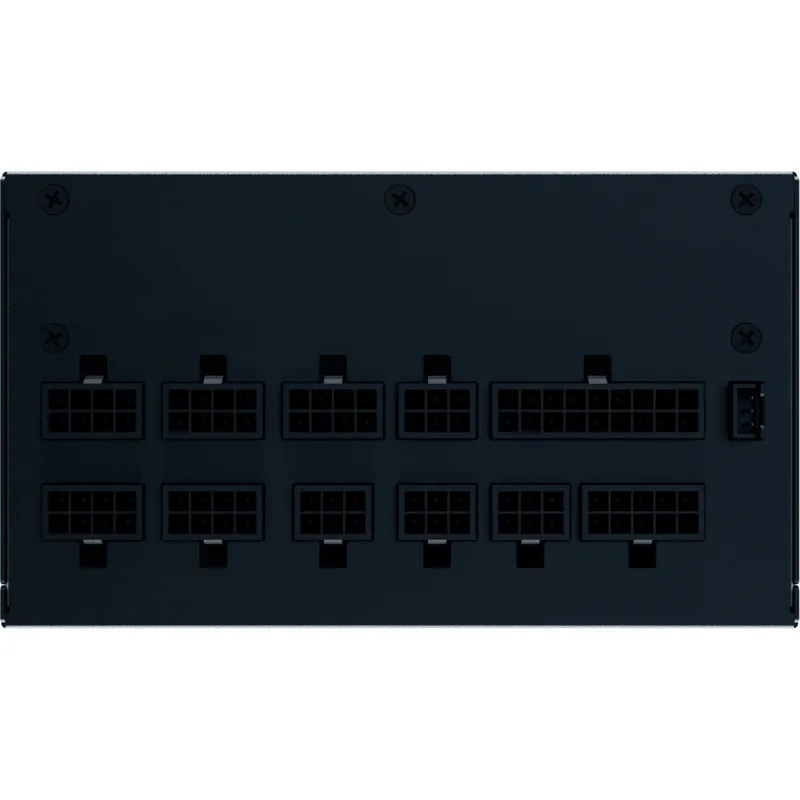
The unit provides a 24-pin mainboard connector, 8-pin and 4+4-pin CPU connectors, 6+2-pin PCIe slots, two SATA ports, a 4-pin Molex plug, and support for both 3-pin and 4-pin ARGB headers.
Is this answer helpful?
The documentation outlines distinct power models ranging from 850W to 1200W units, allowing users to choose based on their specific build requirements.
Is this answer helpful?
Yes, storage integration is seamless with two SATA ports designed for connecting hard drives and SSDs efficiently during system assembly.
Is this answer helpful?
Yes, the notes section advises strict adherence to power cable routing to avoid airflow blockage and ensure proper thermal management.
Is this answer helpful?
Higher wattage options provide extra headroom for overclocking tasks, though users should match the wattage to their specific build requirements.
Is this answer helpful?
The inclusion of wattages in the Razer Katana Chroma ATX 2.4 Manual ensures purchasers have transparent information regarding electrical performance limits and expansion capabilities.
Is this answer helpful?
Safety is key for all users to prevent strain on the power supply unit during heavy load scenarios and ensure system longevity.
Is this answer helpful?
Advantages and Disadvantages
Advantages

- Extensive connection options for diverse hardware setups
- Multiple wattage selections available for specific needs
- Support for legacy hardware via Molex and floppy ports
- Dedicated ARGB headers for lighting customization
- Clear documentation on power distribution and flow
Disadvantages

- Legacy Floppy port support may be unnecessary for modern builds
- Non-modular cable configuration in some models listed
- Limited explicit information on cable management routing
- Wattage options require manual selection based on load
- Basic connector count does not indicate cable length
Product Specification
Fan
5.51 inches, semi-passive, ARGB illuminated
Cable Management
fully modular
Certificate per Manufacturer
80 PLUS Platinum (according to Manufacturer, 115V)
Certificate per 80 PLUS
80 PLUS Platinum (115V, according to 80 PLUS Certificate)
Dimensions (WxHxD)
5.91x3.39x6.30 inches
Manufacturer Warranty
5 years
+3.3V
25A
+5V
25A
-12V
0.3A
+5Vsb
3A
Number of 12V Rails
1
PFC
active
Form Factor
ATX PS/2
Specification
ATX 2.4
Special Features
ErP Lot 6, RGB Interface 3-Pin (+5V/DATA/GND), supports Haswell C6/C7 Low-Power States, semi-passive mode switchable
Color
black
Weight
5.07 lbs
Product Description
The Razer Katana Chroma ATX 2.4 Experience
When building a high-performance system with the Razer Katana Chroma ATX 2.4, understanding the power distribution is vital. This guide focuses on the essential connectivity options provided in the Razer Katana Chroma ATX 2.4 Manual. Users should note the robust connection array designed for maximum compatibility and power stability across diverse hardware configurations. Advanced planning ensures every cable finds its intended socket without clutter.
The specifications highlight a comprehensive array of power delivery lines. For the mainboard, a 24-pin connector is provided to ensure stable voltage flow to the motherboard. Additional CPU power is supported through dedicated 8-pin and 4+4-pin CPU connectors. Graphics card power is handled via 6+2-pin PCI Express slots, allowing for flexible expansion options. Storage integration is seamless with two SATA ports. Legacy equipment compatibility is maintained through a 4-pin Molex connector plus a floppy port if needed. Lighting control is modernized with 3-pin and 4-pin ARGB headers, offering vibrant customization possibilities for enthusiasts.
Power capacity varies to suit different needs. The documentation outlines distinct power models ranging from 850W to 1200W units. This variation ensures that users can select the appropriate strength for their specific build requirements without unnecessary overhead. The inclusion of these wattages in the Razer Katana Chroma ATX 2.4 Manual ensures purchasers have transparent information regarding electrical performance limits and expansion capabilities. Higher wattage options provide extra headroom for overclocking tasks.
Proper installation requires attention to the listed connector counts. The system allows for one 24-pin mainboard, one 8-pin CPU, and multiple PCIe connections depending on the variant. Users must match their hardware needs to the available ports listed in the technical overview. This prevents strain on the power supply unit during heavy load scenarios. Ensuring every component draws the correct power is crucial for system longevity and stability. Cables should be organized to improve airflow within the case.
In conclusion, the power specifications presented in this guide provide a clear roadmap for assembly. Whether running a modest setup or a high-end gaming rig, the listed connectors and wattage options support a wide range of architectures. The Razer Katana Chroma ATX 2.4 Manual serves as a definitive resource for these hardware connections. This documentation is essential for all build phases. By adhering to the provided connection guidelines, system builders can achieve optimal performance and reliability for their investment in this ecosystem. Safety is key for all users.
Notes: Ensure strict adherence to power cable routing to avoid airflow blockage. Always check voltage ratings for safety.
Search for 67,706 Manuals online


Type-in Brand or Model