

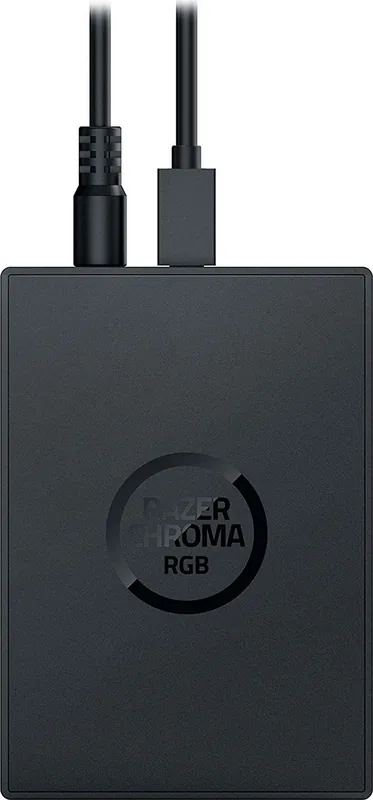

Razer Chroma Addressable RGB Controller Manual
PDF manual · 24 Pages
English



Quick check
Incorrect answer, please try again.
Chat with your Razer Chroma Addressable RGB Controller manual using AI
Get instant AI answers from your Razer Chroma Addressable RGB Controller manual
Ask anything about the Razer Chroma Addressable RGB Controller. Answers come from this manual, with the pages they are based on.
Ask a Question
Do you recommend Chroma Addressable RGB Controller?
Yes No
Dennis Bauch
7 months ago
Are there any physical installation issues with this RGB controller regarding connector sizes or mounting?
Frequently Asked Questions
It supports addressable RGB (ARGB) strips or devices using WS2812B LEDs or equivalent models. Ensure your strips use 3-pin 5V connectors compatible with the controller ports.
Is this answer helpful?
No, you must install Razer Synapse 3, which handles all driver requirements. An internet connection is needed for initial setup and updates.
Is this answer helpful?
Yes, you can use the included double-sided adhesive tape or utilize the mounting points at the bottom to screw it into empty SSD mounting plates.
Is this answer helpful?
No, you must turn off your PC before connecting the Molex power cable or plugging in LED strips to avoid electric shocks and component damage.
Is this answer helpful?
You can connect up to six separate ARGB strips or devices, as the controller features six dedicated 3-pin 5V addressable headers.
Is this answer helpful?
The product comes with a 1-year limited warranty coverage. Registering your device on the Razer ID website helps maximize potential benefits.
Is this answer helpful?
Advantages and Disadvantages
Advantages

- Supports six independent ARGB headers for extensive lighting expansion
- Seamless synchronization with Razer Synapse 3 and other Chroma devices
- Includes necessary cables for power and data connection
- Offers flexible mounting solutions with adhesive tape and SSD slots
- Features automatic device detection and manual configuration options
Disadvantages

- Requires a free Molex socket on the power supply unit
- Needs a motherboard with an available USB 2.0 9-pin header
- Installation requires turning off the PC to ensure safety
- Some advanced features require the separate Chroma Studio module
- Does not include the addressable LED strips themselves
Product Specification
Type
Lighting, LED Controller
Consists of
1x Controller, 1x Connection cable (9-Pin USB 2.0 Header to USB 2.0 Micro-B), 1x Connection cable (4-Pin Molex to Barrel connector), 1x Adhesive strip, Mounting accessories
Connection
USB 2.0 Micro-B (LED Controller)
Ports
6x 3-Pin ARGB (+5V/DATA/GND) (LED Controller)
Power Supply
Power supply via 1x Barrel connector (LED Controller)
Dimensions
3.94x2.76x0.71 in (LED Controller)
Color
Black
Product Description
Unlock Ultimate RGB Immersion with the Razer Chroma Addressable RGB Controller
Transform your gaming setup into a vibrant spectacle of light with the Razer Chroma Addressable RGB Controller. This powerful device acts as the central hub for your custom lighting, allowing you to sync up to six addressable RGB strips or devices seamlessly. Whether you are building a high-end PC or upgrading an existing rig, this controller bridges the gap between your hardware and the world's largest lighting ecosystem via Razer Synapse 3.
The controller features six dedicated 3-pin 5V headers, giving you the flexibility to connect multiple ARGB components simultaneously. Powered by a standard Molex socket from your power supply unit, it ensures stable voltage delivery for your LED strips. The installation process is straightforward: simply connect the Molex cable for power, link the internal USB header to your motherboard using the provided Micro-USB to USB pin header cable, and secure the module inside your chassis using the included double-sided adhesive tape or mounting points for SSD slots.
Once connected, the true magic happens through software integration. Razer Synapse 3 offers deep customization options where you can detect connected devices automatically or manually configure them. You have full control over device types, LED counts, and even physical strip bends to match your unique case layout. The software includes a vast library of quick effects like ambient awareness, audio meters, breathing patterns, and spectrum cycling. For advanced users, the Chroma Studio module allows for granular control over individual LEDs, creating complex animations that react to games, applications, or system events.
Safety and maintenance are prioritized in the design. The device operates within a specific temperature range and requires your PC to be powered off during installation to prevent electric shocks. With a one-year limited warranty, this controller is built to last while providing exclusive benefits when registered on the Razer ID platform. It is the perfect addition for gamers who want their peripherals to tell a story through light.
Key Highlights
- Seamless integration with Razer Synapse 3 for cloud-based profiles.
- Support for WS2812B LEDs and equivalent addressable strips.
- Automatic detection of connected devices upon startup.
- Flexible mounting options including adhesive tape and SSD screw holes.
- Advanced lighting synchronization across all Razer Chroma-enabled devices.
Search for 67,706 Manuals online


Type-in Brand or Model
America Considine
5 months ago
Does the RGB controller software support fan-specific effects like ring rotation, and how reliable is it for controlling fans compared to a motherboard?
Manual.ly
5 months ago
The controller reduces software clutter by using a single app compatible with your keyboard and mouse. However, the software has limitations for fan control. While it detects LEDs, it may not control all of them correctly. Fan-specific effects like ring rotation are not supported, and the mainboard often handles these better. Some users report issues where radial modes appear mirrored on the fan or run eccentrically due to layout settings. Additionally, thicker connectors can be difficult to insert. Overall, the hardware performs its basic function well, but the software requires optimization.