
QNAP TS-EC1280U-RP Manual
PDF manual · 63 Pages
English



Quick check
Incorrect answer, please try again.
Chat with your QNAP TS-EC1280U-RP manual using AI
Get instant AI answers from your QNAP TS-EC1280U-RP manual
Ask anything about the QNAP TS-EC1280U-RP. Answers come from this manual, with the pages they are based on.
Ask a Question
Do you recommend TS-EC1280U-RP?
Yes NoFrequently Asked Questions
It combines rackmount density, ECC memory support, RAID protection, hot-swap drive bays, and expansion options. That mix makes it practical for shared storage, backup, and uptime-sensitive environments.
Is this answer helpful?
Yes. The system supports memory replacement and expansion through its DIMM slots. The manual recommends proper antistatic precautions and careful installation to avoid damage.
Is this answer helpful?
Yes, hot-swapping is supported for RAID 1 or higher. This allows a failed drive to be replaced while the system stays online, helping reduce service interruption.
Is this answer helpful?
The NAS can recover certain inactive RAID configurations by reinstalling the original drives in the same slots and using the storage management recovery option. Recovery depends on drive condition.
Is this answer helpful?
Yes. The platform supports PCIe network expansion cards, letting administrators increase bandwidth beyond the built-in Ethernet ports when higher throughput is needed.
Is this answer helpful?
Supported models include an LCD panel that can show IP settings, disk information, volume status, system temperature, and shutdown or reboot options.
Is this answer helpful?
Yes, on models with dual power supplies. If both PSUs are installed, redundant power mode can be enabled to warn about failures and improve availability.
Is this answer helpful?
Advantages and Disadvantages
Advantages

- 2U rackmount design delivers high storage density in a compact footprint.
- Xeon-class processing and ECC RAM support stable business workloads.
- Hot-swap drives and RAID recovery help minimize downtime.
- Expandable hardware supports RAM, PCIe networking, mSATA cache, and redundant PSU options.
Disadvantages

- Many upgrades are intended for trained technicians, so setup is not plug-and-play.
- Newly installed drives are formatted automatically, which can erase existing data.
- Some features depend on the exact model and optional hardware accessories.
- The system requires careful handling, especially during internal installation and maintenance.
Product Specification
Hard Drive
Attention! various configurations possible
Internal
12x 2.5"/3.5", SATA 6Gb/s, Hot-Swap
External
4x Gb LAN
Additional Ports
4x USB 3.0 (Host), 4x USB 2.0 (Host), 2x mSATA, 1x PCIe 3.0 x8, 1x PCIe 3.0 x4
RAID Level
0/1/5/6/10/50/60/JBOD
CPU
Intel Xeon E3-1245 v3, 4C/8T, 3.40-3.80GHz, 8MB+1MB Cache, 84W TDP, Codename "Haswell-WS" (Haswell, Intel 22nm)
RAM
4GB DDR3 ECC, 512MB Flash
Fan
4x 2.36in
Power Consumption
166.58W (Operation), 80.41W (Idle)
Dimensions
16.63x3.46x20.89 in (WxHxD), 2U
Weight
31.26 lb
Features
redundant power supply, iSCSI, FTP server, WebDAV, 256bit AES encryption
Warranty
24 months (Valid for the storage system - different warranty periods may apply for storage expansions.)
USB Notation
Link
Product Description
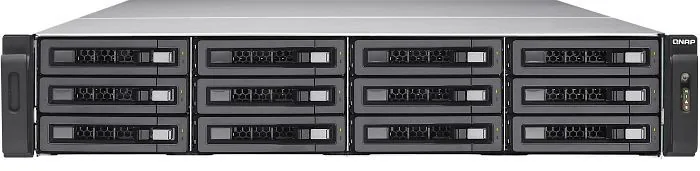
QNAP Turbo Station TS-EC1280U-RP 12TB, 4x Gb LAN, 2U Manual
A compact rackmount server for serious storage needs
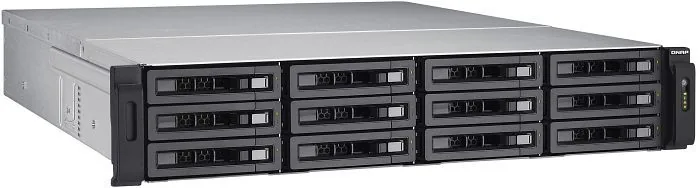
The QNAP Turbo Station TS-EC1280U-RP is designed for organizations that want dependable storage in a space-saving 2U form factor. With room for large-scale data handling and a business-focused feature set, it fits naturally into backup rooms, branch offices, and shared storage environments where uptime matters.
At the heart of this system is an Intel Xeon processor family paired with ECC memory support, giving it the stability expected from a professional NAS platform. The unit can be expanded with additional RAM, and its architecture also supports PCIe-based network upgrades. For teams that want to move beyond basic file sharing, this makes the TS-EC1280U-RP a flexible foundation rather than a fixed appliance.
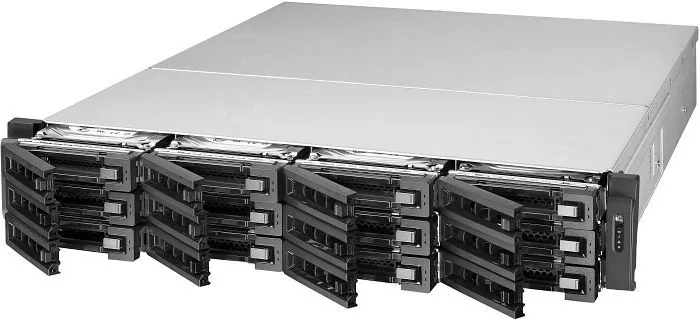
The storage experience is equally practical. Drive bays support hot-swapping, which helps reduce downtime when a disk needs replacement. RAID recovery tools add another layer of protection, making it easier to bring an array back after accidental removal or disconnection. The LCD panel on supported models also simplifies day-to-day checks, offering quick access to IP information, disk status, volume details, and system health.
Another highlight is the emphasis on serviceability. The manual covers RAM upgrades, network expansion cards, mSATA cache module installation, and redundant power supply replacement. That level of detail suggests a product built for administrators who value control, maintenance access, and planned growth. It is not just about storing data; it is about managing a storage platform that can evolve with the workload.
From a workflow perspective, the TS-EC1280U-RP is well suited to shared folders, centralized backups, and RAID-based protection schemes. It supports multiple RAID options, including configurations that improve resilience while keeping performance predictable. Combined with four Gigabit LAN ports, it is a strong fit for environments that need steady access across several users or services.
Notes
- Use compatible drives and follow installation steps carefully.
- Back up data regularly before maintenance or upgrades.
- Some features depend on the exact model and optional accessories.
Search for 67,706 Manuals online


Type-in Brand or Model