
QNAP TS-1253BU-RP-4G Manual
PDF manual · 57 Pages
English



Quick check
Incorrect answer, please try again.
Chat with your QNAP TS-1253BU-RP-4G manual using AI
Get instant AI answers from your QNAP TS-1253BU-RP-4G manual
Ask anything about the QNAP TS-1253BU-RP-4G. Answers come from this manual, with the pages they are based on.
Ask a Question
Do you recommend TS-1253BU-RP-4G?
Yes NoFrequently Asked Questions
The device is powered by an Intel Celeron J3455 quad-core processor running at 1.5 GHz with burst capabilities up to 2.3 GHz.
Is this answer helpful?
Yes, the NAS has two memory slots for DDR3L modules. You can upgrade from the pre-installed 4 GB to a maximum of 8 GB total.
Is this answer helpful?
You can install QTS using Qfinder Pro on a LAN, set up via Cloud Key using myQNAPcloud, or use a direct HDMI connection with a keyboard.
Is this answer helpful?
The unit supports 3.5-inch SATA hard disk drives and 2.5-inch SATA solid-state drives, including hot-swappable configurations for flexibility.
Is this answer helpful?
Yes, the RP versions feature two 250W power supplies allowing hot-swapping and redundancy to maintain uptime if one unit fails.
Is this answer helpful?
The NAS supports connecting a USB expansion unit via USB 3.0 ports, specifically models like UX-800U-RP or UX-1200U-RP for additional storage.
Is this answer helpful?
The system operates safely between 0 to 40 degrees Celsius with non-condensing relative humidity ranging from 5 to 95 percent.
Is this answer helpful?
Advantages and Disadvantages
Advantages

- Twelve hot-swappable drive bays offer immense storage scalability for large datasets.
- Redundant power supply ensures high availability and continuous operation during single PSU failure.
- Dual slot memory upgrade allows expansion from 4 GB to 8 GB DDR3L for better multitasking.
- Four Gigabit LAN ports support link aggregation for increased network throughput and redundancy.
- PCIe 2.0 x2 slot enables hardware expansion for 10Gb networking or specialized functions.
Disadvantages

- Maximum memory is limited to 8 GB which may restrict heavy enterprise workloads.
- Gigabit Ethernet ports may require upgrades for larger networks needing 10Gbase-T speeds.
- The 2U rackmount chassis adds significant weight and requires sturdy server cabinet support.
- Power supply wattage increases significantly when driving twelve hard drives under full load.
- Hot-swapping requires careful handling to ensure data integrity and avoid system instability.
Product Specification
Hard Drive
N/A
Internal
12x 2.5"/3.5", SATA 6Gb/s, Hot-Swap
External
4x Gb LAN
Additional Interfaces
4x USB 3.0 (Host), 1x HDMI 1.4b, 1x PCIe 2.0 x2
RAID Level
0/1/5/6/10/50/60/JBOD
CPU
Intel Celeron J3455, 4C/4T, 1.50-2.30GHz, 2MB Cache, 10W TDP, Codename "Apollo Lake" (Goldmont, Intel 14nm)
Memory
4GB DDR3L (2x 2GB, 0 Slots Free), 4GB eMMC Flash
Cooling Fans
2x 2.76in, 33.2dB(A)
Power Consumption
75.9W (Active), 42.7W (Idle)
Dimensions
18.98x3.50x21.02in (WxHxD), 2U
Weight
35.58 lbs
Features
redundant power supply, iSCSI, DLNA Server, FTP Server, iTunes Server, WebDAV
Warranty
36 Months
USB Naming
Link
Product Description
Elevate Your Data Center Efficiency with Storage Solutions
In the evolving business landscape, robust data storage is critical for operational success. The QNAP Turbo Station TS-1253BU-RP-4G, 4x Gb LAN Manual details a high performance NAS solution designed for small and medium businesses. This device streamlines file management while ensuring data security through advanced redundancy protocols and reliable architecture.
Performance is driven by an Intel Celeron J3455 quad-core processor running at 1.5 GHz. With burst capabilities up to 2.3 GHz, this chipset handles multitasking effortlessly. Users start with 4 GB of memory but have the option to upgrade to 8 GB using DDR3L SODIMM modules. This flexibility ensures the system grows alongside user requirements without needing a complete hardware overhaul.
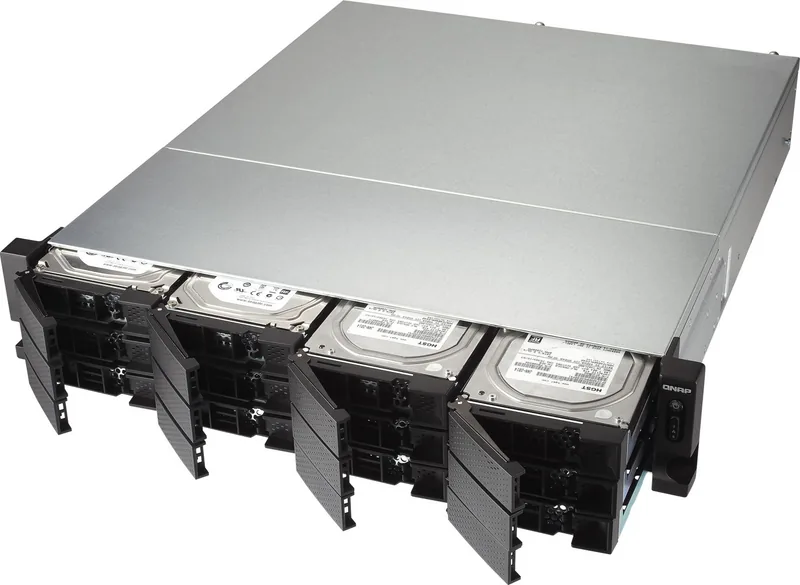
The defining feature of this unit is the twelve hot-swappable SATA drive bays. Administrators appreciate the ability to replace or install drives without powering down the system, a significant advantage for uptime-critical environments. The hardware supports mixed configurations of 3.5-inch hard drives and 2.5-inch solid-state drives. This versatility allows for optimization strategies like SSD caching to accelerate read and write speeds.
Connectivity options are plentiful and designed for high traffic. Four Gigabit Ethernet ports allow for link aggregation or load balancing. Additionally, four USB 3.0 ports provide quick access for backups or mobile devices. A single PCIe 2.0 x2 slot offers room for expansion cards, enabling features like 10Gb networking or specialized protocols. HDMI output supports direct console access for local setup.
Reliability remains a top priority with the redundant power supply unit configuration. Two power supplies ensure that if one fails, the other maintains operation. The system features clear LED indicators for status, drives, and power levels. The front and rear panels are accessible for management tasks, ensuring efficient monitoring.
Installing the operating system is straightforward. Administrators can use Qfinder Pro on a LAN, remote access via CloudLink, or direct HDMI connection. QTS provides a user-friendly interface for managing storage space and applications. Security features include encryption support and firewall configurations for robust protection.
Physically, the unit measures 89 x 482 x 534 mm, fitting standard 19-inch racks. While heavy at 16 kg, it includes rails for secure mounting. For organizations requiring high storage density, this model offers an exceptional balance. It supports various RAID levels to protect against data loss, frequently cited in QNAP Turbo Station TS-1253BU-RP-4G, 4x Gb LAN Manual references for robust network capabilities.
Maintenance is simplified through built-in diagnostics. Beep alarms provide auditory feedback regarding system issues like power supply failures. Troubleshooting guides recommend checking drive connections if the system is unresponsive. Environmental requirements include a temperature range of 0 to 40 degrees Celsius for optimal function and safety during operation.
Search for 67,706 Manuals online


Type-in Brand or Model