
QNAP TL-R1220Sep-RP/TL-R1620Sep-RP Manual
PDF manual · 43 Pages
English



Quick check
Incorrect answer, please try again.
Chat with your QNAP TL-R1220Sep-RP/TL-R1620Sep-RP manual using AI
Get instant AI answers from your QNAP TL-R1220Sep-RP/TL-R1620Sep-RP manual
Ask anything about the QNAP TL-R1220Sep-RP/TL-R1620Sep-RP. Answers come from this manual, with the pages they are based on.
Ask a Question
Do you recommend TL-R1220Sep-RP/TL-R1620Sep-RP?
Yes NoFrequently Asked Questions
QNAP recommends specific HBAs such as QXP-820S-B3408, QXP-1620S-B3616W, and SAS-12G2E for guaranteed compatibility. Third-party adapters may work but should be checked against QNAP's compatibility list to avoid unsupported configurations.
Is this answer helpful?
Yes. When connected to a QNAP NAS running supported QTS or QuTS hero versions, the enclosure supports hot-swapping for supported RAID types. Follow the NAS storage management steps to identify the failed drive, replace it with an equal-or-larger capacity drive, and monitor rebuilding via Storage & Snapshots.
Is this answer helpful?
QTS can support up to eight connected JBOD expansion units. Ensure your NAS and HBAs meet firmware and OS version requirements (QTS/QuTS hero versions noted by QNAP) and plan multipath or aggregation topologies accordingly.
Is this answer helpful?
Use Multipath I/O (MPIO) for path-level fault tolerance and Link Aggregation Control Protocol (LACP) for aggregated throughput. Combining MPIO and LACP delivers both network availability and improved performance when properly configured on host and switch infrastructure.
Is this answer helpful?
Yes. QNAP recommends keeping SFF-8644 cable lengths to approximately 1 meter to avoid signal degradation and performance issues; longer cables may reduce reliability and are not recommended.
Is this answer helpful?
Install enclosures in controlled environments within specified temperature and humidity ranges, use ESD precautions when handling drives, ensure proper grounding, and follow warnings for moving parts and PSU handling. Replace batteries only with specified types and dispose of used batteries per local regulations.
Is this answer helpful?
If the host cannot detect the enclosure, power off and remove all drives, power on the bare enclosure, locate it from Storage & Snapshots or QNAP JBOD Manager, then reinsert drives and verify detection. Also confirm HBA and cable connections and compatibility.
Is this answer helpful?
Advantages and Disadvantages
Advantages

- High-density storage: 12- and 16-bay designs support large-capacity 3.5" drives and 2.5" HDD/SSDs.
- Enterprise SAS connectivity: 12 Gbps SFF-8644 ports enable high throughput and multipath setups.
- Hot-swap and redundancy: Supports hot-swapping drives and redundant power supplies for uptime.
- Flexible networking: Compatible with MPIO and LACP to improve availability and aggregated performance.
- Serviceability: Drive trays, status LEDs, audible alerts and rail-mount options simplify maintenance.
Disadvantages

- Dependency on specific HBAs: Requires QNAP-certified host bus adapters for guaranteed compatibility.
- Cable length limitation: SFF-8644 recommended max ~1 meter, limiting physical placement options.
- Additional cost: Rail kits and compatible HBAs are often sold separately, increasing deployment cost.
- Power and noise: Redundant PSUs and multiple fans increase power consumption and audible sound levels.
- Complexity: Proper MPIO/LACP setup and firmware/OS compatibility checks add administrative overhead.
Product Specification
Hard Drive
N/A
USB Notation
Link
Product Description
QNAP NAS Expansion Unit - SAS Interface Manual
Overview
QNAP NAS expansion units with SAS interfaces provide a powerful and flexible way to scale storage for growing environments. Designed for enterprise and prosumer deployments, these expansion enclosures expand a NAS or server with high-density drive bays, enterprise-grade SAS connectivity, hot-swap capability, and redundant power and cooling to maintain uptime.
Key Features and Product Highlights
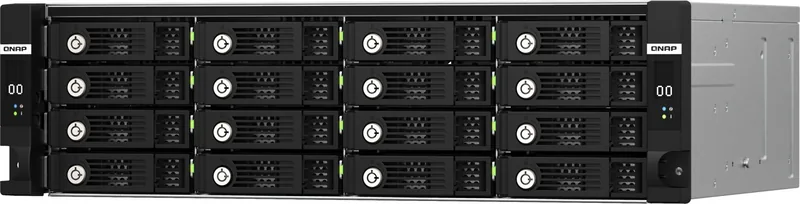
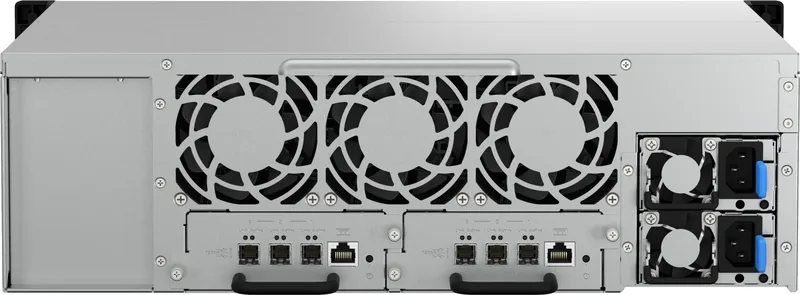
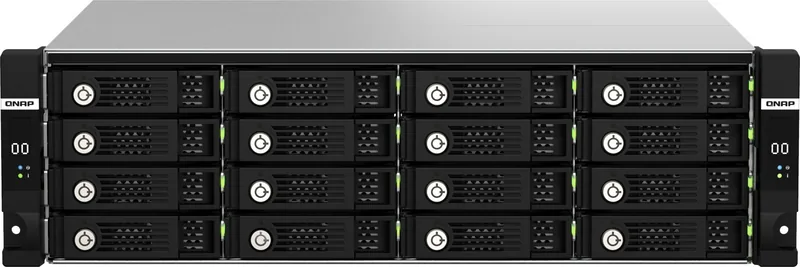
The QNAP SAS expansion units (examples: 12-bay and 16-bay models) deliver high-capacity 3.5" drive support plus compatibility for 2.5" HDDs and SSDs. They connect via SFF-8644 (12Gb/s SAS) ports to compatible host bus adapters, enabling multipath I/O and link aggregation topologies for improved fault tolerance and throughput. Typical hardware highlights include redundant PSUs, multiple system fans, drive status LEDs, enclosure ID, and support for hot-swapping failed drives without powering down.
These enclosures are intended to complement QNAP NAS systems running modern QTS or QuTS hero releases, or to attach to Windows/Linux servers. They are rackmountable (2U/3U), shipped with mounting hardware and SAS cables, and require QNAP-certified HBAs for guaranteed compatibility.
Typical Use Cases
- Scale NAS capacity for backup, archive, or large media libraries.
- Attach to servers that need high-density external storage with SAS performance.
- Deploy in fault-tolerant architectures using MPIO, LACP, or both to maximize availability and throughput.
Practical Notes on Installation & Operation
Installation follows straightforward steps: mount the enclosure, install drives on trays, connect SFF-8644 cables to a compatible HBA, connect power, and power on. The system supports drive hot-swap and guided rebuilds when used with compatible QNAP NAS software. Be mindful of cable length (recommendation: ≤1 meter for SFF-8644) and use supported HBAs. Observe ESD precautions and follow environmental requirements for temperature and humidity.
Reliability & Safety
These expansion units include warnings and procedures for safe handling of moving parts, batteries, and PSUs. Redundant power supply support and fan monitoring with audible alerts improve resiliency. Firmware/OS compatibility and warranty restrictions should be reviewed before deployment.
Conclusion
QNAP SAS expansion units deliver a robust, rack-ready storage expansion path for NAS and server environments that require high density, enterprise SAS connectivity, and resilient operation. Their design focuses on scalability, serviceability, and integration with QNAP storage management tools.
Notes
- Use QNAP-recommended HBAs (e.g., QXP-820S-B3408, QXP-1620S-B3616W, SAS-12G2E) for best compatibility.
- Keep SFF-8644 cable lengths short and use certified cables.
- Enable redundant PSU mode and alerts in the host system to monitor enclosure health.
Search for 67,706 Manuals online


Type-in Brand or Model