
QNAP QuCPE-303x Manual
PDF manual · 37 Pages
English



Quick check
Incorrect answer, please try again.
Chat with your QNAP QuCPE-303x manual using AI
Get instant AI answers from your QNAP QuCPE-303x manual
Ask anything about the QNAP QuCPE-303x. Answers come from this manual, with the pages they are based on.
Ask a Question
Do you recommend QuCPE-303x?
Yes NoFrequently Asked Questions
The QuCPE-3032 model comes with a 4-Core Intel Atom C3558R processor and 8GB of RAM. The 3034 version features an 8-Core Intel Atom C3758R processor paired with 16GB of RAM to handle higher computational tasks.
Is this answer helpful?
Yes, the system supports up to 64GB of RAM using two DDR4 UDIMM slots. QNAP recommends using authorized modules with identical specifications to maintain stability and prevent compatibility issues during operation.
Is this answer helpful?
Yes, the device supports cloud management through myQNAPcloud Link. You can add your device using an AMIZ cloud entry key to enable centralized administration and remote deployment across multiple sites efficiently.
Is this answer helpful?
There are two M.2 SSD slots supporting 2280 NVMe drives and one M.2 slot for 4G or 5G modules. These slots allow for fast local storage and cellular connectivity options without needing internal bays.
Is this answer helpful?
Always discharge static electricity before touching components and ensure power is disconnected. Avoid touching moving fan blades and follow specific ESD protocols to prevent damage to the motherboard during maintenance.
Is this answer helpful?
A basic reset resets passwords and network settings to defaults. An advanced reset restores factory settings but data on drives remains. Back up your configuration before resetting to avoid loss of custom rules.
Is this answer helpful?
Advantages and Disadvantages
Advantages

- Powerful Intel Atom multi-core processor supports virtualization and hardware acceleration technologies like SmartNIC and DPDK for high performance.
- Extensive connectivity options include eight 2.5G RJ-45 ports and two 10G SFP+ ports for versatile network integration.
- Memory is upgradable using DDR4 modules allowing capacity expansion up to 64GB for heavy multitasking workloads.
- Supports M.2 SSD expansion slots for NVMe storage and 4G/5G modules for flexible WAN connectivity solutions.
- Features remote management capabilities through myQNAPcloud allowing administration from any location with internet access.
Disadvantages

- Warranty claim process requires sending device to authorized service centers which may cause downtime during repairs.
- System performance relies heavily on using QNAP recommended memory modules to ensure stability and prevent boot errors.
- Limited internal storage slots compared to full NAS units restricts large scale data storage capacity without external expansion.
- Initial configuration may require technical knowledge to set up cloud keys and networking parameters correctly for first time use.
- Single power supply design lacks redundancy which could lead to unexpected shutdowns if the cable fails.
Product Specification
Function
Switch
Type
Standalone, Control Unit
Network Connections
8x RJ-45, 2x SFP+
Speeds
8x RJ-45 (100/1000/2.5GBase-T), 2x SFP+ (1G/10Gb/s)
PoE
N/A
Configuration
Web Interface, Console, Network (1x RJ-45, dedicated, 10/100/1000Base-T), serial (USB-A 3.0, USB-A 2.0)
Cooling
Active, 2x Fans (1.57 inches)
Dimensions (WxHxD)
11.22x1.81x9.33 inches, 1U
Weight
4.78 lbs
Color
Anthracite
Features
Metal Case, Firmware Updates Supported, Display, Dedicated Subsystem (NAS Functions, VM Host, Video Surveillance, Print Server, Intel Atom C3558R, 8GB DDR4 ECC, 2x M.2 2280 NVMe, 1x M.2 3052 PCIe)
Manufacturer Warranty
2 years
Product Description
Exploring the QNAP QuCPE-303x Platform
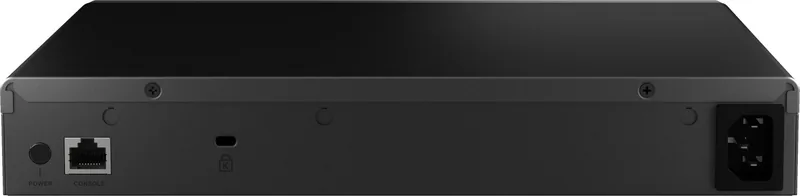
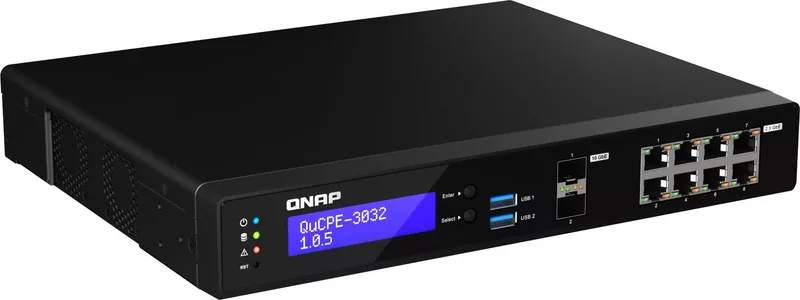
The QNAP QuCPE-303x Dual-System VM-Host & Rackmount 2.5G Managed Switch is an advanced network virtualization device designed for business environments. It acts as a central unit for managing network functions while providing robust data processing capabilities. This all-in-one appliance simplifies infrastructure demands for small to medium enterprises by consolidating hardware needs. Users rely on Intel Atom multi-core processors equipped with hardware acceleration technologies like SmartNIC and DPDK support. This architecture facilitates the execution of multiple virtual machines without compromising performance levels during peak usage times. The system runs on the dedicated QNE Network Operating System for streamlined service chaining.
Network Connectivity Overview
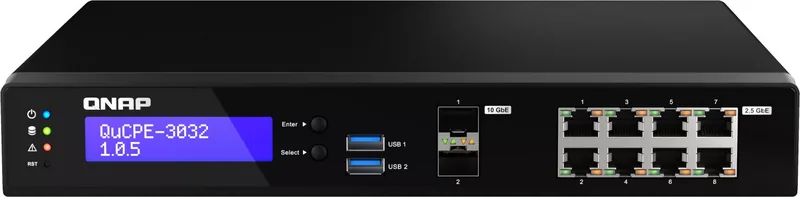
Flexibility remains central to the design philosophy with extensive port options available. The unit includes eight 2.5 Gigabit Ethernet RJ-45 ports for standard device connections. Two 10 Gigabit SFP+ slots provide high-speed uplink capabilities for backbone integration. Cloud management tools allow administrators to oversee equipment from remote locations via the myQNAPcloud ecosystem. Local network discovery is supported through utilities like Q-Search Pro for easy initial setup. This ensures seamless integration into existing office networks without requiring complex configurations. Status LEDs provide immediate feedback on system activity and port speeds for quick diagnostics.
Storage and Memory Scalability
Expandable components allow users to adapt the system for growing data demands. Two M.2 SSD slots accommodate NVMe drives for fast read and write operations. A dedicated M.2 slot supports 4G or 5G wireless modules for backup connectivity options. System memory is upgradeable using DDR4 UDIMM modules to reach maximum theoretical capacity. Utilizing recommended proprietary parts ensures long term stability and optimal performance standards. Regular maintenance and hardware checks are essential for preventing potential errors during critical operations. Users can monitor internal temperature and fan status via the LCD display on the front panel.
Installation and Safety Guidelines
Proper installation procedures must be followed to maintain system integrity and safety. Always disconnect power sources before touching internal components to avoid electrical hazards. Ensure the operating environment meets temperature and humidity specifications for longevity. Data protection measures should be implemented since installation processes may wipe existing storage data. Authorized service centers handle warranty claims effectively. Regular updates to the firmware keep security patches current and functional. Adhering to electrostatic discharge protocols prevents damage to sensitive electronic components during upgrades. Never attempt unauthorized modifications to the hardware casing.
Technical Specifications Note
The device supports specific voltage ranges and cooling requirements. Ensure adequate airflow around the unit to prevent overheating. Consult compatibility lists for additional module verification before purchasing. Proper grounding prevents electrical noise interference affecting network stability. Proper installation procedures protect against damage. This ensures the system operates reliably for extended periods. It is essential to plan your network topology before connecting the unit.
Search for 67,706 Manuals online


Type-in Brand or Model