

QNAP QSW-M5216-1T Manual
PDF manual · 46 Pages
English



Quick check
Incorrect answer, please try again.
Chat with your QNAP QSW-M5216-1T manual using AI
Get instant AI answers from your QNAP QSW-M5216-1T manual
Ask anything about the QNAP QSW-M5216-1T. Answers come from this manual, with the pages they are based on.
Ask a Question
Do you recommend QSW-M5216-1T?
Yes NoFrequently Asked Questions
You can access the switch using a web browser by entering its IP address or via Qfinder Pro software. The default IP is 169.254.100.101 if DHCP is not available.
Is this answer helpful?
The default username is admin. The default password is the MAC address of the switch written in uppercase letters without punctuation marks.
Is this answer helpful?
Yes, you can use Link Aggregation Control Protocol (LACP) to combine multiple ports for higher throughput and redundancy across connected devices.
Is this answer helpful?
Yes, the QSS interface allows you to add, edit, and delete VLANs to segment your network traffic and improve security.
Is this answer helpful?
Press and hold the Reset button on the back for 10 seconds to restore factory defaults. Alternatively, use the QSS interface under System Settings.
Is this answer helpful?
Yes, the switch supports real-time firmware updates that can be checked and installed directly through the QSS management interface.
Is this answer helpful?
Advantages and Disadvantages
Advantages

- Sixteen 25 GbE SFP28 ports provide massive bandwidth for high-speed data transfer
- Centralized management via QSS simplifies configuration and monitoring
- Supports advanced features like VLAN, LACP, RSTP, and IGMP Snooping
- Compact design fits easily into standard rack environments
- Secure HTTPS access and ACL rules enhance network security
Disadvantages

- Single 10GbE RJ45 port limits copper connectivity options
- Firmware updates require careful planning to avoid service interruption
- Advanced configuration may have a learning curve for beginners
- Standard password relies on MAC address which requires finding the sticker
- No PoE support mentioned for the SFP28 ports
Product Specification
Function
Switch
Type
Standalone, Rackmount (via mounting bracket)
Network ports
16x SFP28, 1x RJ-45
Speeds
16x SFP28 (1G/10G/25Gb/s), 1x RJ-45 (100/1000/2.5G/5G/10GBase-T)
PoE
N/A
Backplane
820Gb/s, 32K MAC addresses
Officially supported standards
802.1AB, 802.1AX, 802.1Q, 802.1p, 802.1w, 802.3, 802.3ab, 802.3ad, 802.3ae, 802.3an, 802.3az, 802.3by, 802.3bz, 802.3u, 802.3x, 802.3z, IGMPv2
Configuration
Web interface, Console, Network (RJ-45, dedicated, rear, 10/100/1000Base-T), serial (DB9, rear)
Cooling
Active
Dimensions (WxDxH)
11.22x1.71x9.36 inches, 1U
Weight
4.74 lbs
Color
Black
Features
Metal case, removable mounting brackets, firmware updates possible
Manufacturer warranty
Two years
Note
For this device, link aggregation was officially specified with the obsolete standard IEEE802.3ad. The function has not been managed by the IEEE Working Group 3 (IEEE 802.3, CSMA/CD - Ethernet) since 2008, but by Working Group 1 (IEEE 802.1, High Level Interface - Internetworking) and is technically unchanged via IEEE 802.1AX.
Product Description
Discover the Power of High-Speed Networking with QNAP
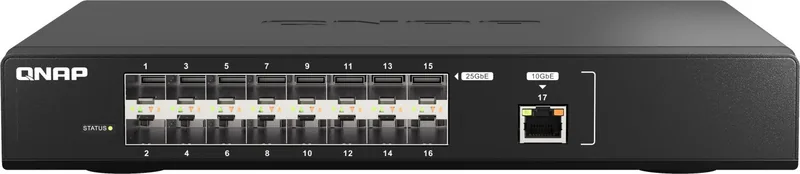
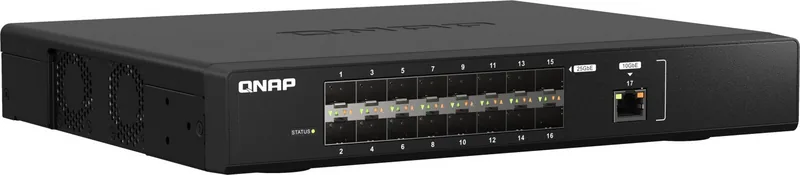
The QNAP QSW-M5216-1T is a robust Layer-2 managed switch designed to meet the demands of modern high-speed networks. This device features sixteen 25 GbE SFP28 ports and a single 10GbE RJ45 port, offering exceptional throughput for data-intensive applications. Its compact form factor makes it ideal for various deployment scenarios, from server rooms to enterprise environments.
Managing this switch is streamlined through the QNAP Switch System (QSS), a centralized web-based interface that simplifies configuration tasks. Users can easily set up VLANs, configure Link Aggregation Groups for redundancy, and manage Quality of Service (QoS) policies to prioritize critical traffic. The switch supports advanced protocols like Rapid Spanning Tree Protocol (RSTP) and IGMP Snooping, ensuring a stable and efficient network topology.
Security is a top priority with features such as Access Control Lists (ACL) based on IP or MAC addresses, allowing administrators to strictly control network access. The device also supports secure connections via HTTPS and offers flexible firmware update options, including automatic real-time updates or manual installation. Whether you are expanding storage capacity by connecting NAS devices or building a high-performance backbone, this switch delivers reliability and speed.
Key Highlights
The QSW-M5216-1T stands out with its dual-core Marvell ARMADA processor running at 2.0 GHz, providing the necessary power to handle complex networking tasks without lag. The LED indicators on the front panel offer clear visual feedback on link status and speed, aiding in quick troubleshooting. With support for rack mounting and comprehensive management tools, this switch is a versatile addition to any professional network infrastructure.
Search for 67,706 Manuals online


Type-in Brand or Model