

QNAP QSW-M3200R Manual
PDF manual · 49 Pages
English



Quick check
Incorrect answer, please try again.
Chat with your QNAP QSW-M3200R manual using AI
Get instant AI answers from your QNAP QSW-M3200R manual
Ask anything about the QNAP QSW-M3200R. Answers come from this manual, with the pages they are based on.
Ask a Question
Do you recommend QSW-M3200R?
Yes NoFrequently Asked Questions
You can access the switch using a web browser on the same network if you know its IP address and login credentials. Alternatively, use QFinder Pro utility to locate and access the switch on your local area network.
Is this answer helpful?
The default password is the MAC address of the switch image omitting punctuation and capitalizing any letters. You must change this password after logging in for security reasons.
Is this answer helpful?
Yes, QFinder Pro is a desktop utility that enables you to locate and access QNAP devices on a specific network. It supports Windows, macOS, Linux, and Chrome OS.
Is this answer helpful?
You can request firmware updates through the web interface or manually download updates from the QNAP website. Back up system settings before updating to prevent data loss.
Is this answer helpful?
QSS stands for QNAP Switch System. It allows for Layer 2 network administration and system management of the switch through a web interface.
Is this answer helpful?
Yes, the switch supports VLANs which group multiple network devices together and limit their broadcast domain for better security and traffic management.
Is this answer helpful?
Press and hold the reset button for 5 seconds to reset settings or 10 seconds for factory defaults. You can also reset via the web interface if accessible.
Is this answer helpful?
Advantages and Disadvantages
Advantages

- High speed 10G connectivity with 4 RJ45 and 8 SFP+ ports
- Centralized management via QNAP Switch System dashboard
- Support for VLANs and Link Aggregation for redundancy
- Security features include Access Control Lists
- Quiet operation with 28 dB sound level
Disadvantages

- Requires initial manual configuration for IP and settings
- Default password based on MAC address requires change
- 2U rackmount size may not fit all spaces
Product Specification
Function
Switch
Type
Standalone, Rackmount (via mounting brackets), Rackmount (via optional pair bracket)
Network Ports
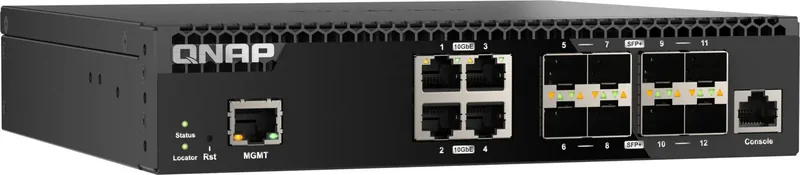
4x RJ-45, 8x SFP+
Speeds
4x RJ-45 (100/1000/2.5G/5G/10GBase-T), 8x SFP+ (1G/10Gb/s)
PoE
N/A
Backplane
320Gb/s, 9KB Jumboframes, 16K MAC Addresses
Officially Supported Standards
802.1AB, 802.1AX, 802.1Q, 802.1p, 802.1w, 802.3, 802.3ab, 802.3ad, 802.3ae, 802.3u, 802.3x, 802.3z, IGMPv3
Configuration
Web interface, Console, serial (RJ-45), Network (RJ-45, dedicated, 10/100/1000Base-T)
Cooling
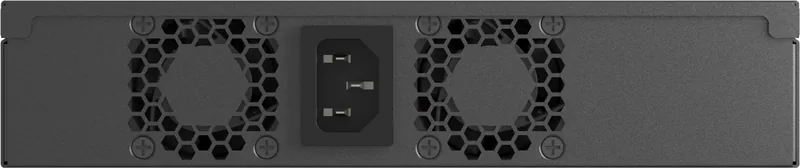
Active, 2x fans
Dimensions (WxHxD)
8.15x1.70x7.85 inches
Weight
3.26 lbs
Color
black
Features
Metal chassis, removable mounting brackets, firmware updates possible
Manufacturer Warranty
two years
Note
For this device, "link aggregation" was officially specified using the obsolete standard IEEE 802.3ad. Since 2008, the function has not been managed by the IEEE "Working Group 3" (IEEE 802.3, CSMA/CD - Ethernet), but by the "Working Group 1" (IEEE 802.1, High Level Interface - Internetworking), and is technically unchanged, defined via IEEE 802.1AX.
Product Description
Product Overview
The QNAP QSW-M3200R Desktop 10G Managed Switch, 4x RJ-45, 8x SFP+ Manual details advanced networking capabilities.
Features and Benefits
This hardware is designed for scalability and performance. It supports Layer 2 administration functions for your business. Users can create separate VLANs to segment traffic effectively. This isolates traffic for better security and network management. The Link Aggregation Group feature combines ports for higher throughput. This provides redundancy in case of single hardware failures. Quality of Service settings allow you to prioritize critical applications. Video traffic will not lag during heavy usage periods. The QNAP Switch System provides a centralized dashboard interface.
Installation and Access
Detailed instructions in the manual cover port settings. Connecting the switch to a computer or network is described step by step. Accessing the device is possible via a web browser or Qfinder utility. Qfinder Pro helps locate the switch on the network. It supports Windows, MacOS, and Linux operating systems. The hardware design includes safety protocols for users. Intelligent fans keep the unit cool during operation. It meets FCC and CE standards. Installation requires a flat surface and stable power connections. The rail kit secures the unit in a standard rack. Power usage is optimized for efficiency and low noise. Logs help diagnose issues later on effectively.
System Management
You can configure time settings for accurate event recording. The user guide covers troubleshooting steps clearly for end users. It lists LED meanings for quick status checks and diagnosis. Amber lights may indicate lower speeds or system warnings. Green lights show active connections on the ports clearly. Use quality network cables for best results consistently. The switch integrates with QNAP products seamlessly. It expands storage or NAS capabilities within your infrastructure. Network loops can disrupt service if not managed. The RSTP feature prevents these loops effectively and safeguards data.
Specifications and Warranty
Overall, this product offers reliable 10G connectivity and robust features. Specifications mention a powerful Marvell processor inside. Memory includes 8 GB storage for efficient handling. This aids in managing larger tables dynamically. The unit weighs 1.52 kg total. It fits into standard racks easily without much space. Dimensions are compact enough for desktop environments. Sound level is 28 dB for quiet operation. Fans are quiet and do not disturb offices. Humidity tolerance is wide for various environments. One console port for serial access exists for admin tasks. Management ports handle out-of-band traffic for flexibility. You can set IP addresses manually or via DHCP. The default IP is 169.254.100.101 if DHCP fails. HTTPS is supported for secure sessions and admin. You can force HTTPS for maximum safety. Time synchronization uses NTP servers globally. Logs record everything accurately for compliance. Support resources include links for downloads and help online. Notices cover safety info regarding warranties. Warranty applies for one year from purchase. The product contains a lithium battery inside. Recycling is necessary for environmental safety. Compliance with WEEE directives is ensured. RoHS ensures no lead or mercury is used. Compliance with Class A rules applies to operation. The QSS desktop shows graphs visually. Traffic flow is visualized on the interface clearly. You can disable ports remotely for scheduled maintenance. Static MAC addresses add another layer of security. QoS queues range from zero to seven for prioritization. This optimizes bandwidth usage effectively and efficiently.
Search for 67,706 Manuals online


Type-in Brand or Model