

QNAP QSW-M2108R-2C Manual
PDF manual · 28 Pages
English



Quick check
Incorrect answer, please try again.
Chat with your QNAP QSW-M2108R-2C manual using AI
Get instant AI answers from your QNAP QSW-M2108R-2C manual
Ask anything about the QNAP QSW-M2108R-2C. Answers come from this manual, with the pages they are based on.
Ask a Question
Do you recommend QSW-M2108R-2C?
Yes NoFrequently Asked Questions
The default IP address is 169.254.100.101. If your network lacks a DHCP server, you must set your computer's IP to 169.254.100.102 to access the web interface.
Is this answer helpful?
Use the username admin. The default password matches the device's MAC address. You will be prompted to create a new password immediately after logging in for security reasons.
Is this answer helpful?
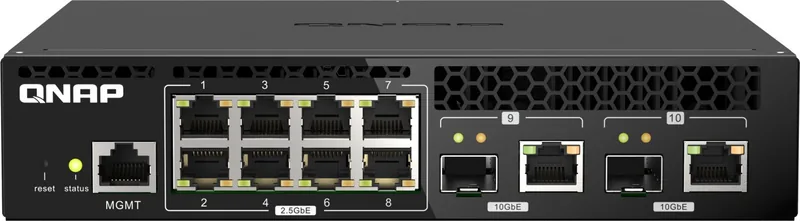
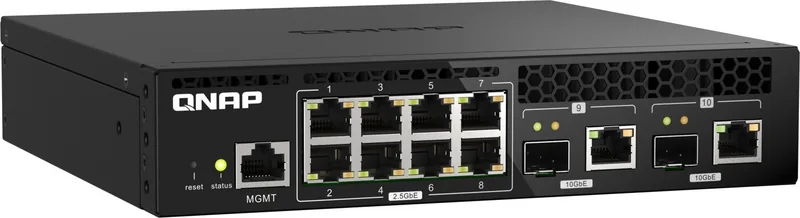
It has eight 2.5GbE RJ45 ports and two combo ports that support either SFP+ fiber or RJ45 copper connections, capable of speeds up to 10Gbps.
Is this answer helpful?
Yes, the package includes a rack mount kit, allowing you to install the unit securely in a standard equipment rack alongside other networking gear.
Is this answer helpful?
No, the QSW-M2108 series does not support PoE. You must power connected devices like cameras or phones using separate power adapters.
Is this answer helpful?
Advantages and Disadvantages
Advantages

- Eight 2.5GbE ports deliver significantly faster speeds than standard Gigabit switches
- Two combo SFP+/RJ45 ports allow for flexible 10Gbps uplink options
- Auto-configuration via DHCP simplifies installation for non-technical users
- Compact design supports both desktop placement and rack mounting
- Clear LED status indicators help quickly diagnose link speeds and activity
Disadvantages

- Default password is based on MAC address which may be less secure initially
- No PoE (Power over Ethernet) support limits device connection options
- Switching capacity may become a bottleneck in very large enterprise deployments
Product Specification
Function
Switch
Type
Standalone, Rackmount (via optional mounting bracket or pair holder)
Network Ports
8x RJ-45, 2x RJ-45/SFP+
Speeds
8x RJ-45 (100/1000/2.5GBase-T), 2x RJ-45 (100/1000/2.5G/5G/10GBase-T), 2x SFP+ (1G/10Gb/s)
PoE
N/A
Backplane
80Gb/s, 9KB Jumboframes, 1.5MB packet buffer, 16K MAC addresses
Officially Supported Standards
802.1AB, 802.1AX, 802.1Q, 802.1p, 802.1w, 802.3, 802.3ab, 802.3ad, 802.3ae, 802.3an, 802.3az, 802.3bz, 802.3u, 802.3x, 802.3z, IGMPv3
Configuration
Web interface, Console, serial (RJ-45)
Cooling
Active, 2 fans
Dimensions (WxDxH)
8.15x1.70x7.85 inches
Weight
2.65 lbs
Color
Black
Features
Metal enclosure, firmware updates possible
Manufacturer Warranty
Two years
Note
For this device, link aggregation was officially specified with the obsolete standard IEEE802.3ad. The function has been managed since 2008 not by the IEEE Working Group 3 (IEEE 802.3, CSMA/CD - Ethernet) but by Working Group 1 (IEEE 802.1, High Level Interface - Internetworking) and is technically unchanged via IEEE 802.1AX defined.
Product Description
Elevate Your Network with the QNAP QSW-M2108R-2C
The QNAP QSW-M2108R-2C represents a significant leap forward in desktop networking, designed specifically for users who demand high-speed performance without breaking the bank. This 2.5G Smart Switch is an ideal solution for small offices, creative professionals, and home labs that require faster data transfer rates than standard Gigabit networks can provide.
At the heart of this device lies its impressive port configuration. It features eight 2.5GbE RJ45 ports, allowing you to connect multiple devices at speeds up to 2.5 times faster than traditional 1Gbps connections. Additionally, it includes two combo SFP+/RJ45 ports, offering flexibility to integrate 10Gbps fiber optic links or high-speed copper connections as your network grows. With a total switching bandwidth of 80 Gbps, this switch ensures that your data flows smoothly even under heavy loads, making it perfect for large file transfers, video editing workflows, and multi-user environments.
Setup is remarkably straightforward thanks to its default DHCP client support. Once connected to a network, the switch automatically obtains an IP address, ready for immediate use. For standalone setups, you can easily access the web user interface by configuring your computer to a specific IP range. The intuitive interface allows for quick management, while security is prioritized with mandatory password changes upon first login. The LED indicators provide clear visual feedback on link status and speed, ensuring you always know the health of your connections. Whether you are expanding a home office or upgrading a business network, the QNAP QSW-M2108R-2C delivers reliability and speed in a compact, rack-mountable form factor.
Search for 67,706 Manuals online


Type-in Brand or Model