

QNAP QSW-M2106R Manual
PDF manual · 48 Pages
English



Quick check
Incorrect answer, please try again.
Chat with your QNAP QSW-M2106R manual using AI
Get instant AI answers from your QNAP QSW-M2106R manual
Ask anything about the QNAP QSW-M2106R. Answers come from this manual, with the pages they are based on.
Ask a Question
Do you recommend QSW-M2106R?
Yes NoFrequently Asked Questions
The default password is the MAC address of the switch image omitting punctuation and capitalizing letters. For example, if MAC is 00:0a:0b:0c:00:01, password is 000A0B0C0001.
Is this answer helpful?
Access the switch via any computer on the same network using its IP address or via Qfinder Pro utility to locate the device on the local area network.
Is this answer helpful?
Yes, you can configure Virtual LANs through the QSS interface under the VLAN management section to group network devices and limit broadcast domains.
Is this answer helpful?
You can perform a system reset by pressing the physical reset button for 10 seconds to restore factory settings and recover the default access credentials.
Is this answer helpful?
Yes, users can enable Secure Connection (HTTPS) in the System Settings menu to encrypt administrative traffic and secure remote access.
Is this answer helpful?
Firmware can be updated via Live Update checks within QSS or by manually downloading the image file from the QNAP website and uploading it.
Is this answer helpful?
Advantages and Disadvantages
Advantages

- Layer 2 network management with versatile port configurations
- Eight 2.5 GbE and 10 GbE ports for high-speed connectivity
- QSS dashboard offers comprehensive traffic and status monitoring
- Support for VLANs, LAG, and QoS for optimized network flow
- Secure access via HTTPS and customizable Access Control Lists
Disadvantages

- Only a one-year limited warranty coverage period
- Requires physical reset button access for certain recoveries
- Firmware updates may require manual intervention or specific tools
- Default IP configuration might need adjustment for some networks
- Physical reset is required if admin credentials are completely lost
Product Specification
Feature
Switch
Type
Standalone, Rackmount (via mounting bracket), Rackmount (via optional pair bracket)
Network Connections
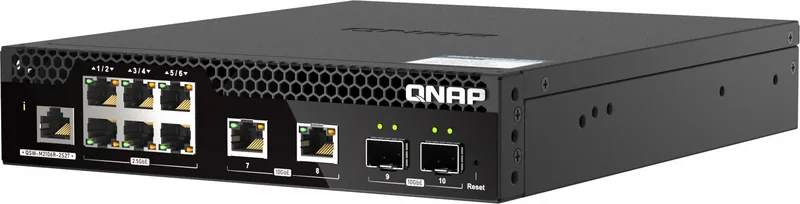
8x RJ-45, 2x SFP+
Speeds
2x RJ-45 (100/1000/2.5G/5G/10GBase-T), 6x RJ-45 (100/1000/2.5GBase-T), 2x SFP+ (1G/10Gb/s)
PoE
N/A
Backplane
110Gb/s, 9KB Jumboframes, 1.5MB Packet Buffer, 16K MAC Addresses
Official Supported Standards
802.1AB, 802.1Q, 802.1p, 802.1w, 802.3, 802.3ab, 802.3ad, 802.3ae, 802.3az, 802.3u, 802.3x, 802.3z, IGMPv3
Configuration
Web interface, Console, serial (RJ-45)
Cooling
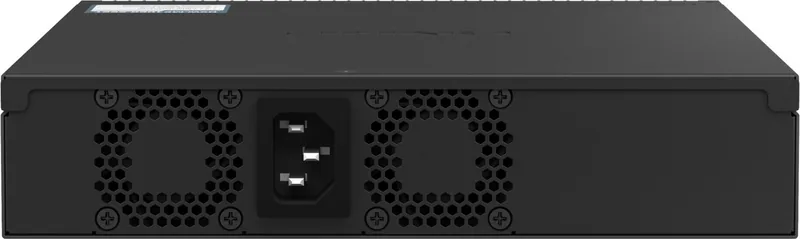
Active, 2x Fans
Dimensions (W x H x D)
8.15 x 1.70 x 9.80 in
Weight
3.42 lbs
Color
White
Features
Metal enclosure, removable mounting brackets, firmware updates possible
Manufacturer Warranty
Two Years
Note
For this device, "link aggregation" was officially specified with the obsolete standard IEEE 802.3ad. The function has been managed since 2008 no longer by the IEEE "Working Group 3" (IEEE 802.3, CSMA/CD - Ethernet), but by the "Working Group 1" (IEEE 802.1, High Level Interface - Internetworking) and technically unchanged via IEEE 802.1AX defined.
Product Description
Comprehensive Network Infrastructure Guide
The QNAP QSW-M2106R Desktop 2.5G Smart Switch, 8x RJ-45, 2x SFP+ Manual defines the architecture for high-speed networking solutions. Layer 2 management capabilities are central to this device, allowing administrators to control data flow effectively across multiple devices. With six 2.5 GbE RJ45 ports and two 10 GbE RJ45 ports, users gain eight flexible twisted-pair connections. Furthermore, two 10 GbE SFP+ combo ports provide superior bandwidth expansion for servers and switches. This versatility supports modern enterprise demands for rapid data transfer and scalability. The device is designed to enhance operational productivity without compromising on security.
Intelligent Network Management
Utilizing the QNAP Switch System or QSS, network professionals can manage configurations with precision. The interface supports VLAN grouping to segment traffic, improving security and broadcast domain control. Administrators can configure Link Aggregation Groups to enhance throughput and redundancy, ensuring business continuity if a single port fails. Quality of Service features enable traffic shaping by classifying packets based on priority. QoS settings allow for eight priority queue levels, guaranteeing critical applications receive bandwidth when needed. The Dashboard displays real-time port status and link aggregation health.
Detailed Installation Process
The QNAP QSW-M2106R Desktop 2.5G Smart Switch, 8x RJ-45, 2x SFP+ Manual outlines strict installation requirements. Environmental factors like temperature and humidity must be monitored to prevent hardware damage. Installation involves attaching rubber feet for stability or handles for rack mounting. Connecting to the network requires standard Ethernet cables to the host or PoE ports. Accessing the switch can be done via Qfinder Pro or a standard web browser interface using the default IP address. Users must ensure proper grounding to avoid electric shock risks.
Security Protocols and Updates
Security is prioritized through regular firmware maintenance and secure connection settings. Users can enable HTTPS for encrypted administrative access, protecting management traffic from eavesdropping. The switch allows for Access Control List definitions to permit or deny traffic based on IP or MAC addresses. IGMP Snooping manages multicast traffic to optimize bandwidth usage. Regular system backups ensure settings can be restored easily in case of configuration errors or device failure. Default credentials must be changed after first login to maintain strong security practices.
Hardware and Monitoring
The device utilizes a Marvell Prestera CPU with 1 GB of memory. Physical dimensions are compact, fitting on any desk or into standard racks. Power consumption is efficient at 40W. The LED indicators provide visual status on system health and port activity. Reset functions allow for system recovery if the user forgets credentials. These specifications create a reliable networking hub. Monitoring network settings is essential for proactive maintenance, allowing view of port statistics and LLDP remote device information.
Support and Maintenance
Users can track system uptime and verify current firmware versions directly from the dashboard. QNAP provides support resources including documentation and service portals for troubleshooting. The limited warranty covers hardware defects for a year. Keeping software current via Live Updates or manual installation is recommended to fix bugs. Proper documentation ensures users never face operational hurdles during upgrades or expansion phases.
Search for 67,706 Manuals online


Type-in Brand or Model