

QNAP QSW-M2106PR Manual
PDF manual · 48 Pages
English



Quick check
Incorrect answer, please try again.
Chat with your QNAP QSW-M2106PR manual using AI
Get instant AI answers from your QNAP QSW-M2106PR manual
Ask anything about the QNAP QSW-M2106PR. Answers come from this manual, with the pages they are based on.
Ask a Question
Do you recommend QSW-M2106PR?
Yes NoFrequently Asked Questions
You can connect the switch to a computer or network and open a web browser or Qfinder Pro software. Use the default admin username and MAC address as the password found on the device label.
Is this answer helpful?
The device has a total PoE power budget of 310 Watts. Ports one to eight can deliver up to 90 Watts per port individually.
Is this answer helpful?
Yes. You can reset the password by holding the Reset button on the front panel. A five-second press resets the password to the MAC address, while ten seconds restores factory defaults.
Is this answer helpful?
Yes. You can update the firmware manually or check for updates automatically through the system menu in the QSS interface. Ensure you backup settings first.
Is this answer helpful?
The switch supports VLANs, RSTP, LLDP, QoS, ACLs, and IGMP Snooping through the QSS configuration menu for comprehensive network control.
Is this answer helpful?
You can enable DHCP for automatic IP assignment or manually set a static IP address, subnet mask, and gateway in the System settings section.
Is this answer helpful?
Yes. The device complies with CE and FCC Class A standards, making it suitable for commercial environments, but it requires proper installation.
Is this answer helpful?
Advantages and Disadvantages
Advantages

- High 310W PoE++ budget supports multiple powered devices
- Multi-gigabit speeds with 2.5 GbE and 10 GbE options
- Robust Layer 2 management features including VLAN and LAG
- User-friendly interface via QSS and Qfinder Pro
- Compact size fits easily in limited rack or desk space
Disadvantages

- No 4K video capabilities mentioned for direct media streaming
- Fan noise may be audible in quiet environments
- Requires specific cable standards for optimal PoE performance
- Initial password setup requires MAC address lookup
- Limited to Layer 2 switching without advanced routing features
Product Specification
Function
Switch
Type
Standalone, Rackmount (via mounting brackets), Rackmount (via optional pair bracket)
Network Connections
8x RJ-45, 2x SFP+
Speeds
2x RJ-45 (100/1000/2.5G/5G/10GBase-T), 6x RJ-45 (100/1000/2.5GBase-T), 2x SFP+ (1G/10Gb/s)
PoE
8x RJ-45 PoE++ (8x 90W), total: 310W
Backplane
110Gb/s, 9KB Jumboframes, 1.5MB packet buffer, 16K Mac addresses
Officially Supported Standards
802.1AB, 802.1Q, 802.1p, 802.1w, 802.3, 802.3ab, 802.3ad, 802.3ae, 802.3af, 802.3at, 802.3az, 802.3bt, 802.3u, 802.3x, 802.3z, IGMPv3
Configuration
Web interface, Console, serial (RJ-45)
Cooling
Active, 2x Fans
Dimensions (WxHxD)
8.15 x 1.70 x 9.80 in
Weight
3.90 lbs
Color
White
Features
Metal enclosure, removable mounting brackets, firmware updates possible
Manufacturer Warranty
Two years
Note
For this device, "link aggregation" was officially specified with the obsolete standard IEEE 802.3ad. The function has been managed since 2008 not by the IEEE "Working Group 3" (IEEE 802.3, CSMA/CD - Ethernet) but by the "Working Group 1" (IEEE 802.1, High Level Interface - Internetworking) and technically unchanged defined via IEEE 802.1AX.
Product Description
Overview of QNAP QSW-M2106PR Switch
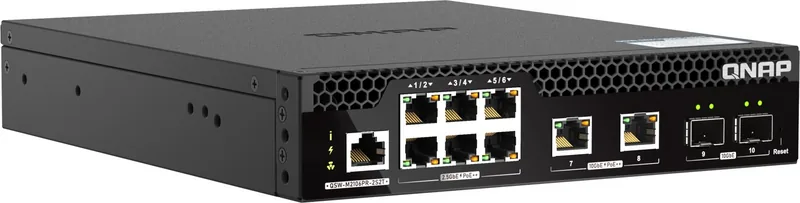
The QNAP QSW-M2106PR is a robust Multi-Gigabit Ethernet Switch designed to enhance network scalability and productivity. It features six 2.5 GbE RJ45 ports, two 10 GbE RJ45 ports, and two 10 GbE SFP+ combo ports. This configuration allows for flexible connectivity options suitable for modern high-speed environments. The switch supports Layer 2 network management through the QNAP Switch System, or QSS, interface.
One of the standout features is the Power-over-Ethernet capability. The device offers a total PoE power budget of 310 Watts. This allows for powering compatible devices such as wireless access points, surveillance cameras, and VoIP phones directly through the network cables. Ports one to eight support up to 90 Watts per port under the IEEE 802.3bt-2018 standard.
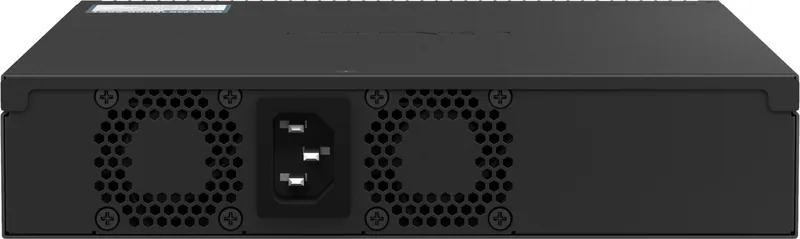
Installation is straightforward with the included gummy feet and rack mounting handles. Security and safety instructions ensure proper handling to prevent electrical hazards or component damage. The device includes two high-performance fans for reliable airflow. Management is handled via a web browser or Qfinder Pro software. Users can configure VLANs, port settings, Link Aggregation Groups, and Quality of Service. Access Control Lists allow for traffic filtering. Security settings can be updated with HTTPS enabled for safe connections. Regular firmware updates are recommended through the system menu.
Hardware includes a Marvell Prestera CPU for efficient packet processing. The compact design fits easily in tight spaces. Standard default login credentials are provided based on the MAC address. Network configuration options are extensive. Users can define VLANs to segment traffic logically. Rapid Spanning Tree Protocol ensures loop prevention and redundancy. LLDP settings help discover neighboring devices automatically. Quality of Service policies prioritize critical traffic to prevent congestion.
Static MAC addresses can be added to secure access. IGMP Snooping optimizes multicast traffic forwarding. The device status LEDs provide immediate visual feedback on speed, activity, and power status. For troubleshooting, a reset button is available on the front panel. Holding it for five seconds resets the password, while ten seconds restores factory defaults. System backups allow administrators to save configurations and restore them if needed.
The firmware can be updated automatically or manually via the web interface. The unit measures 43.3 mm in height and 207 mm in width. Weight is 1.73 kg. It includes power cable and rack screws. Console port is RJ45 type for serial access. Software updates check automatically for the latest firmware images. Access to the switch is possible via default password generation based on MAC address without punctation. Users must change password after first login for security best practices.
Backup configuration files are stored in BIN format for recovery. The device supports DHCP client configuration for IP assignment automatically. Manual static IP setting is also possible for the network interface. Time settings can be synchronized with internet time servers to ensure event log accuracy. Fan status LEDs indicate operational health clearly on the front panel. PoE LEDs show power status per port. Speed LEDs display connection rates in green or orange. System status LED remains green when ready.
Security precautions include anti-static wristbands and cooling before touching internal parts. The device must be installed in a controlled environment free of dust. Warranty claims require authorized service centers. Overall, this switch is an excellent choice for small to medium networks requiring high performance and centralized management. Comprehensive support resources are available online including documentation and community forums.
Search for 67,706 Manuals online


Type-in Brand or Model