
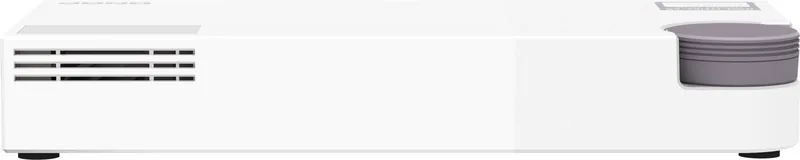

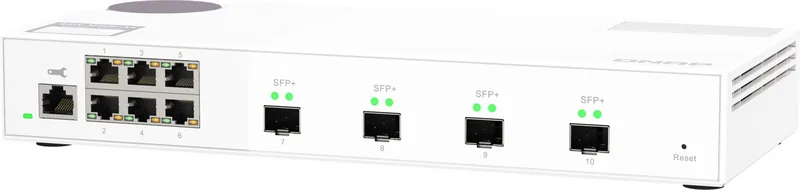
QNAP QSW-M2106 Manual
PDF manual · 47 Pages
English



Quick check
Incorrect answer, please try again.
Chat with your QNAP QSW-M2106 manual using AI
Get instant AI answers from your QNAP QSW-M2106 manual
Ask anything about the QNAP QSW-M2106. Answers come from this manual, with the pages they are based on.
Ask a Question
Do you recommend QSW-M2106?
Yes NoFrequently Asked Questions
Connect the power cable to the rear port and plug network cables into the host port. Use the Qfinder Pro utility on a computer connected to the same LAN to locate the device. Ensure the computer recognizes the switch to proceed with configuration.
Is this answer helpful?
The default username is admin. The default password is the MAC address of the switch without punctuation or uppercase letters. This information is found on the label attached to the device or can be discovered using Qfinder Pro.
Is this answer helpful?
Yes, you can update firmware via the QNAP Switch System interface. It can check for updates online or manually upload an image file from a computer. Ensure settings are backed up before starting the update process to prevent data loss.
Is this answer helpful?
Yes, you can configure VLANs through the management interface to segment traffic. Members are isolated and broadcast domains are restricted. A specific VLAN ID is assigned during the configuration process to manage group memberships effectively.
Is this answer helpful?
Holding the reset button for five seconds resets the system password. Holding it for ten seconds restores all factory default settings. This allows recovery from configuration errors or loss of access to the administration panel.
Is this answer helpful?
Status LEDs on the front panel indicate link speed and activity. The system LED shows power and initialization states. You can also view detailed port statistics and traffic logs within the management dashboard.
Is this answer helpful?
Advantages and Disadvantages
Advantages

- Six 2.5G RJ-45 ports for high-speed connectivity
- Four 10 GbE SFP+ ports for backbone uplinks
- Intuitive QNAP Switch System management interface
- Support for VLAN and Link Aggregation
- Compact design suitable for desks and racks
Disadvantages

- No PoE support mentioned for power delivery
- Web interface requires browser access
- Reset button can cause accidental factory resets
- Default password security relies on MAC address
- Power supply and cable not PoE compatible
Product Specification
Function
Switch
Type
Standalone
Network ports
6x RJ-45, 4x SFP+
Speeds
6x RJ-45 (100/1000/2.5GBase-T), 4x SFP+ (1G/10Gb/s)
PoE
N/A
Backplane
110Gb/s, 9KB Jumboframes, 1.5MB Packet buffer, 16K MAC Addresses
Officially Supported Standards
802.1AB, 802.1AX, 802.1Q, 802.1p, 802.1w, 802.3, 802.3ab, 802.3ad, 802.3ae, 802.3an, 802.3az, 802.3bz, 802.3u, 802.3x, 802.3z, IGMPv3
Configuration
Web interface, Console, serial (RJ-45)
Cooling
Active, 1x Fan
Dimensions (WxHxD)
11.42 x 1.67 x 5.0 inches
Weight
2.54 lbs
Color
white
Features
external power adapter, firmware updates possible
Manufacturer Warranty
two years
Note
For this device, "link aggregation" was officially specified with the obsolete standard IEEE802.3ad. The function is no longer managed by the IEEE "Working Group 3" (IEEE 802.3, CSMA/CD - Ethernet) since the year 2008, but by the "Working Group 1" (IEEE 802.1, High Level Interface - Internetworking) and technically unchanged via IEEE 802.1AX defined.
Product Description
Elevate Your Network Connectivity
Upgrade your infrastructure with the features found in the QNAP QSW-M2100 Desktop 2.5G Smart Switch, 6x RJ-45, 4x SFP+ documentation. This powerful device brings multi-gigabit speeds to your home or office LAN. Six 2.5G RJ-45 ports connect high-speed computers and NAS units efficiently without bottlenecks. Four 10 GbE SFP+ ports enable fast uplinks for backbone stability and scalability. The compact unit fits easily on desks or in racks without consuming too much desk space. It supports Layer 2 management protocols for efficient data packet handling across the network fabric.
Advanced Management Tools
Control settings through the QNAP Switch System interface designed for ease of use. This tool allows detailed network configuration without needing command line input. Users can define VLANs to segment traffic and improve security isolation between groups. Link aggregation groups boost bandwidth and provide redundancy against single port failures. Quality of Service settings ensure video and audio streams receive priority bandwidth to prevent lag. Access Control Lists filter specific traffic based on IP or MAC addresses for stricter security rules. RSTP prevents broadcast storms by automatically blocking redundant paths in the topology. IGMP snooping optimizes multicast traffic delivery specifically to subscribed groups. LLDP discovers connected neighbor devices to visualize the network topology quickly. Static MAC entries allow precise traffic forwarding without flooding unknown addresses. System logs track activity for better diagnostics and audit trails.
Installation and Maintenance Setup
Connect the power supply cable securely to the rear port and plug network cables in. Use the Qfinder Pro utility to discover the device on the local area network easily. Default credentials are found on the sticker label using the MAC address format without punctuation. A physical reset button allows recovery from configuration errors or forgotten administrator passwords. Press for five seconds for a basic reset or ten seconds to restore factory defaults completely. Firmware updates keep the system secure against vulnerabilities found by researchers globally. Backup system settings to save your configuration for quick restoration during emergencies. Time zone settings must be configured accurately for log integrity. NTP servers synchronize system time over the internet automatically.
Hardware Indicators and LEDs
Front panel LEDs show status clearly for troubleshooting connection issues on site. The system LED signals power state or firmware initialization status using color changes. Port LEDs indicate link speed and activity levels using green and orange colors effectively. Green usually signifies 2.5G or 10G connections while orange indicates slower speeds like 100M. Ensure proper ventilation to maintain the operating temperature range safely within limits. Dust accumulation should be avoided to prevent overheating inside the chassis.
Safety and Support Resources
Follow safety guidelines regarding electrical connections and environmental conditions carefully. Do not expose the unit to liquids or direct sunlight to prevent physical damage. Support resources are available online for troubleshooting and software downloads. Community forums offer peer advice for complex configuration scenarios and best practices. Compliance with international safety standards ensures reliable operation in various regions globally. This switch handles both storage and enterprise networking needs effectively for high performance. The device supports both Windows and macOS operating systems for management tools. The unit operates within standard humidity ranges and includes warranty protection against manufacturing defects. CE and FCC compliance ensures it meets regional regulatory requirements for electronic devices. Regular firmware maintenance is recommended to keep security patches current and fix bugs. This product offers a solid entry point for 2.5G networking without enterprise costs.
Search for 67,706 Manuals online


Type-in Brand or Model