

QNAP QSW-IM1200-8C Manual
PDF manual · 32 Pages
English



Quick check
Incorrect answer, please try again.
Chat with your QNAP QSW-IM1200-8C manual using AI
Get instant AI answers from your QNAP QSW-IM1200-8C manual
Ask anything about the QNAP QSW-IM1200-8C. Answers come from this manual, with the pages they are based on.
Ask a Question
Do you recommend QSW-IM1200-8C?
Yes NoFrequently Asked Questions
The default IP address is 169.254.100.101. If your network lacks a DHCP server, set your computer IP to 169.254.100.102 to access the web interface.
Is this answer helpful?
Use the username admin and the password corresponding to the device's MAC address. You will be prompted to create a new password immediately for security.
Is this answer helpful?
Yes, the QSW-IM1200 uses natural convection cooling. It operates reliably between 0°C and 65°C without active fans.
Is this answer helpful?
It accepts a DC input voltage ranging from 9V to 54V, making it suitable for various industrial power supplies.
Is this answer helpful?
While it complies with FCC Class A limits, operation in residential areas may cause interference. It is primarily designed for commercial or industrial environments.
Is this answer helpful?
Advantages and Disadvantages
Advantages

- Supports wide DC input voltage from 9V to 54V for industrial flexibility
- High switching bandwidth of 240 Gbps ensures fast data transfer
- Fanless design with natural convection cooling reduces noise and failure points
- Multiple port options including 10GbE SFP+ and combo RJ45/SFP+
Disadvantages

- Limited to desktop form factor which may not fit all rack setups easily
- Default password is based on MAC address requiring immediate change
- Operating temperature range requires specific environmental controls
Product Specification
Function
Switch
Type
Standalone, Rackmount (via mounting bracket)
Network ports
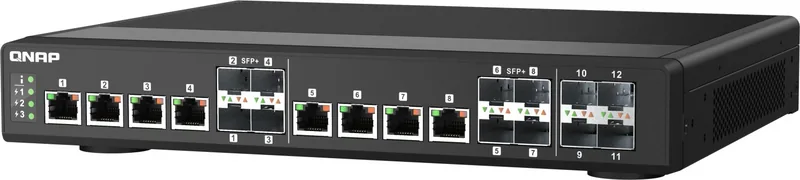
8x RJ-45/SFP+, 4x SFP+
Speeds
8x RJ-45 (100/1000/2.5G/5G/10GBase-T), 12x SFP+ (1G/10Gb/s)
PoE
N/A
Backplane
240Gb/s, 9KB Jumboframes, 16K MAC addresses
Officially supported standards
802.1AB, 802.1Q, 802.1p, 802.1w, 802.3, 802.3ab, 802.3ad, 802.3ae, 802.3an, 802.3az, 802.3bz, 802.3u, 802.3x, 802.3z
Configuration
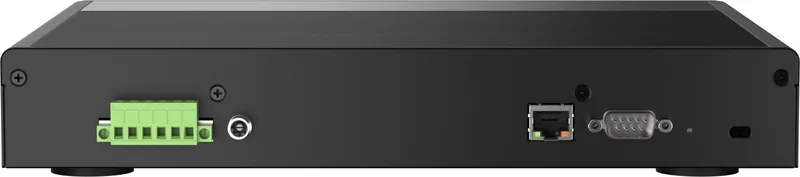
Web interface, Console, serial (DB9), Network (RJ-45, dedicated, rear, 10/100/1000Base-T)
Cooling
Passive
Dimensions (WxDxH)
11.22x1.71x9.37 inches, 1HE
Weight
10.1 lbs
Color
Black
Features
Metal enclosure, removable mounting brackets, firmware updates possible, power supply only via remote powering, extended operating range (Temperature: -22F to 149F, Humidity: 5% to 95%), theft protection (Kensington Lock)
Manufacturer warranty
Two years
Note
For this device, link aggregation was officially specified with the obsolete standard IEEE802.3ad. The function has been managed since 2008 not by the IEEE Working Group 3 (IEEE 802.3, CSMA/CD - Ethernet), but by Working Group 1 (IEEE 802.1, High Level Interface - Internetworking) and is technically unchanged defined via IEEE 802.1AX.
Product Description
QNAP QSW-IM1200 Industrial Desktop 10G Smart Switch Review
The QNAP QSW-IM1200 Industrial Desktop 10G Smart Switch is engineered for demanding industrial environments where reliability and speed are paramount. This robust device features a compact desktop design capable of withstanding harsh conditions, making it ideal for factories, transportation systems, and outdoor applications. With a switching bandwidth of 240 Gbps, it ensures high-speed data transmission without bottlenecks.
The switch offers versatile connectivity options including four dedicated 10GbE SFP+ ports and eight combo ports that support both SFP+ and RJ45 interfaces. This flexibility allows seamless integration into various network topologies. The unit operates on a wide DC input voltage range of 9V to 54V, providing power redundancy and compatibility with diverse industrial power sources. It supports natural convection cooling, eliminating the need for noisy fans in sensitive areas.
Setup is straightforward thanks to default DHCP client support, allowing the switch to automatically obtain an IP address. For networks without a DHCP server, users can manually configure their computer to access the web interface at 169.254.100.101. The intuitive LED indicators provide real-time status updates on system health, power supply, and link speeds, simplifying troubleshooting. Security is prioritized with a prompt to change the default password upon first login.
Key Highlights
- Industrial Durability: Designed to operate in temperatures ranging from 0°C to 65°C.
- High Performance: 240 Gbps switching capacity handles heavy traffic loads efficiently.
- Flexible Power: Wide input voltage range supports various industrial power standards.
- Easy Management: Web-based interface and Qfinder utility streamline configuration.
Important Notes
Ensure your network environment meets the operating temperature requirements. Always change the default password immediately after installation to maintain security. If using a non-DHCP network, remember to reset your computer's IP address after configuration.
Search for 67,706 Manuals online


Type-in Brand or Model