
QNAP QSW-2100 Manual
PDF manual · 28 Pages
English



Quick check
Incorrect answer, please try again.
Chat with your QNAP QSW-2100 manual using AI
Get instant AI answers from your QNAP QSW-2100 manual
Ask anything about the QNAP QSW-2100. Answers come from this manual, with the pages they are based on.
Ask a Question
Do you recommend QSW-2100?
Yes NoFrequently Asked Questions
Both models include four 2.5GbE RJ-45 ports and a 60 Gbps switching bandwidth. The QSW-2104-2S has two 10GbE SFP+ ports, while the QSW-2104-2T has two 10GbE RJ-45 ports. Choose based on whether your faster uplinks use SFP+ or copper Ethernet.
Is this answer helpful?
Each QSW-2104 model has four 2.5GbE RJ-45 ports. These ports can also establish links at 1 Gbps or 100 Mbps with compatible devices.
Is this answer helpful?
Yes. Its 10GbE RJ-45 ports support 10 Gbps, 5 Gbps, 2.5 Gbps, 1 Gbps, and 100 Mbps. Its four 2.5GbE RJ-45 ports support 2.5 Gbps, 1 Gbps, and 100 Mbps connections.
Is this answer helpful?
A red flashing loop indicator means the switch has detected a network loop involving connected ports. Check for duplicate cable paths or incorrectly connected network equipment to prevent traffic disruption.
Is this answer helpful?
Use the port LEDs. Green indicators identify the highest supported speed for the relevant port type, while amber indicators show lower negotiated speeds. Flashing indicates an active link, and an unlit LED indicates no link.
Is this answer helpful?
The QSW-2104-2S and QSW-2104-2T measure 34 x 180 x 145 mm. The 2S weighs 713 g, while the 2T weighs 722 g.
Is this answer helpful?
Advantages and Disadvantages
Advantages

- Four 2.5GbE RJ-45 ports support fast device connections and remain compatible with 1GbE and 100Mbps equipment.
- 60 Gbps switching bandwidth supports multiple high-speed local transfers.
- QSW-2104-2T adds two flexible 10GbE RJ-45 ports supporting 10G, 5G, 2.5G, 1G, and 100M links.
- QSW-2104-2S offers two 10GbE SFP+ ports for fiber or DAC-based network uplinks.
- Power, link-speed, activity, and loop LEDs provide quick visual diagnostics.
Disadvantages

- The QSW-2104-2S and QSW-2104-2T have different 10GbE connector types, so model selection matters.
- The source describes an unmanaged switch, so advanced configuration features are not indicated.
- Full multi-gigabit speeds require compatible endpoints and suitable cabling or SFP+ accessories.
- Only four ports are 2.5GbE RJ-45; the remaining two ports vary by model.
- A loop warning helps identify a problem, but network loop prevention practices are still necessary.
Product Specification
Function
Switch
Type
Standalone
Network ports
6x RJ-45
Speeds
4x RJ-45 (100/1000/2.5GBase-T), 2x RJ-45 (100/1000/2.5G/5G/10GBase-T)
PoE
N/A
Backplane
60 Gb/s, 9 KB jumbo frames, 16K MAC addresses
Officially supported standards
802.3u, 802.3ab, 802.3bz, 802.3an, 802.3az
Configuration
Unmanaged
Cooling
Passive
Dimensions (W x H x D)
7.09 x 1.34 x 5.71 in
Weight
1.59 lb
Color
Black
Special features
Metal housing, external power supply, front-facing power connection
Manufacturer warranty
Two years
Product Description
QNAP QSW-2100 Desktop 2.5G Switch, 6x RJ-45 - Read, Download & Print Free
High-speed networking for demanding desktops and small workspaces
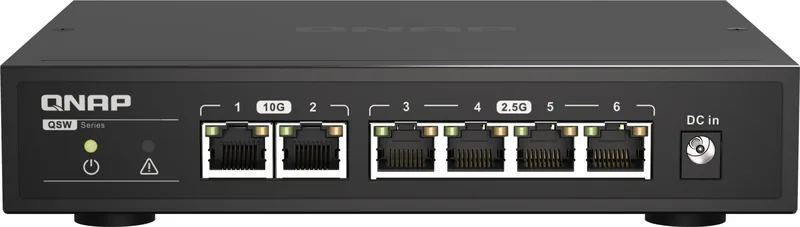
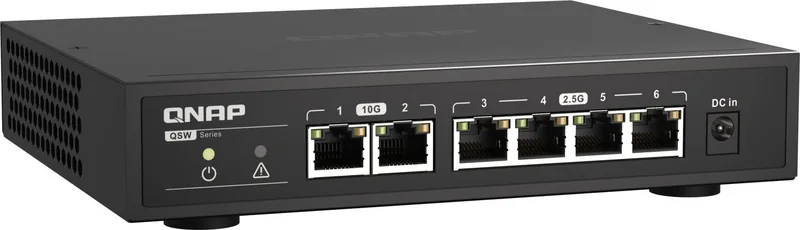
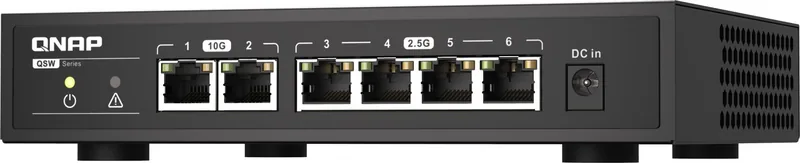
The QNAP QSW-2104 series is a compact unmanaged multi-gigabit switch range designed to expand fast wired connectivity without complex configuration. While the QSW-2104-2S and QSW-2104-2T share four 2.5GbE RJ-45 ports, they differ in their two high-speed uplink connections: the 2S model uses 10GbE SFP+ ports, while the 2T model provides two 10GbE RJ-45 ports. This makes the range useful for homes, studios, and small offices that need faster transfers between computers, network storage, routers, and other compatible equipment.
Flexible multi-gigabit connections
Each switch offers a 60 Gbps switching bandwidth and supports existing lower-speed devices as well as faster network hardware. The 2.5GbE RJ-45 ports operate at 2.5 Gbps or can connect at 1 Gbps and 100 Mbps. On the QSW-2104-2T, the 10GbE RJ-45 ports support 10 Gbps as well as 5 Gbps, 2.5 Gbps, 1 Gbps, and 100 Mbps links. The QSW-2104-2S instead uses SFP+ connections for 10GbE links, with 1Gbps operation indicated separately by its status LEDs.
This combination gives users a practical path to upgrade from Gigabit Ethernet. A 10GbE connection can link the switch to a NAS or high-performance workstation, while the 2.5GbE ports can serve desktop PCs, access points, and other multi-gigabit devices. The unmanaged design keeps installation straightforward: connect compatible Ethernet cables or SFP+ hardware, attach power, and verify connectivity through the front LED indicators.
Clear status monitoring
The front-panel LEDs make basic network checks easy. A green power LED confirms that the switch is on. Port LEDs show the negotiated link rate and flash to signal network activity. A dedicated loop indicator turns red and flashes when a network loop is detected, helping users identify a potential cabling issue before it causes disruption.
The QSW-2104 series measures 34 x 180 x 145 mm, making it suitable for desktop placement or installation using the supplied mounting accessories. It operates from a 100-240 VAC power input and is rated for environments between 0 C and 40 C with 10% to 90% non-condensing humidity.
Notes
- Choose QSW-2104-2T when two 10GbE copper RJ-45 connections are needed.
- Choose QSW-2104-2S when a network uses 10GbE SFP+ links.
- Check cable, adapter, and endpoint capabilities to achieve the intended link speed.
Search for 67,706 Manuals online


Type-in Brand or Model
Kailee Cassin
5 months ago
Is this switch quiet and reliable for upgrading from 1 Gbit/s networking?
Manual.ly
5 months ago
Yes. The switch is passively cooled, so it operates silently without a fan. Reviews also report stable full-speed performance, a cool operating temperature, and a solid aluminum housing. Its compact power adapter is designed not to block neighboring outlets.