

QNAP QHora-301W Manual
PDF manual · 63 Pages
English



Quick check
Incorrect answer, please try again.
Chat with your QNAP QHora-301W manual using AI
Get instant AI answers from your QNAP QHora-301W manual
Ask anything about the QNAP QHora-301W. Answers come from this manual, with the pages they are based on.
Ask a Question
Do you recommend QHora-301W?
Yes NoFrequently Asked Questions
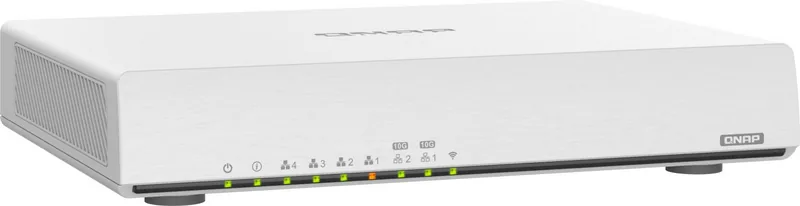
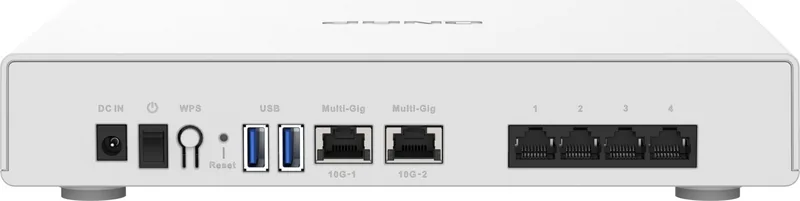
The QHora-301W features a Qualcomm IPQ8074A processor running at 2.2 GHz with 1 GB RAM. It includes two 10 GbE ports, four 1 GbE ports, two USB 3.2 Gen 1 ports, and eight internal 5dBi antennas. The device operates fanlessly and supports VESA mounting.
Is this answer helpful?
Connect the router to your computer via Ethernet, power it on, and open a browser to https://192.168.100.1. Use admin as the username and your routers MAC address (without colons) as the default password. You can also use Qfinder Pro to locate the device.
Is this answer helpful?
Yes, the router supports both Wireless Router mode and Access Point (AP) mode. To switch to AP mode, go to System > Operation Mode in the QuRouter interface. Note that some features like WAN and QuWAN will be disabled in this mode.
Is this answer helpful?
Absolutely. The router features built-in QuWAN technology, a cloud-based SD-WAN solution. This allows you to configure hub and edge roles, manage organization settings, and securely direct traffic across wide area networks with centralized control.
Is this answer helpful?
The QHora-301W supports multiple VPN protocols including QBelt (QNAP proprietary), L2TP, and OpenVPN. You can set up both VPN servers and clients, manage connection logs, and configure up to 30 simultaneous VPN tunnels.
Is this answer helpful?
Advantages and Disadvantages
Advantages

- Dual 10 GbE ports enable ultra-high-speed wired connections
- Wi-Fi 6 (802.11ax) technology supports speeds up to 3600 Mbps
- Built-in SD-WAN and QuWAN support for advanced network topology
- Fanless design ensures silent operation and energy efficiency
- Comprehensive VPN options including QBelt, L2TP, and OpenVPN
Disadvantages

- Default password is based on MAC address which may be less convenient
- QuWAN binding requires specific location verification steps
- Firmware updates can take several minutes depending on connection
- Limited USB storage capacity compared to dedicated NAS units
- Initial setup requires careful configuration of regulatory domains
Product Specification
Modem
N/A
WAN
1x 10G/5G/2.5GBase-T (shared), 2x 1000Base-T (shared)
LAN
1x 10G/5G/2.5GBase-T, 1x 10G/5G/2.5GBase-T (shared), 2x 1000Base-T (shared), 2x 1000Base-T
Wireless
WLAN 802.11a/b/g/n/ac/ax (Wi-Fi 6), simultaneous
Transfer Rate
1148Mbps (2.4GHz), 2402Mbps (5GHz)
Security
64/128bit WEP, WPA, WPA2, WPA3, WPS
Antennas
internal
Ports
2x USB-A 3.0
Power Consumption
24W (consumption, operation), no specification (max. power supply output)
Dimensions
9.84x7.09x1.89 in
Features
MU-MIMO, VLAN, VPN passthrough (PPTP/L2TP/IPSec/SSL)
Band Capability
Dual Band (simultaneous)
Transfer Rate 802.11ax (Wi-Fi 6 / Wi-Fi 6E) 2.4GHz
1148Mbps (Spatial Streams: 4x4, Bandwidth: 40MHz, Modulation: 1024-QAM)
Transfer Rate 802.11ax (Wi-Fi 6 / Wi-Fi 6E) 5GHz
2402Mbps (Spatial Streams: 2x2, Bandwidth: 160MHz, Modulation: 1024-QAM or Spatial Streams: 4x4, Bandwidth: 80MHz, Modulation: 1024-QAM)
Note
Transfer rate specification for 802.11ax at 2.4GHz and 5GHz. (802.11ax (2.4GHz) 4x4 40MHz 1024-QAM: 1148Mbps, 802.11ax (5GHz) 2x2 160MHz 1024-QAM/4x4 80MHz 1024-QAM: 2402Mbps)
Note #2
Open-/DD-WRT may only be available for certain revisions; please refer to additional links!
Product Description
QNAP QHora-301W AX3600: The Ultimate Wi-Fi 6 Router Experience
The QNAP QHora-301W AX3600 represents a significant leap forward in home and small business networking. As QNAPs first router featuring the latest 802.11ax standard, it delivers blazing-fast wireless transfer speeds reaching up to 3600 Mbps. This device is engineered for performance, boasting dual 10 GbE ports that ensure your high-speed internet connection is fully utilized without bottlenecks. Whether you are streaming 4K content, gaming online, or managing a complex network of devices, the QHora-301W provides the robust infrastructure needed for seamless connectivity.
Beyond raw speed, this router excels in versatility and management. It comes equipped with eight internal 5dBi antennas and supports advanced features like MU-MIMO and band steering to optimize traffic flow. The built-in QuRouter interface offers an intuitive dashboard for configuring operation modes, switching between wireless router and access point setups, and managing security settings effortlessly. Network administrators will appreciate the comprehensive control over VLANs, SD-WAN capabilities via QuWAN, and extensive VPN options including QBelt, L2TP, and OpenVPN support.
Security is paramount with the QHora-301W. It includes a robust firewall, parental controls for managing family internet usage, and NAT configuration for safe external access. The device also supports guest networks, allowing you to keep your main network secure while providing internet access to visitors. With its fanless design and VESA mount compatibility, it fits perfectly into any environment, from home offices to enterprise edge locations. Managing the router is simple through web browsers or the Qfinder Pro utility, ensuring that setup and maintenance are straightforward tasks for users of all skill levels.
Search for 67,706 Manuals online


Type-in Brand or Model