
QNAP QGD-3014-16PT Manual
PDF manual · 62 Pages
English



Quick check
Incorrect answer, please try again.
Chat with your QNAP QGD-3014-16PT manual using AI
Get instant AI answers from your QNAP QGD-3014-16PT manual
Ask anything about the QNAP QGD-3014-16PT. Answers come from this manual, with the pages they are based on.
Ask a Question
Do you recommend QGD-3014-16PT?
Yes NoFrequently Asked Questions
The device supports a maximum of 8 GB of RAM using two 4 GB DDR4 SODIMM modules. It is recommended to use QNAP-approved memory modules to ensure stability.
Is this answer helpful?
Yes, the QGD-3014 features a dual-CPU design that supports Layer 2 management functions and allows you to run virtual machines, acting as a VM-host alongside its switching capabilities.
Is this answer helpful?
The device is equipped with 16 Gigabit Ethernet ports that support IEEE 802.3at PoE+, providing up to 30W per port with a total power budget of 140W.
Is this answer helpful?
Yes, the QGD-3014 ships with QTS (QNAP Turbo NAS System) pre-installed, allowing you to manage storage, virtualization, and network settings immediately after setup.
Is this answer helpful?
Yes, the switch supports USB expansion units via its rear USB 3.0 ports, allowing you to connect compatible QNAP storage enclosures to increase capacity.
Is this answer helpful?
You can perform a basic system reset by pressing and holding the Switch Reset button for 3 seconds, or a full advanced reset by holding it for 15 seconds.
Is this answer helpful?
Advantages and Disadvantages
Advantages

- Integrates switch and NAS functionality to save space and reduce hardware costs
- Supports 16 PoE+ ports with a 140W budget for powering security cameras
- Dual-CPU design enables running virtual machines and NVR applications locally
- Includes an LCD panel for local monitoring and configuration without a PC
- Compatible with various drive types including 3.5-inch HDDs and M.2 SSDs
Disadvantages

- Limited memory capacity with only 8 GB RAM pre-installed and no upgrade beyond 8 GB
- Requires manual installation of drives and memory modules which voids warranty if done incorrectly
- Total power consumption is relatively high at 250W under full load
- Fan noise may be noticeable in quiet office environments due to internal cooling requirements
- Complex initial setup for users unfamiliar with both networking and NAS concepts
Product Specification
Function
Switch
Type
Standalone
Network Ports
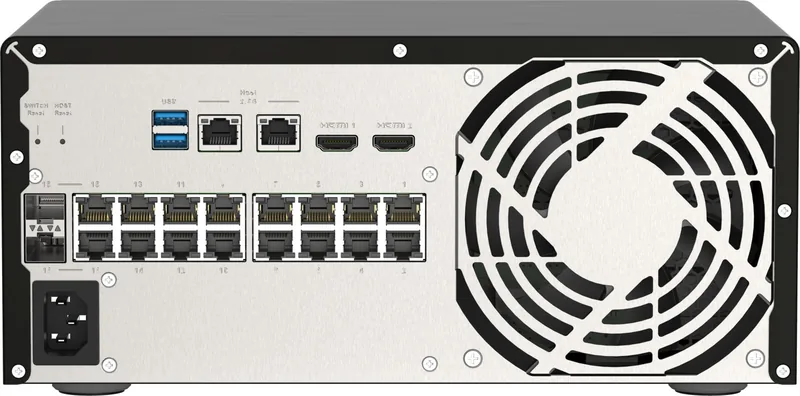
14x RJ-45 (rear), 2x RJ-45/SFP (rear)
Speeds
16x RJ-45 (100/1000Base-T), 2x SFP (1Gb/s)
PoE
16x RJ-45 PoE+ (16x 30W), total: 148.4W
Backplane
32Gb/s, 9KB Jumboframes, 8K Mac addresses
Officially Supported Standards
802.1AX, 802.1p, 802.1Q, 802.3, 802.3ab, 802.3ad, 802.3af, 802.3at, 802.3u, 802.3x, 802.3z, IGMPv3
Configuration
Web interface, console, network (2x RJ-45, dedicated, rear, 2.5GBase-T)
Cooling
active, 1x fan (120mm, rear)
Color
black
Features
Metal case, display, firmware updates possible, dedicated subsystem (NAS functions, VM host, video surveillance, print server, Intel Celeron J4125, 4x 2.00GHz, 8GB DDR4 SO-DIMM, 4x 3.5" SATA 6Gb/s, 2x M.2 2230, 3x USB-A 3.0, 2x HDMI 2.0, 2x audio jack)
Manufacturer Warranty
two years
Note
For this device, link aggregation was officially specified with the obsolete standard IEEE802.3ad. The function has not been managed by the IEEE Working Group 3 (IEEE 802.3, CSMA/CD - Ethernet) since 2008, but is managed by Working Group 1 (IEEE 802.1, High Level Interface - Internetworking) and technically defined unchanged via IEEE 802.1AX.
Product Description
QNAP QGD-3014: The Ultimate Edge Computing Solution for Surveillance and Virtualization
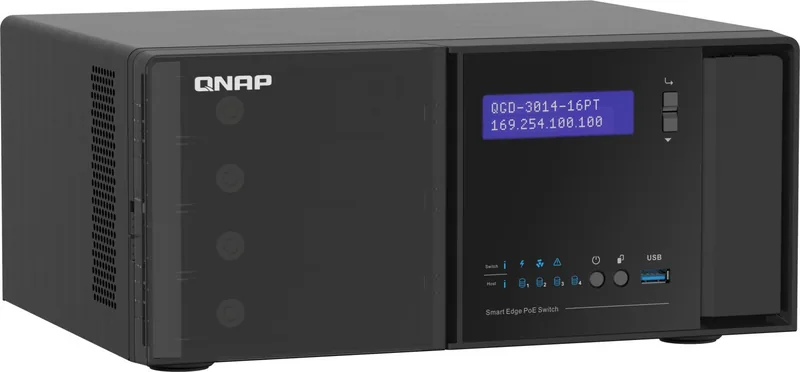
The QNAP QGD-3014 Dual-System VM-Host & NAS Desktop Gigabit Smart Switch represents a revolutionary approach to network infrastructure by merging the capabilities of a high-performance smart switch with a powerful network-attached storage (NAS) system. Designed specifically for surveillance applications, this device eliminates the need for separate hardware by housing four 3.5-inch SATA hard drives directly within its chassis while simultaneously managing network traffic through sixteen PoE+ ports.
At the heart of the QGD-3014 lies a dual-CPU architecture powered by an Intel Celeron J4125 processor. This setup supports software-defined networking (SDN), enabling users to run multiple virtual machines, act as a router, or host a Network Video Recorder (NVR) without external servers. The inclusion of 8 GB of DDR4 RAM ensures smooth operation for demanding tasks like video analytics and file serving. With a total PoE budget of 140W, the switch can power up to sixteen connected devices such as IP cameras, VoIP phones, and wireless access points, simplifying cabling and reducing installation costs.
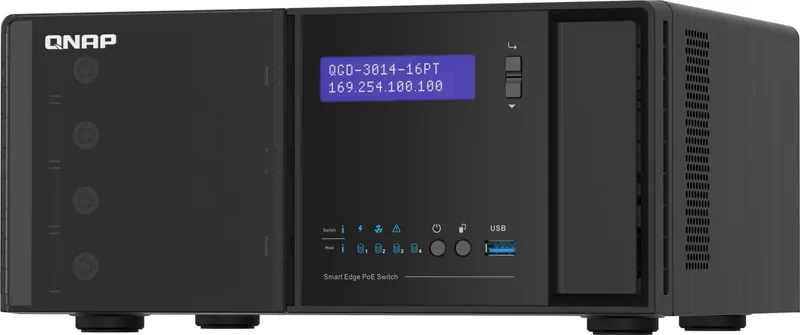
Installation is straightforward thanks to the intuitive LCD panel on the front, which allows administrators to view TCP/IP settings, monitor drive health, and control system operations without needing a computer. The device comes preloaded with QTS, QNAP's user-friendly operating system, which facilitates easy management of storage, virtualization, and network switching through a single interface. Whether you are securing a small business or managing a large-scale surveillance deployment, the QGD-3014 offers a compact, efficient, and highly versatile solution that consolidates critical IT functions into one robust unit.
Search for 67,706 Manuals online


Type-in Brand or Model