
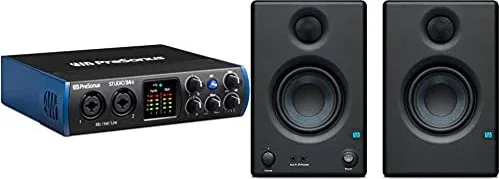
PreSonus Studio 24c Manual
PDF manual · 30 Pages
English



Quick check
Incorrect answer, please try again.
Chat with your PreSonus Studio 24c manual using AI
Get instant AI answers from your PreSonus Studio 24c manual
Ask anything about the PreSonus Studio 24c. Answers come from this manual, with the pages they are based on.
Ask a Question
Do you recommend Studio 24c?
Yes NoVideo Manual
PreSonus Studio 24c | Complete Setup Guide for Beginners (2025)
Frequently Asked Questions
No. The Studio 24c is class-compliant on macOS and works without driver installation. Installing PreSonus Universal Control is optional if you want additional hardware management or bundled content access.
Is this answer helpful?
It supports 24-bit resolution and sample rates of 44.1, 48, 88.2, 96, 176.4, and 192 kHz, selectable in Universal Control (Windows) or via compatible DAW settings on macOS.
Is this answer helpful?
Press the 48V button to enable phantom power for both mic inputs; the button illuminates when active. Always lower the channel gain before toggling phantom power to avoid output spikes, and avoid engaging phantom on vulnerable ribbon microphones unless specified safe by the mic manufacturer.
Is this answer helpful?
Yes on Windows: the Studio 24c’s ASIO driver offers two loopback streams configurable in Universal Control to record application audio into another app. This functionality is not available natively on macOS; third-party utilities are required there.
Is this answer helpful?
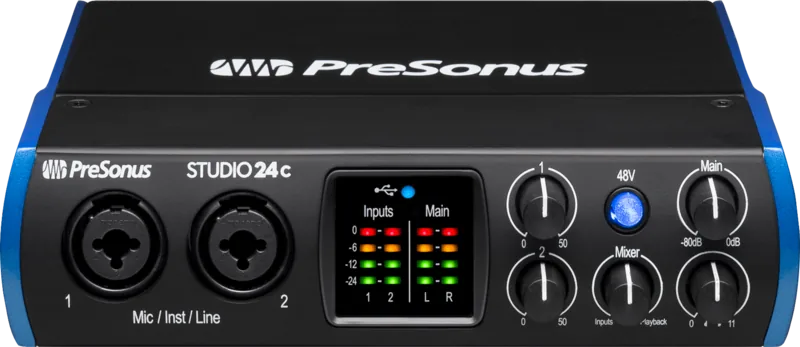
It offers two combo XLR/TRS mic/line/instrument inputs with XMAX-L preamps, balanced main outputs, a rear headphone output, MIDI in/out, and a USB-C port (backward-compatible with USB-A).
Is this answer helpful?
Yes. Register the Studio 24c at My PreSonus to access the Studio One Artist product key. Download and install the software, then authorize it by signing into your My PreSonus account when launching Studio One for the first time.
Is this answer helpful?
Set the audio buffer as low as your system can handle without artifacts. Lower buffers reduce latency for tracking, while higher buffers increase stability during mixing. Adjust in Universal Control (Windows) or your DAW’s audio preferences.
Is this answer helpful?
Advantages and Disadvantages
Advantages

- High-quality 24-bit/192 kHz conversion for transparent recordings.
- Two XMAX-L Class A mic preamps with 50 dB gain range for versatile source capture.
- USB-C connectivity with USB-A backward compatibility; macOS class-compliant operation.
- Low-latency monitoring via front-panel mixer knob and clear input/output metering.
- Bundled Studio One Artist and Studio Magic plugins accessible after registration.
Disadvantages

- Loopback virtual streams available only on Windows (not native on macOS).
- Phantom power is global (all mic inputs), which may risk some ribbon mics if left enabled.
- Limited to two analog inputs; may be restrictive for larger multi-mic sessions.
- Headphone dynamic range lower than main converters; not optimized for very high-impedance cans.
- Requires driver install on Windows for ASIO; adds setup steps compared with true plug-and-play.
Product Specification
Interface
USB-C 2.0
Input Channels
2
Output Channels
4
Mic Preamps
2
Analog Inputs
2x Mic/Line/Instrument In (XLR/1/4 in Combo)
Analog Outputs
2x Line Out (1/4 in Jack), 1x Headphone (1/4 in Jack)
Digital Inputs
no
Digital Outputs
no
AD/DA Converter
24bit/192kHz
Features
MIDI In/Out, Level Indicator
Dimensions
7.09x1.73x5.67in (WxHxD)
Weight
1.98 lb
Product Description
PreSonus Studio 24c — Compact USB-C Audio Interface
The PreSonus Studio 24c is a compact, high-resolution USB-C audio interface built for home studios, podcasters, and mobile recording setups. It delivers 24-bit/192 kHz conversion, two XMAX-L Class A mic preamps, combo XLR/TRS inputs, balanced main outputs, and a rear headphone jack — offering a complete I/O solution for vocalists, instrumentalists, and producers. File- and driver-compatible with USB-C and USB-A ports, it supports both macOS (class-compliant, no driver required) and Windows (Universal Control + ASIO driver available).
Features and Practical Use
Studio 24c’s XMAX-L preamps provide high headroom and low noise for clean mic recordings, while the 50 dB gain range accommodates quiet condenser mics to hot line signals. Inputs accept instrument-level signals directly, making guitar or bass tracking straightforward. A single front-panel mixer knob lets you blend real-time direct input monitoring with computer playback to avoid latency during tracking. Input and output LED metering and a sync LED help monitor levels and clock status quickly.
The interface includes 48V phantom power (global switch), clear wiring guidance for XLR phantom connections, and helpful protection tips like lowering gains before toggling phantom power. Back-panel MIDI I/O expands connectivity to keyboards and external gear. For Windows users, Universal Control exposes sample-rate and buffer-size settings, and provides two loopback virtual streams for recording application audio into another app. macOS users benefit from plug-and-play Core Audio compatibility.
Bundled with Studio One Artist and the Studio Magic plugin bundle (via My PreSonus account registration), the Studio 24c is ready for recording, mixing, and MIDI-based production. Detailed setup guidance covers popular DAWs (Cubase, Ableton Live, Logic, Pro Tools, Cakewalk) and walks through installing and authorizing Studio One, configuring audio/MIDI I/O, creating tracks, and using drag-and-drop virtual instruments and effects.
Who It’s For
This interface is ideal for musicians and content creators who want a durable, portable interface with professional conversion and mic preamps, simple monitoring controls, and direct integration with PreSonus software. Its specification sheet provides studio-grade dynamic range, low THD+N, and headphone power sufficient for a wide range of cans.
Notes
- Register at My PreSonus to download drivers, Studio One Artist, and bundled content.
- On Windows, install Universal Control and ASIO drivers; on macOS, no driver is required but Universal Control is optional.
- Use caution when enabling 48V phantom power — turn down gains first to avoid spikes.
Search for 67,706 Manuals online


Type-in Brand or Model