
PreSonus Eris E5 XT Manual
PDF manual · 17 Pages
English



Quick check
Incorrect answer, please try again.
Chat with your PreSonus Eris E5 XT manual using AI
Get instant AI answers from your PreSonus Eris E5 XT manual
Ask anything about the PreSonus Eris E5 XT. Answers come from this manual, with the pages they are based on.
Ask a Question
Do you recommend Eris E5 XT?
Yes NoFrequently Asked Questions
The Eris E5 XT is a nearfield studio monitor for mixing, recording, editing, and critical listening. Its compact size and room-tuning controls make it especially suitable for desktop studios, home studios, and smaller production spaces.
Is this answer helpful?
It provides balanced XLR and 1/4-inch TRS line inputs, as well as an unbalanced RCA input. Balanced XLR or TRS connections are recommended when available because they can reduce noise and interference.
Is this answer helpful?
Use the monitors vertically, with tweeters at ear height. Angle them toward the listening position so the speakers and your head form an equilateral triangle. Leave 20 to 30 cm from nearby walls when possible.
Is this answer helpful?
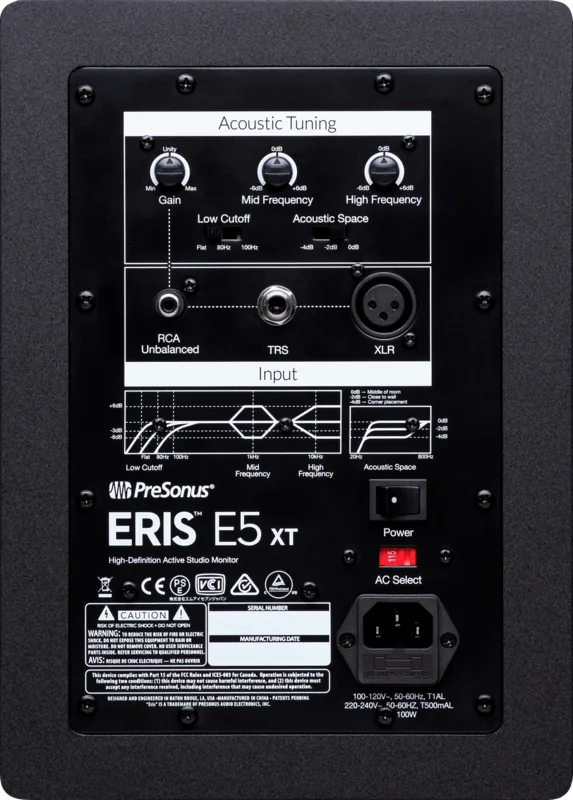
Acoustic Space reduces frequencies below 800 Hz by 0, -2, or -4 dB. Use 0 dB with adequate space from walls, -2 dB near a rear wall, and -4 dB when the monitor is close to a corner.
Is this answer helpful?
Yes. Its low-cut filter offers Flat, 80 Hz, and 100 Hz settings. Selecting 80 Hz or 100 Hz can help establish a suitable crossover area when using a subwoofer without an adjustable low-pass filter.
Is this answer helpful?
Play pink noise, measure each speaker separately at the listening position, and adjust its input gain to 82 dB SPL. With both monitors playing, the combined level is approximately 85 dB SPL.
Is this answer helpful?
Advantages and Disadvantages
Advantages

- Wide EBM waveguide supports a broad horizontal sweet spot and focused stereo imaging.
- XLR, balanced 1/4-inch TRS, and RCA inputs allow connection to varied audio sources.
- Acoustic Space, HF, MF, and low-cut controls help tailor playback to room placement.
Disadvantages

- The 48 Hz low-frequency limit may not reveal the deepest sub-bass without a subwoofer.
- Only one input source should be connected to each monitor at a time.
- Correct placement and SPL calibration are important for the most accurate results.
Product Specification
Principle
2-way
Tweeter
1 x 1 in (25.4 mm)
Woofer
1 x 5.25 in (133.4 mm)
Frequency Range
48 Hz-20 kHz
Power
80 W Peak
Max. SPL
102 dB
Dimensions
7.99 x 10.98 x 9.02 in (W x H x D)
Weight
11 lb
Product Description
PreSonus Eris E5 XT Manual: Compact Nearfield Monitoring for Focused Mixing
The PreSonus Eris E5 XT is a high-resolution nearfield studio monitor designed for producers, musicians, podcasters, and content creators who need clear, dependable playback in small to mid-sized rooms. Its 5.25-inch low-frequency driver and 1-inch silk-dome tweeter provide a detailed listening experience, while the compact cabinet makes it easy to place on a desk or dedicated monitor stands. The PreSonus Eris E5 XT Manual highlights how careful setup and calibration can help users achieve more reliable mixes.
A key feature is the EBM waveguide, which creates a broad horizontal listening area while keeping vertical dispersion more controlled. This helps reduce early reflections from desktops and mixing surfaces, while supporting a defined stereo image at the listening position. For best results, the monitors should be installed vertically, with the tweeters at ear level and angled inward to form an equilateral triangle with the listener.
Connections and acoustic controls
The Eris E5 XT offers flexible connectivity for studio gear and home recording systems. It includes balanced XLR and 1/4-inch TRS inputs, plus an unbalanced RCA input. Only one source should be connected at a time. Balanced connections are preferable where possible because they can help minimize electromagnetic and radio-frequency interference.
Rear-panel acoustic tuning controls allow the speaker response to be adapted to the room. High and mid-frequency controls provide up to plus or minus 6 dB of adjustment. A low-cut filter can be set to Flat, 80 Hz, or 100 Hz, which is useful when integrating a subwoofer. The Acoustic Space control reduces frequencies below 800 Hz by 0, -2, or -4 dB to compensate for bass buildup caused by nearby walls or corners.
Placement and calibration
Positioning has a major impact on monitor accuracy. Ideally, leave 20 to 30 cm between each speaker and the nearest wall, and keep both monitors equally spaced from surrounding boundaries. If placement close to a wall is unavoidable, use the Acoustic Space setting to reduce excessive low-end energy. For corner placement, the -4 dB option is a practical starting point.
The PreSonus Eris E5 XT Manual also recommends calibrating both speakers individually with pink noise and an SPL meter. Setting each monitor to 82 dB SPL produces an approximate 85 dB SPL level when both play together. This process helps maintain balanced stereo monitoring and gives mixes a more consistent reference.
Notes
The E5 XT reaches from 48 Hz to 20 kHz, delivers 102 dB peak SPL at one meter, and combines 45 W of LF power with 35 W of HF power. It is a capable choice for accurate nearfield work where room-aware tuning and practical connections matter.
Search for 67,706 Manuals online


Type-in Brand or Model