
PreSonus ATOM Manual
PDF manual · 53 Pages
English



Quick check
Incorrect answer, please try again.
Chat with your PreSonus ATOM manual using AI
Get instant AI answers from your PreSonus ATOM manual
Ask anything about the PreSonus ATOM. Answers come from this manual, with the pages they are based on.
Ask a Question
Do you recommend ATOM?
Yes NoFrequently Asked Questions
The ATOM SQ excels at drum programming, step sequencing, clip launching, and melodic performance. Its 32 RGB pads, arpeggiator, touch strip, and encoders make it ideal for beatmaking, live performance, and controlling virtual instruments and DAWs.
Is this answer helpful?
No driver is required for basic operation; the ATOM SQ is class-compliant and bus-powered. For firmware updates, content downloads, and enhanced features, install PreSonus Universal Control from your MyPreSonus account.
Is this answer helpful?
The ATOM SQ auto-configures with Studio One and Ableton Live, providing dedicated Instrument, Song, Editor, and User pages. In Studio One it maps to Impact XT, pattern editors, and plugin parameters; in Live it controls session/clip launching, devices, and mixer functions.
Is this answer helpful?
Yes. The pads support multiple layouts (Keyboard, Continuous, Blocks, Scale Only), selectable musical scales and roots, octave/range shifting, and velocity modes (All, Full, 16-vel) adjustable from the device screen.
Is this answer helpful?
The touch strip is assignable to pitch bend, mod wheel, expression, breath CC, note-repeat rate, channel volume, or custom Control Link assignments. In certain DAW Song modes it can act as a crossfader or track volume when used with Shift.
Is this answer helpful?
Register the ATOM SQ at My.PreSonus.com, download Universal Control, and run the firmware updater. Universal Control will alert you to new firmware and guide the update process; the unit reboots automatically when complete.
Is this answer helpful?
Yes. Pads are pressure sensitive and can send mono or poly aftertouch or CC messages. However, host support varies, and some DAWs or plugins may not recognize polyphonic aftertouch or certain pressure modes.
Is this answer helpful?
Advantages and Disadvantages
Advantages

- Seamless deep integration with Studio One and Ableton Live for instant mapping and functionality.
- 32 RGB pads with velocity and pressure sensitivity for expressive playing and visual feedback.
- Assignable touch strip for pitch bend, mod, expression, note repeat, or track volume control.
- Compact, bus-powered design with eight encoders and A–H bank buttons for versatile control.
- Multiple layout modes (Keyboard, Continuous, Scale Only, Blocks) and arpeggiator for creative workflows.
Disadvantages

- Full feature set requires Universal Control firmware updates and MyPreSonus registration.
- Some pressure/aftertouch features and advanced modes depend on host application support.
- MCU/HUI behaviors vary across DAWs; setup needed for non-integrated hosts.
- Certain pad features (Impact XT behavior, scale locking) differ when using specific plugins.
- Touch strip and plus/minus assignments must sometimes be configured before launching some DAWs.
Product Specification
Type
DAW-Controller
Keys
no
Faders
no
Product Description
PreSonus ATOM: Boost Your Beatmaking with the PreSonus Atom Manual
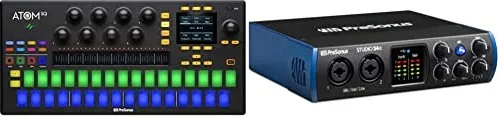
The PreSonus ATOM SQ is a hybrid MIDI keyboard and pad controller designed for modern producers and live performers. With a staggered 32-pad RGB layout, velocity and pressure sensitivity, an integrated arpeggiator, touch strip, and eight encoders, the ATOM SQ blends classic TR-style step sequencing with expressive melodic performance. It’s optimized for tight integration with Studio One and Ableton Live while also functioning as a flexible MIDI controller for any DAW via configurable MIDI, MCU, or HUI modes.
From the moment you connect the ATOM SQ, it adapts: Studio One and Ableton Live detect and automatically configure it for deep control of instruments, pattern editors, clip launching, and device parameters. The pads change color and behavior depending on mode—Instrument, Song, Editor, or User—so you can switch from piano-style layouts to drum banks, continuous note layouts, or scale-limited modes instantly. The touch strip is assignable to pitch bend, mod, expression, note-repeat rates, or track volume, while the +/– pads offer octave or pitch-bend pressure control.
Hardware controls are thoughtfully engineered for workflow speed: eight rotary encoders with velocity-sensitive response allow fast or precise parameter changes; A–H bank buttons switch pad banks or octaves and double as momentary sustain; navigation and transport controls provide MCU/HUI-style DAW control when desired. The onboard screen and screen encoder expose instrument, song, editor, and user pages for quick editing of arpeggiator patterns, pad mapping, velocity modes (All, Full, 16-vel), scales and roots, and pad layout options. Setup and firmware updates are handled through PreSonus Universal Control and your MyPreSonus account, where bundled software like Studio One Artist and Ableton Live Lite can be redeemed.
Whether you’re programming drums with 16-step patterns, playing melodic parts in a chosen scale, performing live clips in Ableton, or customizing MIDI mappings for third-party apps, the ATOM SQ combines tactile performance features with studio-focused integration. Its durable, bus-powered design and feature set make it a powerful, portable centerpiece for beatmaking, sound design, and live rigs.
Notes
- Firmware updates and Universal Control are recommended for full functionality and bug fixes.
- Studio One and Ableton Live have specialized integrations; some modes and features behave differently outside those DAWs.
- Pads support velocity and pressure sensitivity; some host applications may not support poly aftertouch or certain pressure messages.
Search for 67,706 Manuals online


Type-in Brand or Model