
PowerWalker VI CSW Manual
PDF manual · 4 Pages
English



Quick check
Incorrect answer, please try again.
Chat with your PowerWalker VI CSW manual using AI
Get instant AI answers from your PowerWalker VI CSW manual
Ask anything about the PowerWalker VI CSW. Answers come from this manual, with the pages they are based on.
Ask a Question
Do you recommend VI CSW?
Yes NoVideo Manual
PowerWalker 2200 RLE UPS Unboxing and Installation | Ensuring Reliable Power for Your Computers
Frequently Asked Questions
The typical transfer time is around 6 milliseconds, with a maximum of 10 milliseconds, ensuring minimal interruption during power switching events.
Is this answer helpful?
Yes, it includes a USB communication port with HID support for monitoring software integration on connected computers.
Is this answer helpful?
Users must turn off the device and unplug the input cable before removing the battery cover and unplugging the old pack to avoid short circuits.
Is this answer helpful?
The E14 error code indicates an output short circuit, requiring users to check their connected loads for faults before restarting the unit.
Is this answer helpful?
Yes, the device features two USB ports that provide 5V at 2.1A combined, suitable for charging mobile phones and tablets.
Is this answer helpful?
Advantages and Disadvantages
Advantages

- Pure sine wave output ensures compatibility with sensitive electronics.
- LCD display provides clear status on voltage and battery life.
- Includes USB charging ports for mobile devices at 5V and 2.1A.
- RJ-45 protection safeguards networking gear from surge damage.
- Automatic voltage regulation stabilizes fluctuating power input.
Disadvantages

- Battery replacement requires disconnecting power and careful handling.
- Language in primary documentation is German.
- Surge protection outlets do not offer battery backup functionality.
- Manual handling required for battery pack removal and installation.
- Overload indicators may flash frequently during testing phases.
Product Specification
Type
Tower
Classification
VI (Line-Interactive)
Voltage
230V
Input
1x C14
Interfaces
1x USB, 2x USB Charging Port (2.1A)
Data Line Protection
2x RJ-11/RJ-45
Charge Time
6-8 hours (90%)
Features
LCD, HID Support
Product Description
Protecting Your Electronics with the BlueWalker PowerWalker VI CSW UPS/USV
Maintaining reliable power is essential for any modern household or office setup. Devices range from computers to entertainment systems, and power surges can cause significant damage to delicate components. This is where the BlueWalker PowerWalker VI CSW UPS/USV becomes a critical component for risk management. Understanding the capabilities of this unit requires consulting the BlueWalker PowerWalker VI CSW UPS/USV Manual, which provides detailed operational insights for users planning their electrical setup. Safety and stability are paramount in preventing data loss.
Key Features and Interface
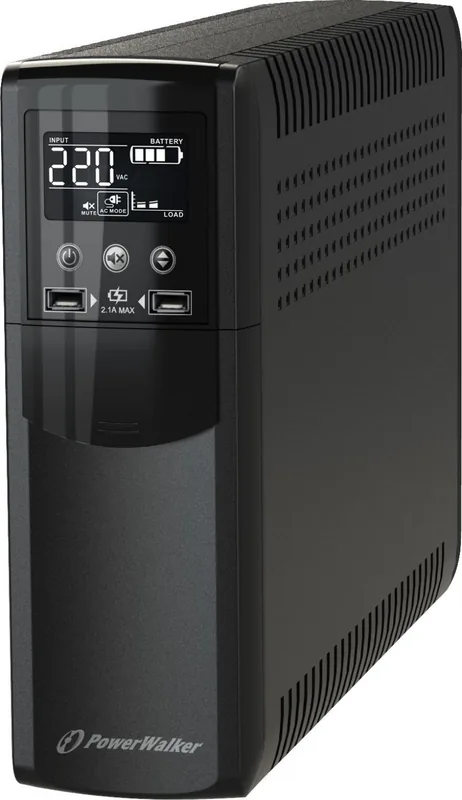
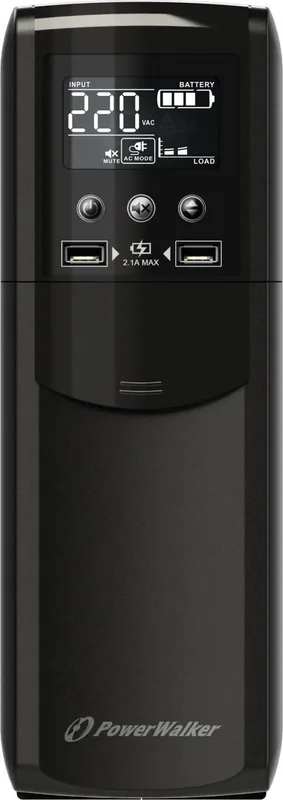
The system features a clear LCD display showing voltage, battery status, and load percentage. Users can toggle between standby and line modes using the front panel buttons. The mute button helps silence alarms during testing or low battery warnings effectively. Two USB ports provide charging capabilities at 5V and 2.1A, ensuring mobile devices stay powered without needing external adaptors. Communication via USB HID allows for monitoring software integration on computers directly. The interface is intuitive, designed to reduce user error during operation. It supports automatic voltage regulation to stabilize incoming power fluctuations.
Technical Performance and Protection
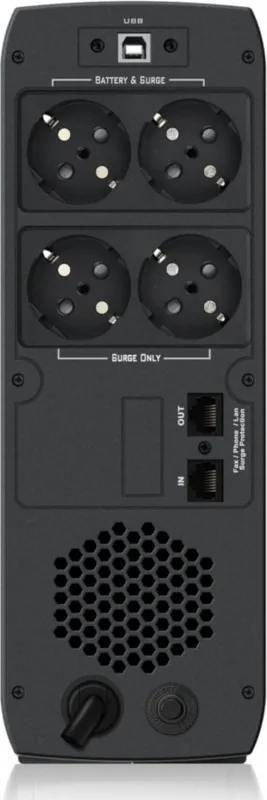
This UPS delivers pure sine wave output, ensuring compatibility with sensitive electronics. The transfer time is typically around 6 milliseconds, minimizing interruptions significantly. Input voltage ranges from 162V to 290VAC, offering robust grid protection against surges. The unit operates within a temperature range of 0-40C. Several models exist, including the 600 VA, 800 VA, and 1500 VA versions. Each model handles specific wattages efficiently. It includes RJ-45 protection for internet lines, safeguarding connected networking gear from surges traveling through cables. This protection extends to the LAN connection for security.
Battery Backup and Maintenance
Battery backup ensures your load stays on during outages reliably. Battery replacement requires care and adherence to safety guidelines strictly. Overload indicators help prevent damage, and error codes like E14 assist in troubleshooting short circuits quickly. Users are advised to disconnect power before changing the 12V battery packs safely. Proper recycling of old batteries is mandatory to protect the environment locally. The unit indicates battery health clearly on the screen. It also warns of weak batteries or connection issues proactively. This ensures the system functions correctly when needed most.
Summary and Recommendations
Whether for home use or small business applications, this unit offers comprehensive surge protection and backup power. Referencing the BlueWalker PowerWalker VI CSW UPS/USV Manual ensures optimal setup and longevity for your investment. Users gain peace of mind knowing their hardware is defended against unstable grids effectively. Regular checks on the indicator lights ensure the system is always ready for emergencies. The combination of voltage regulation and battery support makes it a versatile choice for protecting valuable assets across various industries.
Search for 67,706 Manuals online


Type-in Brand or Model