


PowerWalker VI 500 R1U Manual
PDF manual · 2 Pages
English



Quick check
Incorrect answer, please try again.
Chat with your PowerWalker VI 500 R1U manual using AI
Get instant AI answers from your PowerWalker VI 500 R1U manual
Ask anything about the PowerWalker VI 500 R1U. Answers come from this manual, with the pages they are based on.
VI 500 R1U Maintenance Schedule
Charge the battery for 12 hours every 3 months by plugging the power cord into the wall receptacle and turning on the main switch. In high temperature locations, repeat every 2 months.
The expected lifetime of the battery is around 3 years. Replace it if improper operation or harsh environment reduces actual lifetime.
Free maintenance reminders
Timed to your purchase date. Always free, unsubscribe anytime.
Ask a Question
Do you recommend VI 500 R1U?
Yes NoFrequently Asked Questions
It is designed to protect small IT and office equipment such as computers, monitors, and external storage. It provides backup power during outages and helps reduce damage from surges and unstable voltage.
Is this answer helpful?
Yes. It includes USB and serial connectivity for communication with monitoring software. This allows the user to check UPS status, battery condition, load, and runtime more easily.
Is this answer helpful?
The unit provides four IEC C13 outlets. These are intended for connected computer equipment and similar devices that need temporary backup power and surge protection.
Is this answer helpful?
No, it is not recommended for non-computer-related devices such as medical equipment, life-support systems, microwaves, or vacuum cleaners. It is meant for standard IT loads.
Is this answer helpful?
Charge it fully before first use and keep the UPS connected to AC power whenever possible. If storing it for a long time, keep the battery charged and recharge it periodically to preserve battery health.
Is this answer helpful?
The LCD shows important operating information such as input voltage, output voltage, battery level, load percentage, and UPS mode. It helps users understand the unit’s current power condition at a glance.
Is this answer helpful?
Advantages and Disadvantages
Advantages

- Compact 1U design fits neatly into small racks and tight workspaces.
- Line-interactive AVR helps smooth out minor voltage fluctuations.
- USB and serial ports support software monitoring and shutdown control.
- LCD display gives quick visibility into load, battery, and operating status.
Disadvantages

- Not intended for high-draw appliances or non-computer equipment.
- 500VA/300W capacity is modest for larger or power-hungry setups.
- Battery care matters; poor storage or heavy use can shorten service life.
- Ventilation and indoor placement requirements limit where it should be installed.
Product Specification
Type
Rackmount
Classification
VI (Line-Interactive)
Apparent power
500VA
Active power
300W
Voltage
230V
Input
C14
Outputs
4x C13
Interfaces
USB, serial
Data line protection
N/A
Runtime
10.3min (50%), 0.8min (100%)
Charging time
8h (90%)
Weight
16.76lbs
Dimensions (WxHxD)
17.05x1.73x8.50in
Rack units
1U
19" rack depth
8.50in
Special features
LCD, HID-Support
Product Description
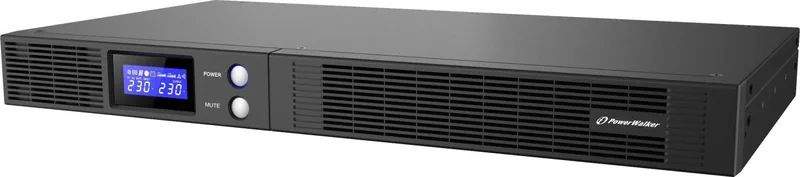
BlueWalker PowerWalker VI 500 R1U, USB/serial: Compact Backup Power with Practical Control
The BlueWalker PowerWalker VI 500 R1U is a space-saving line-interactive UPS designed for users who want reliable protection without adding bulk to their setup. Built for small offices, home workstations, and rack environments, it combines battery backup, surge defense, and voltage regulation in a slim 1U format that is easy to fit into a modern IT layout.
What makes this series especially appealing is its balance between simplicity and useful features. The UPS supports USB and serial communication, so it can work with monitoring software and provide status updates for battery level, load, runtime, and power conditions. For anyone searching for the BlueWalker PowerWalker VI 500 R1U, USB/serial Manual, the product itself is straightforward to use and focused on protecting essential computer gear during outages or unstable mains power.
The unit includes automatic voltage regulation, which helps correct small under-voltage and over-voltage problems before they become a bigger issue. That is valuable in places where electrical supply can fluctuate often. On battery, the UPS delivers sine-wave output at 230Vac, giving connected equipment a cleaner and more dependable backup experience. The LCD panel adds convenience by showing key information at a glance, while audible alerts help users react quickly to utility failure, overload, or low battery conditions.
The PowerWalker VI 500 R1U is especially well suited to computers, monitors, and external storage devices. It offers four IEC C13 outlets and a design that focuses on core productivity equipment rather than high-power appliances. Like most UPS systems in this class, it performs best when the load stays comfortably below its maximum rating, leaving room for stable operation and longer battery life.
Notes
- Best results come from charging the battery before first use.
- Keep vents clear and place the unit in a cool, dry indoor area.
- For storage, maintain a full charge and recharge periodically.
Overall, this UPS is a smart choice for users who want dependable backup power, clean monitoring options, and a compact footprint. It is a practical fit for everyday protection where uptime matters and space is limited.
Search for 67,706 Manuals online


Type-in Brand or Model
Alexandra Watson
10 months ago
Is this UPS too loud for a home office? My unit beeps extremely loudly and buzzes right after switching on.
Manual.ly
10 months ago
The UPS can be audible when it switches to battery or when an alarm is active. However, a very extreme, continuous high-pitched beep plus noticeable buzzing right after power-on is not something you should tolerate in an occupied room. For best results, avoid using it in living or work areas and place it in a separate, ventilated cabinet or storage room (server rack, utility room). Also check the connected load and battery condition, and verify whether any audible alarm or test mode is enabled. If the loud noise happens immediately on every startup and cannot be reduced, please stop using it there and contact support so we can help with troubleshooting or a replacement.