
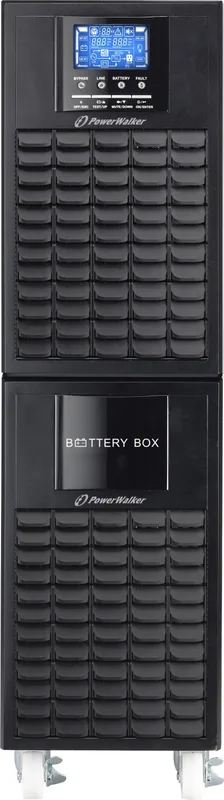
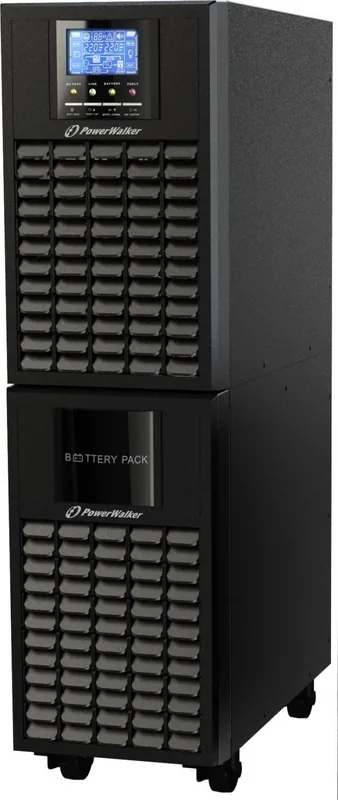
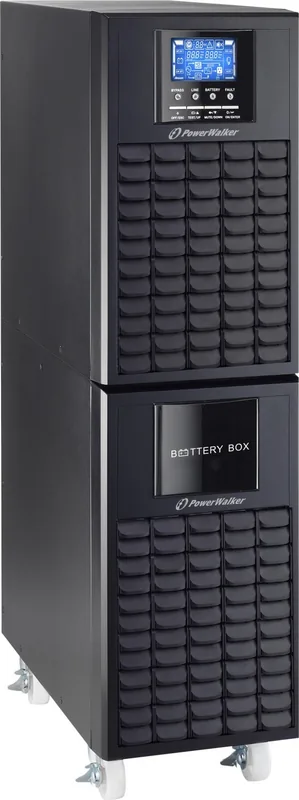
PowerWalker VFI 6000 CG PF1 Manual
PDF manual · 60 Pages
English



Quick check
Incorrect answer, please try again.
Chat with your PowerWalker VFI 6000 CG PF1 manual using AI
Get instant AI answers from your PowerWalker VFI 6000 CG PF1 manual
Ask anything about the PowerWalker VFI 6000 CG PF1. Answers come from this manual, with the pages they are based on.
VFI 6000 CG PF1 Maintenance Schedule
Charge the UPS for 1-2 hours every 2 months when stored between 40 and 45 degrees Celsius.
Charge the UPS for 1-2 hours every 3 months when stored between -25 and 40 degrees Celsius.
Free maintenance reminders
Timed to your purchase date. Always free, unsubscribe anytime.
Ask a Question
Do you recommend VFI 6000 CG PF1?
Yes NoFrequently Asked Questions
The UPS provides USB and RS-232 ports for local monitoring, supports vendor software for Windows, Linux and macOS, and offers optional SNMP for network management.
Is this answer helpful?
Yes. The long-run variant supports external battery packs but requires a DC breaker or protection device between the UPS and battery pack; follow polarity, voltage and jumper settings carefully and only connect matching battery types.
Is this answer helpful?
Parallel operation is supported on parallel-capable models. All units must be identical models/configurations, each must have its own battery pack, and you must calibrate output voltage and measurement differences (<1.5V) before bringing the parallel system online.
Is this answer helpful?
ECO mode routes utility power through bypass when voltage and frequency are within set thresholds for energy savings. CVCF locks output frequency to 50/60 Hz (converter mode) regardless of input within a wide range; use CVCF when fixed output frequency is required.
Is this answer helpful?
Always connect earth first and disconnect last, use original packaging for transport, isolate and verify voltage before servicing, disconnect batteries prior to internal work, and replace fuses with identical type/amperage. Qualified personnel should perform internal adjustments.
Is this answer helpful?
Charge batteries at least 9–10 hours to reach most capacity before first use. For storage, recharge periodically: every 3 months at -25–40°C or every 2 months above 40°C, with 1–2 hours charge per cycle as recommended.
Is this answer helpful?
The UPS signals overload via buzzer and LCD. Prolonged overload can force transfer to bypass or a fault shutdown. Faults display specific codes; some conditions require cutting off utility, battery and output and contacting service.
Is this answer helpful?
Advantages and Disadvantages
Advantages

- True online double-conversion topology with ±1% output voltage regulation and 0 ms transfer time for seamless protection.
- Configurable output voltage/frequency, ECO and CVCF modes for flexible deployment and energy savings.
- USB and RS-232 communications plus optional SNMP and monitoring software for broad management support.
- Supports parallel operation for redundancy or increased capacity with per-unit battery independence.
- Comprehensive front-panel LCD, LEDs, audible alerts and detailed fault/warning codes for clear diagnostics.
Disadvantages

- Advanced settings (battery count, charger/inverter calibration) require qualified technicians and risk damage if set incorrectly.
- Standard models cannot be converted to long-run; improper battery connections can cause fire or permanent damage.
- Parallel systems need careful pre-calibration of voltages and identical configurations, adding installation complexity.
- Long-run configurations require external battery breakers and appropriate wiring; adds cost and space.
- Device emits audible alarms in many warning/fault states; some alarms cannot be muted until faults are resolved.
Product Specification
Type
Tower
Classification
VFI (On-Line)
Apparent Power
6,000VA
Active Power
6,000W
Voltage
208V, 220V, 230V, 240V
Input
Hardwired
Outputs
1x Hardwired
Interfaces
USB, serial
Data Line Protection
RJ-11, RJ-45
Runtime
11.2min (50%), 3.7min (100%)
Charge Time
9h
Weight
130.47lb
Dimensions (WxHxD)
7.48x27.09x14.53in
Features
LCD
Product Description
BlueWalker PowerWalker VFI 6000 CG PF1, USB/serial Manual
The BlueWalker PowerWalker VFI 6000 CG PF1 is a robust online double-conversion UPS designed for commercial and industrial environments where dependable, continuous power is essential. Built to deliver up to 6000 VA/6000 W, this tower-style unit offers full-featured protection with USB and RS-232 communications, optional parallel capability, and configurable settings to match a variety of site requirements. It supports both standard and long-run battery configurations and includes safety features, maintenance bypass, and intelligent slots for expanded management.
Key product highlights
The VFI 6000 CG PF1 provides precise voltage regulation (±1%), high efficiency (>94% in AC mode), and fast, seamless transfer characteristics (0 ms line-to-battery). It supports selectable output voltages (208/220/230/240 VAC) and flexible frequency behavior (50/60 Hz or automatic selection). Built-in charging and user-adjustable battery parameters allow tuning for internal or external battery packs; long-run models accept external battery packs with DC breakers. The unit includes front-panel LCD and LEDs to monitor mode, load, battery state, faults and warnings, plus audible alarms and mute function.
Operationally, the UPS covers AC, ECO, CVCF (constant voltage/constant frequency) and battery modes, with options for bypass behavior (allowed/forbidden/manual enable) and ECO thresholds for energy saving. Parallel models allow multiple units to share load for redundancy or capacity scaling; the manual outlines calibration and safe procedures for adding or removing units. Maintenance and service features—like an EPO connector, maintenance bypass switch and clear installation wiring guidance—simplify safe handling and service by qualified personnel.
Designed to meet IEC/EN safety and EMC standards, the PowerWalker VFI 6000 CG PF1 includes protections for overload, short circuit, fan failure, over-temperature and battery conditions, with detailed fault and warning codes shown on the display. Monitoring software and SNMP options extend management capabilities across Windows, Linux, macOS and network environments.
This model suits data centers, network closets, industrial controllers and critical business equipment that require clean, continuous power and flexible battery runtime options. With clear installation, calibration, and maintenance guidance, the VFI 6000 CG PF1 aims to combine high availability with configurable control for professional deployments.
Notes
- Long-run models require external battery packs and DC protection breakers; never mix internal and external battery circuits without following documented procedures.
- Parallel systems require identical unit configuration and careful voltage/current calibration before placing into service.
- Many advanced settings (battery count, charge current, inverter calibration) should be changed only by qualified technicians.
Search for 67,706 Manuals online


Type-in Brand or Model