
PowerWalker MBS/PDU IEC Manual
PDF manual · 2 Pages
English



Quick check
Incorrect answer, please try again.
Chat with your PowerWalker MBS/PDU IEC manual using AI
Get instant AI answers from your PowerWalker MBS/PDU IEC manual
Ask anything about the PowerWalker MBS/PDU IEC. Answers come from this manual, with the pages they are based on.
Ask a Question
Do you recommend MBS/PDU IEC?
Yes NoFrequently Asked Questions
It lets you move connected equipment from UPS power to direct utility power during maintenance or UPS replacement. This helps keep systems running while the UPS is serviced or disconnected.
Is this answer helpful?
It is intended for use with UPS systems that match the unit’s connection style and power rating. You should confirm compatibility with the UPS input/output arrangement before installation.
Is this answer helpful?
In bypass mode, equipment is powered directly by utility power, so UPS protection is temporarily removed. That is why bypass should be used only when the utility supply is stable and maintenance is planned.
Is this answer helpful?
No. It is designed for indoor use only. It should be kept away from moisture, liquids, and excessive heat to maintain safe operation and long-term reliability.
Is this answer helpful?
Confirm that utility power is normal and stable. Then move the rotary switch from Normal to Bypass. After maintenance, reconnect the UPS and return the switch to Normal.
Is this answer helpful?
The unit supports up to 16A on 208/220/230/240 VAC models and up to 20A on 110/115/120/127 VAC models. Always match the device to the correct voltage and load requirements.
Is this answer helpful?
Advantages and Disadvantages
Advantages

- Enables maintenance and UPS replacement without interrupting connected equipment.
- Manual bypass control is simple and easy to understand during operation.
- Compact and lightweight design fits small technical or office power setups.
- Includes a circuit breaker and clear connection points for safer installation.
Disadvantages

- Designed for indoor use only, so it is not suitable for outdoor environments.
- Requires careful grounding and leakage-current checks before use.
- Must be matched to the correct voltage and connector standard.
- Bypass operation depends on user action, so it is not fully automatic.
Product Specification
Dimensions
6.54x6.34x3.51in
Weight
2.20lb
Note
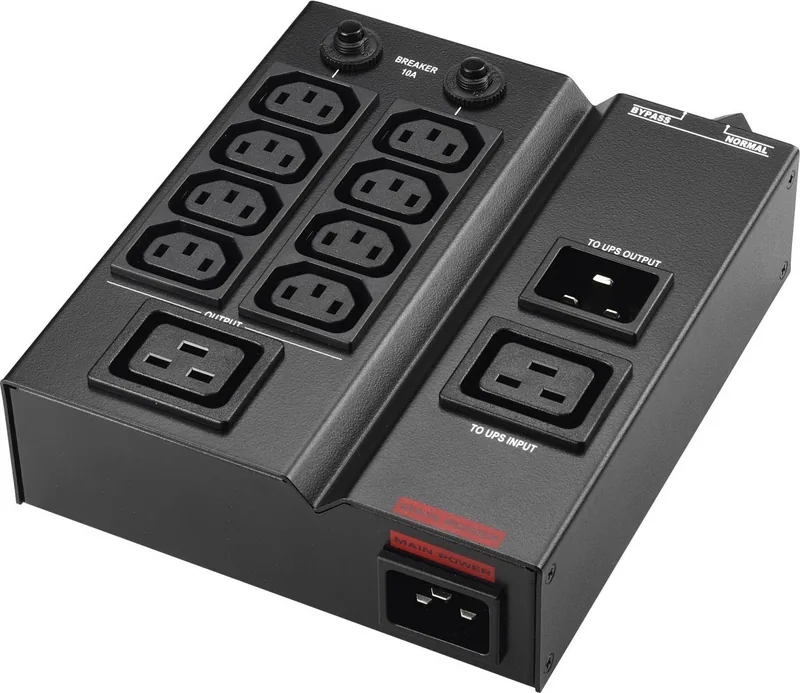
Outputs: 8x IEC C22. Input: 1x IEC C20, 2x IEC C19
Product Description
BlueWalker PowerWalker MBS/PDU IEC Bypass Switch: Reliable Power Transfers for UPS Maintenance
The BlueWalker PowerWalker MBS/PDU IEC Bypass Switch is designed for environments where uptime matters. It works alongside UPS systems and large voltage regulators, giving users a practical way to shift connected equipment from UPS protection to direct utility power when maintenance is needed. This makes routine servicing, battery replacement, or UPS checks far less disruptive.
What makes this device especially useful is its manual rotary bypass function. With a simple switch from Normal to Bypass, the load can stay powered while the UPS is safely taken out of the circuit. That means connected systems continue running on utility power, helping reduce downtime during planned work. For offices, technical rooms, and small server setups, this kind of control is a major advantage.
The product is built for straightforward integration. It includes dedicated sockets for UPS input and output, an AC input, an output receptacle, and a circuit breaker for added protection. Setup is direct: connect the wall power, link the UPS to the unit, and route equipment through the output side. The BlueWalker PowerWalker MBS/PDU IEC Bypass Switch Manual emphasizes careful installation and correct switching steps, which is important for safe and stable operation.
Safety is a strong part of its design philosophy. The unit is intended for indoor use only and should be kept away from moisture, heat, and liquids. Proper grounding is required, and the combined leakage current of the unit and attached devices must remain within safe limits. These reminders make it clear that this is a professional power accessory rather than a casual plug-in adapter.
In practical terms, the device is a compact solution with solid electrical handling for its class. It supports up to 16A on higher-voltage systems and up to 20A on lower-voltage variants, while remaining relatively light and space-efficient. That balance of capacity and simplicity makes it a smart companion for users who want controlled bypass operation without adding complexity to their power setup.
Notes
- Best suited for scheduled maintenance and UPS replacement workflows.
- Always verify the utility supply is normal before switching to bypass.
- Match the unit to the correct voltage and connector type before installation.
Search for 67,706 Manuals online


Type-in Brand or Model