
PowerA Fusion Pro Manual
PDF manual · 8 Pages
English



Quick check
Incorrect answer, please try again.
Chat with your PowerA Fusion Pro manual using AI
Get instant AI answers from your PowerA Fusion Pro manual
Ask anything about the PowerA Fusion Pro. Answers come from this manual, with the pages they are based on.
Ask a Question
Do you recommend Fusion Pro?
Yes NoFrequently Asked Questions
Connect the orange end of the 3.5mm cable into the headset and the black end into your device. For Xbox, check audio settings for headset format. For PC, ensure separate ports are used with a splitter if needed.
Is this answer helpful?
Yes, the boom microphone is detachable. You can remove it when not needed or insert it and bend it to position it in front of your mouth for talking.
Is this answer helpful?
Adjust the volume by turning the Volume Control Dial located on the headset. Start with minimum volume before wearing and turn counter-clockwise to increase.
Is this answer helpful?
Yes, Game chat is supported in-game or through the Nintendo Switch Online App. Adjust volume using the console physical buttons or via Quick Settings screen.
Is this answer helpful?
This product comes with a two-year limited warranty. Visit the official website for details on claims and support for the specific model purchased.
Is this answer helpful?
Check that the 3.5mm audio cable is securely attached to both the source device and headset. Ensure the Volume Control Dial is not set to minimum volume.
Is this answer helpful?
Make sure the microphone is securely attached and the mute button is not pressed. Check console or PC menu settings to ensure the headset mic is selected for input.
Is this answer helpful?
Advantages and Disadvantages
Advantages

- 50mm precision tuned drivers deliver rich audio with detailed bass and treble for competitive gaming.
- Detachable boom microphone allows flexibility for users who do not require voice chat functionality.
- Compatible with Xbox, PS4, Nintendo Switch, and PC via standard 3.5mm audio connection.
- Foldable design and padded headband ensure comfort and portability during travel or storage.
- Comes with a two-year limited warranty providing long-term security for the purchaser.
Disadvantages

- Wired connection limits movement distance from the console or PC device being used.
- PC users with separate audio jacks must purchase a separate splitter cable for audio input.
- Volume control dial requires manual adjustment which might not suit users wanting software control.
- Microphone placement may require bending which can be fragile if handled too roughly.
- No RGB lighting or wireless capabilities included compared to higher end gaming accessories.
Product Specification
Type
Headphones (Over-Ear)
Form
Headband
Principle
Closed
Microphone
Microphone Boom (Detachable)
Connection
3.5mm Jack
Wireless
No
Cable
Single-sided
Controls
Volume control, Mute button
Impedance
20 Ohm
Sensitivity
116 dB
Driver
1.97 in
Product Description
PowerA Fusion Pro Wired Gaming Headset Overview
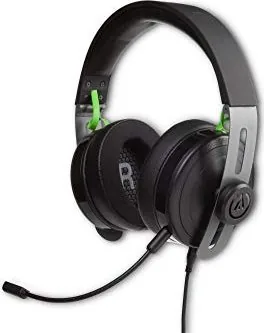
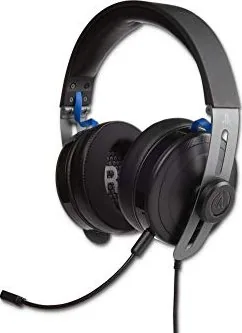
Gamers seeking immersive audio solutions will find the PowerA Fusion Pro Wired Gaming Headset to be an excellent choice for their modern gaming setups. This wired headset delivers clear sound and reliable communication designed specifically for console and PC environments. Featuring 50mm precision tuned drivers, the audio experience is rich and detailed, ensuring you hear every footstep and dialogue in your favorite competitive games. The detachable boom microphone ensures flexibility, allowing you to remove it when not needed or adjust it for optimal voice clarity. The audio cable measures forty-two inches which allows for comfortable movement while seated.
Setup and Compatibility Information
Connecting the headset is straightforward with a 3.5mm audio cable included in the package. You simply connect the orange end of the 3.5mm cable into the headset, and the black end into your device. For PC users with separate audio ports, a splitter may be required to function correctly. The headset works seamlessly with Xbox, PlayStation 4, Nintendo Switch, and personal computers. Adjusting volume is managed via the onboard control dial, positioned conveniently for quick changes while immersed in gameplay. Users must ensure volume is set to minimum before wearing to avoid sudden loud noise that might damage hearing during initial sessions. System settings on Xbox require navigation to volume and audio output for best formats.
Comfort and Design Features
The padded headband and noise-isolating ear cushions provide lasting comfort during extended gaming sessions of many hours. The foldable design makes storage easy and portable for travel to different locations. Users should consult the detailed PowerA Fusion Pro Wired Gaming Headset Manual for specific troubleshooting tips regarding static or microphone issues. Proper configuration ensures friends can hear you clearly without interference or background noise. The microphone mute button allows instant silence when privacy is needed during competitive matches. This ensures you can communicate with teammates only when necessary.
With a two-year limited warranty, this accessory offers peace of mind for the buyer. It complies with strict regulations for electromagnetic interference in residential installations. Whether prioritizing tactical awareness in shooters or cinematic immersion in RPGs, this headset balances performance with durability. The manual provides warranty details to be accessed online. The device generates and uses radio frequency energy so proper setup prevents interference with other electronics. This ensures safety and compliance with all regional standards for electronic devices used worldwide.
*Note: Check system audio settings for best results on Nintendo Switch and PC. *Note: Always verify microphone connection for online chat functionality.
Search for 67,732 Manuals online


Type-in Brand or Model