
Plustek SmartOffice PS406U Plus Manual
PDF manual · 49 Pages
English



Quick check
Incorrect answer, please try again.
Chat with your Plustek SmartOffice PS406U Plus manual using AI
Get instant AI answers from your Plustek SmartOffice PS406U Plus manual
Ask anything about the Plustek SmartOffice PS406U Plus. Answers come from this manual, with the pages they are based on.
SmartOffice PS406U Plus Maintenance Schedule
Replace the pad-module every 50,000 scans (A4, 70 g/m2). Use the Counter Utility program to track scan counts.
Replace the pick-up roller every 300,000 scans (A4, 70 g/m2) to maintain performance.
Ask a Question
Do you recommend SmartOffice PS406U Plus?
Yes NoFrequently Asked Questions
It is rated for up to 40 ppm or 80 ipm at 200 dpi color, 300 dpi grayscale, and 300 dpi black-and-white settings. Actual speed can vary with the selected software, computer processor, memory, and scan settings.
Is this answer helpful?
Yes. Its automatic feeder supports duplex scanning, capturing front and back sides in one pass. The TWAIN interface also allows separate front and back settings and can combine both sides into one arranged output when using automatic size detection.
Is this answer helpful?
The automatic feeder holds up to 100 sheets of A4 or Letter media at 70 g/m2. It supports up to 30 business cards or up to five plastic cards per stack, subject to the stated media requirements.
Is this answer helpful?
Use smooth, dry, rectangular media between 50 and 105 g/m2. Avoid staples, clips, wet ink, folds, tears, carbon paper, tracing paper, envelopes, photographs, and unusually shaped items to reduce jams and damage.
Is this answer helpful?
Yes. The supplied software ecosystem includes OCR-compatible tools, including I.R.I.S. Readiris Pro 10 Corporate Edition. OCR can recognize captured text for conversion into editable formats, with results depending on source quality and settings.
Is this answer helpful?
The unit connects through USB 2.0 High Speed and uses its included external power adapter. The listed operating systems are Windows 2000 Professional, Windows XP, Windows Vista, and Windows 7.
Is this answer helpful?
Advantages and Disadvantages
Advantages

- Up to 40 ppm and 80 ipm duplex scanning supports high-volume office workflows.
- 100-sheet ADF reduces reloads during batch capture tasks.
- 600 dpi CCD scanning supports detailed color, grayscale, and black-and-white output.
- Handles business cards and plastic cards up to 1.2 mm thick.
- TWAIN support, DI Capture, DocAction, and front-panel presets add workflow flexibility.
Disadvantages

- Designed for older Windows environments listed as Windows 2000, XP, Vista, and 7.
- ADF media is limited to 50-105 g/m2 and excludes folded, damaged, or irregular materials.
- Feed roller and pad module require periodic cleaning and replacement.
- Plastic-card batches are limited to five cards, and business-card batches to 30 cards.
Product Specification
Type
Document scanner (CCD)
Resolution
600 x 600 dpi
Speed
40/40 ppm (B&W/Color)
Paper/Film Size
A4
Paper/Film Input
100-sheet ADF, duplex unit
Connections
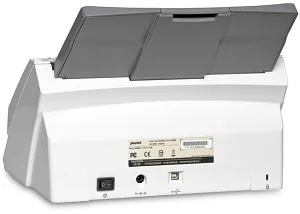
1 x USB 2.0
Product Description
Plustek SmartOffice PS406U Plus - Read, Download & Print Free
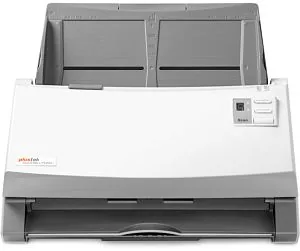
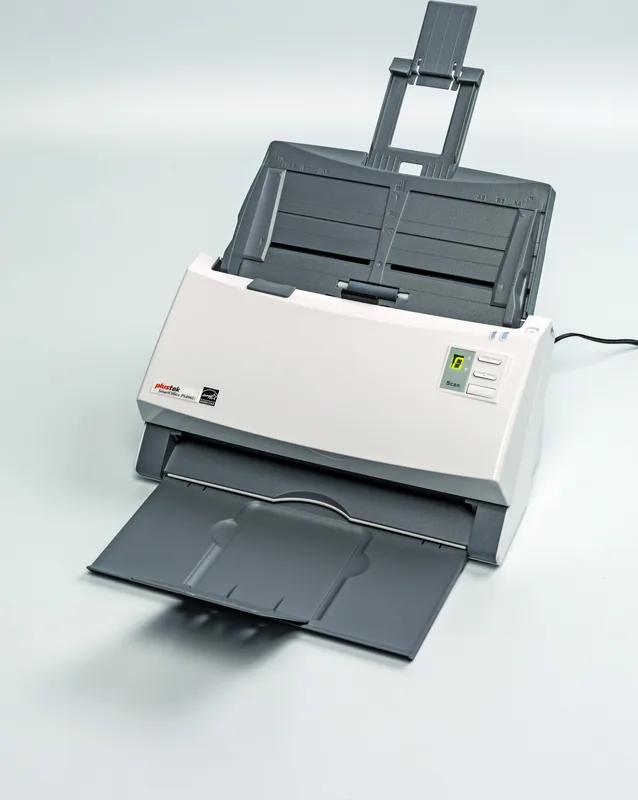
The Plustek SmartOffice PS406U Plus is built for busy offices that need a fast, dependable way to capture paper-based information and move it into everyday workflows. With a compact desktop footprint, USB 2.0 connectivity, and an automatic feeder, it is designed to keep routine tasks moving without demanding a complicated setup.
Fast duplex performance for demanding workloads
This model delivers scanning speeds of up to 40 ppm or 80 ipm at 200 dpi in color, and maintains the same rated speed at 300 dpi in grayscale or black and white. Its 100-sheet automatic feeder supports efficient batch processing for letters, invoices, forms, and other office materials. Duplex capability captures both sides in a single pass, reducing handling time and helping teams stay productive.
The CCD sensor offers an optical resolution of 600 dpi, providing clear color, grayscale, and monochrome results. Supported media sizes range from compact 50.8 x 50.8 mm items to 244 x 356 mm sheets, while the scan area reaches 216 x 356 mm. It also handles stacks of business cards and plastic cards up to 1.2 mm thick, making it flexible for reception desks, administration teams, and records-heavy operations.
Flexible software and simple controls
The Plustek SmartOffice PS406U Plus works with TWAIN-compatible applications and includes tools such as Plustek DI Capture and DocAction. These utilities help users create repeatable scan profiles, select destinations, and launch common tasks quickly. Front-panel controls include up, down, and scan buttons, plus a function display for selecting preset tasks directly from the unit.
OCR-ready workflows are supported through bundled compatible software, allowing captured text to be recognized for easier editing and searching. Users can also send results toward common destinations such as printers, email applications, storage locations, or image-editing tools, depending on their configured workflow.
Built for practical office use
An ultrasonic sensor can detect overlapping sheets during feeder use on supported configurations, helping reduce multi-feed errors. Status LEDs provide immediate feedback for ready mode, standby, open-cover warnings, paper jams, and internal errors. The unit enters standby after 10 minutes of inactivity to help lower energy use.
Maintenance is straightforward. The feeder, roller, pad module, and scanning glass can be accessed for cleaning, while the supplied calibration sheet helps restore accurate color performance when needed. Plustek recommends replacing the pad module after approximately 50,000 scans and the feed roller after approximately 300,000 scans.
Notes
- Use smooth, dry media between 50 and 105 g/m2 for reliable feeding.
- Remove staples, clips, and similar attachments before loading.
- Keep the feeder and sensor clean to support consistent results.
- Plustek SmartOffice PS406U Plus - Read, Download & Print Free is a useful search phrase for users exploring this high-speed office scanner.
Search for 67,706 Manuals online


Type-in Brand or Model