
Plustek eScan A280 Essential Manual
PDF manual · 127 Pages
English



Quick check
Incorrect answer, please try again.
Chat with your Plustek eScan A280 Essential manual using AI
Get instant AI answers from your Plustek eScan A280 Essential manual
Ask anything about the Plustek eScan A280 Essential. Answers come from this manual, with the pages they are based on.
eScan A280 Essential Maintenance Schedule
Replace the pad module every 50,000 sheets of scans (A4, 70 g/m2) to maintain performance.
Replace the feed roller every 300,000 sheets of scans (A4, 70 g/m2) to ensure reliable feeding.
Ask a Question
Do you recommend eScan A280 Essential?
Yes NoFrequently Asked Questions
It is a network-enabled scanner for shared office, reception, and business workflows. Its touch display, automatic feeder, configurable presets, and multiple delivery choices help users capture and distribute materials with minimal steps.
Is this answer helpful?
Yes. The eScan A280 Essential supports single-sided and double-sided scanning. Users can select the preferred scan direction from the main interface or through advanced settings.
Is this answer helpful?
Output can be sent to USB storage, a computer, a mobile device, email, FTP, or cloud services. Supported cloud options include Dropbox, Google Drive, Evernote, Box, SharePoint, and SharePoint SSL.
Is this answer helpful?
Available formats include PDF, JPG, TIFF, PNG, multi-page PDF, and multi-page TIFF. Resolution options range from 100 dpi to 600 dpi, allowing users to balance speed, clarity, and storage needs.
Is this answer helpful?
Yes. Business cards can be loaded horizontally, with up to 30 cards in a stack. Plastic cards can also be processed when the pad module is removed; their maximum thickness is 1.2 mm.
Is this answer helpful?
Regular cleaning helps prevent dust, ink, and toner buildup. The pad module is recommended for replacement after 50,000 scans, while the feed roller is rated for approximately 300,000 scans.
Is this answer helpful?
Advantages and Disadvantages
Advantages

- 7-inch multi-touch screen enables direct control of settings and destinations.
- Supports USB, PC, mobile, email, FTP, and major cloud platforms.
- Duplex scanning, 600 dpi optical resolution, and a 50-sheet automatic feeder improve productivity.
- Includes useful processing tools such as blank-side removal, hole-punch removal, watermarks, crop, rotate, and reorder.
Disadvantages

- Color speed is lower than grayscale and black-and-white speed.
- Connected delivery depends on network setup, and some functions require companion apps.
- Paper preparation is important because staples, folds, damp ink, and unusual materials can cause jams.
- Plastic cards require removal of the pad module and are limited to 1.2 mm thickness.
Product Specification
Type
Document scanner (CIS)
Resolution
600 x 600 dpi
Speed
20/20 ppm (black and white/color)
Paper/film format
A4
Paper/film feed
50-sheet ADF, duplex unit
Memory
1 GB (RAM)
Ports
1 x USB 2.0, 1 x USB-A 2.0 (host), 1 x LAN
Wireless
Wi-Fi
Display
Color, 7 in, touchscreen
Software
OCR software
Dimensions
12.52 x 7.44 x 6.69 in
Weight
6.17 lb
Features
LED lighting, USB direct scan
Manufacturer warranty
1 year
Product Description
Plustek eScan A280 Essential - Read, Download & Print Free
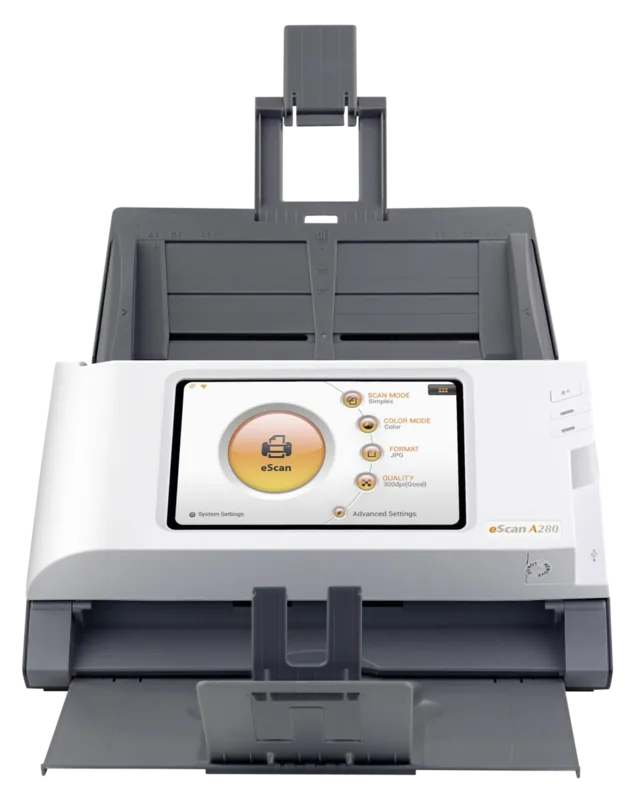
The Plustek eScan A280 Essential is a compact network scanner designed to make routine capture tasks faster, clearer, and easier to manage. Its 7-inch IPS multi-touch display puts essential controls directly at the device, allowing users to select color mode, output type, quality, and destination without relying on a separate workstation for every job. The interface is built for practical office workflows where convenience and repeatable results matter.
Flexible capture for everyday work
With an automatic feeder that holds up to 50 sheets, the eScan A280 Essential helps teams process batches efficiently. It supports single-sided and double-sided scanning, with speeds of up to 20 ppm or 40 ipm in grayscale and black and white at 200 dpi. Color scanning is supported at up to 5 ppm or 10 ipm. Optical resolution reaches 600 dpi, providing detailed results for text, graphics, cards, and other everyday materials.
The device accepts a range of common sizes, including A4, A5, B5, Letter, Legal, and Invoice. It can also handle business cards and plastic cards up to 1.2 mm thick when prepared correctly. Adjustable guides, an extendable feeder, and clear loading guidance help keep materials aligned during operation.
Connected destinations at your fingertips
Network support is one of the key strengths of the Plustek eScan A280 Essential. It can connect through LAN or Wi-Fi and send output to USB storage, a computer, a mobile device, email, FTP, or supported cloud services. Available cloud choices include Dropbox, Google Drive, Evernote, Box, SharePoint, and SharePoint SSL. This flexibility makes it useful for shared office environments, reception areas, and teams that need quick access across multiple destinations.
Users can also create presets for color mode, format, resolution, compression, and scan direction. Supported formats include PDF, JPG, TIFF, PNG, multi-page PDF, and multi-page TIFF. Useful cleanup options include blank-side removal, hole-punch removal, watermarking, and blank-sheet separation for multi-page output. On-screen preview tools allow images to be rotated, cropped, reordered, or deleted before delivery.
Built for reliable daily use
The eScan A280 Essential is designed for a daily workload of up to 1,500 scans. Regular cleaning and timely replacement of the pad module and feed roller can help maintain consistent performance. The pad module is recommended for replacement after 50,000 scans, while the feed roller is rated for up to 300,000 scans.
Notes
- A DHCP-enabled network and internet access are helpful for connected features and automatic date and time settings.
- PC delivery requires the eScan Client application, while mobile delivery requires the Plustek eScan app.
- Prepare materials carefully by removing clips, staples, folds, and wet ink before loading.
Search for 67,706 Manuals online


Type-in Brand or Model