
Pioneer DJ DJM-S5 Manual
PDF manual · 81 Pages
English



Quick check
Incorrect answer, please try again.
Chat with your Pioneer DJ DJM-S5 manual using AI
Get instant AI answers from your Pioneer DJ DJM-S5 manual
Ask anything about the Pioneer DJ DJM-S5. Answers come from this manual, with the pages they are based on.
Ask a Question
Do you recommend DJM-S5?
Yes NoFrequently Asked Questions
The DJM-S5 is designed for use with Serato DJ Pro on a compatible PC or Mac. Connecting the mixer unlocks Serato DJ Pro. Windows systems use the dedicated audio driver and Setting Utility, while Mac systems use the Setting Utility.
Is this answer helpful?
Yes. Each channel has RCA LINE/PHONO inputs and a LINE/PHONO selector. Connect turntables using phono mode and their ground wires to the SIGNAL GND terminals. It can also use DVS control vinyl to operate digital tracks in Serato DJ Pro.
Is this answer helpful?
No. Control vinyl and control CDs are sold separately. The mixer supports DVS with Serato DJ Pro, allowing compatible turntables or media players to control digital music files.
Is this answer helpful?
Available modes include Hot Cue, Roll, Auto Loop, Sampler, Gate Cue, Cue Loop, Saved Loop, Scratch Bank, Transport, and four MIDI user modes. Pitch Play and Saved Flip are also available when the required Serato expansions are purchased and activated.
Is this answer helpful?
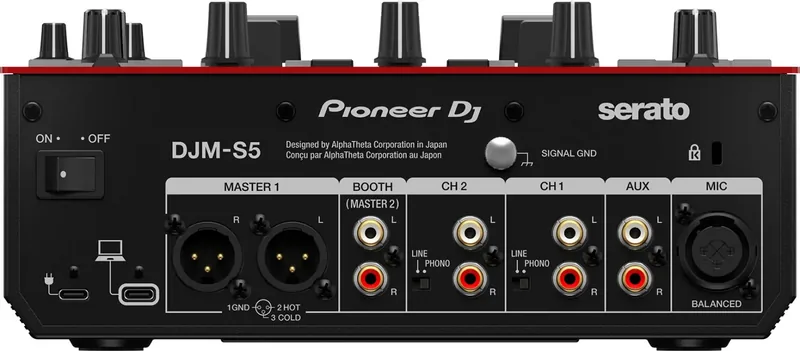
The mixer includes balanced XLR MASTER1 outputs for main sound systems and RCA BOOTH/MASTER2 outputs that can be configured for booth monitoring or master output. It also has 1/4-inch and 3.5 mm stereo headphone outputs.
Is this answer helpful?
Scratch Cutter applies a selected rhythmic cut pattern while you scratch using turntable platters or media-player jog wheels. Activate the mode by holding an FX/CUT button, select a pattern, set its beat division, then use the effect lever to engage it.
Is this answer helpful?
Advantages and Disadvantages
Advantages

- Two-channel USB, phono, and line connectivity supports laptops, turntables, media players, and external sources.
- Serato DJ Pro unlocks when the mixer is connected, with integrated DVS compatibility for control vinyl or CDs.
- Scratch-focused tools include adjustable crossfader feel, curve settings, reverse, Fader Start, Crossfader Hot Cue, and Scratch Cutter.
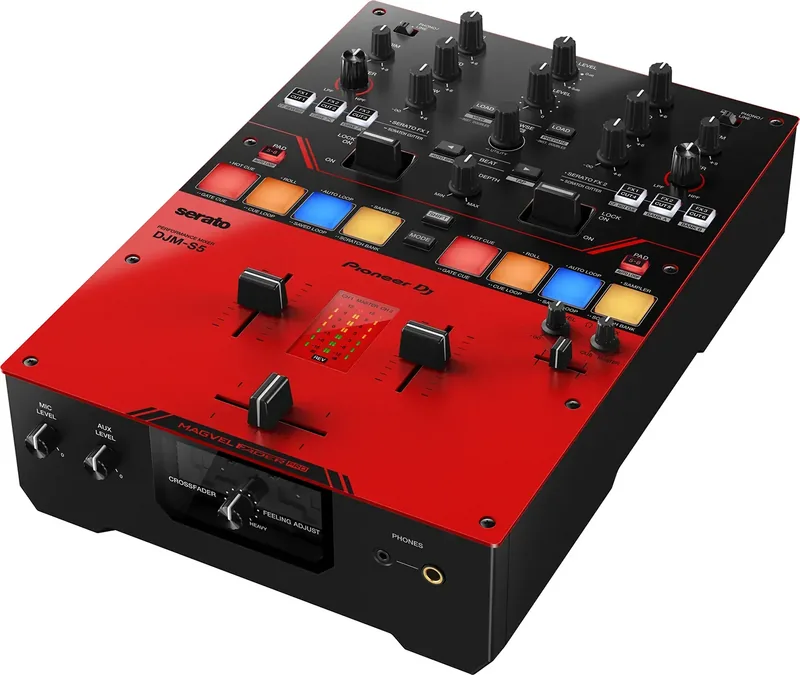
- Performance pads provide Hot Cues, loops, rolls, sampler control, transport functions, Scratch Bank, and MIDI user modes.
- Balanced XLR master output, RCA booth/master output, dual headphone jacks, microphone input, and AUX input support flexible setups.
Disadvantages

- Serato DJ Pro software is not included as an installed package and must be downloaded separately.
- DVS control vinyl and control CDs are not included, so vinyl or CD control requires additional purchases.
- Pitch Play and Saved Flip require separately purchased and activated Serato expansion packs.
- The mixer requires USB power, and insufficient computer USB power can affect operation in some setups.
- It is a two-channel mixer, which may not suit DJs needing simultaneous control of three or four channels.
Product Specification
Channels
2
Equalizer
3-band
Kill switches
No
Inputs
2x Phono/Stereo Line In (RCA), Stereo Line In (XLR/0.25 in combo), Stereo Line In (RCA)
Outputs
Master Out (XLR), Booth/Monitor Out (RCA), Headphones (0.14 in jack), Headphones (0.25 in jack)
Additional connections
USB-C
Special features
Audio interface (24-bit/48 kHz), Crossfader curve control
Dimensions
9.65 x 14.31 x 4.25 in (W x H x D)
Weight
7.5 lb
Product Description
Pioneer DJ DJM-S5 Manual: A Compact Scratch Mixer for Serato DJ Pro
The Pioneer DJ DJM-S5 is a two-channel battle-style DJ mixer designed for creative performance, scratch routines, and flexible Serato DJ Pro control. This Pioneer DJ DJM-S5 Manual overview highlights a compact unit that combines traditional mixer controls with performance-focused features for DJs who want hands-on command of digital and external audio sources.
At the center of the setup are two channels with selectable USB and phono/line inputs. This makes the mixer suitable for a laptop-based Serato DJ Pro workflow, turntables, media players, and other line-level devices. DVS support lets DJs control digital tracks through compatible control vinyl or CDs, creating a familiar vinyl-style experience while retaining software library access and digital performance tools.
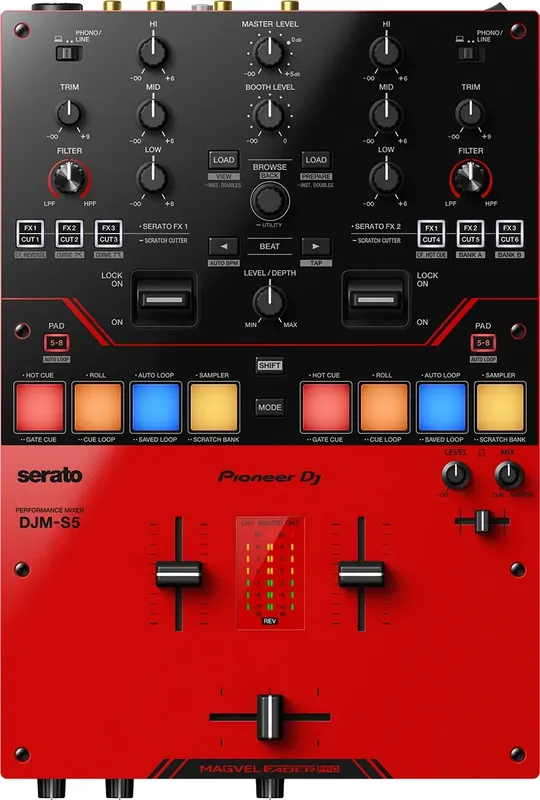
The channel strips provide TRIM control, three-band isolator EQ, channel faders, level meters, and a filter control per channel. A dedicated master section manages overall output, while balanced XLR MASTER1 outputs and RCA BOOTH/MASTER2 outputs accommodate main sound systems and booth monitors. Separate microphone and AUX inputs add useful flexibility for hosts, vocal announcements, and additional playback sources.
Scratch-oriented control is a major strength of the DJM-S5. The adjustable crossfader feeling control allows DJs to alter fader weight to suit their technique. Crossfader curve, reverse operation, cut settings, Fader Start, and Crossfader Hot Cue features provide further ways to personalize transitions and trigger routines. Scratch Cutter adds rhythmic cut patterns while scratching, helping performers create sharper rhythmic phrases without relying solely on crossfader movements.
Six FX/CUT buttons work with Serato DJ Pro effects and can also access mixer functions such as crossfader reverse, curve choices, Hot Cue behavior, and Serato sampler banks. The effect lever supports momentary ON use or LOCK ON operation, while beat controls and the LEVEL/DEPTH knob shape timing and intensity. This layout encourages quick, expressive effects work during live sets.
Performance pads unlock Hot Cue, Roll, Auto Loop, Sampler, Gate Cue, Cue Loop, Saved Loop, Scratch Bank, Transport, and user-assigned MIDI modes. Optional Serato expansions can add capabilities including Pitch Play and Saved Flip. The pads therefore support both direct performance and deeper customization for individual DJ styles.
Notes
- Serato DJ Pro is downloaded separately, but the mixer unlocks it when connected.
- Use the supplied USB cable and avoid USB hubs for reliable operation.
- Windows users should install the dedicated audio driver; Mac users can use the Setting Utility for configuration.
- Control vinyl and control CDs for DVS are sold separately.
Search for 67,732 Manuals online


Type-in Brand or Model