
Pico Interactive Pico 4 Manual
PDF manual · 111 Pages
English


Quick check
Incorrect answer, please try again.
Chat with your Pico Interactive Pico 4 manual using AI
Get instant AI answers from your Pico Interactive Pico 4 manual
Ask anything about the Pico Interactive Pico 4. Answers come from this manual, with the pages they are based on.
Pico 4 Maintenance Schedule
Prolonged use may cause dizziness or eye fatigue. It is recommended to take a break every 30 minutes and look at distant objects.
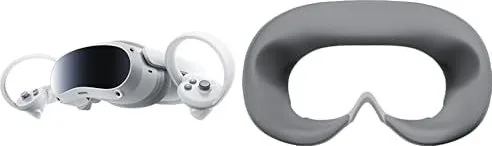
Replace the face cushion if it shows color change, surface fluff, or soft texture after long-term use and repeated cleaning.
Ask a Question
Do you recommend Pico 4?
Yes NoFrequently Asked Questions
A minimum safe space of two meters by two meters is strictly recommended to prevent accidents or damage to the hardware and surroundings while using the headset.
Is this answer helpful?
Yes, the headset supports most prescription glasses with frames under 150mm width. A glasses spacer can be installed to increase space if needed.
Is this answer helpful?
Hardware resets can be performed by holding the power buttons for ten seconds if visual issues occur or the device does not respond normally.
Is this answer helpful?
Yes, there is a dedicated eye protection mode certified by TÜV Rheinland that reduces blue light in three color channels using software algorithms.
Is this answer helpful?
No, this product is not recommended for children aged 12 and under. Teenagers aged 13 and over must use it under adult supervision.
Is this answer helpful?
Do not expose optical lenses to direct sunlight. Exposure may cause permanent yellow spot damage on the screen which is not covered by warranty.
Is this answer helpful?
The kit includes 1.5V AA Alkaline Batteries. Battery management involves standard AA alkaline cells which come included in the box.
Is this answer helpful?
Advantages and Disadvantages
Advantages

- Six degrees of freedom tracking captures translational and rotational movements precisely.
- Dedicated eye protection mode certified by TÜV Rheinland reduces blue light.
- Supports most prescription glasses with frames under 150mm width.
- Interpupillary distance dial prevents eyestrain or ghosting effects effectively.
- Kit includes controllers, lanyards, cables, and alkaline batteries.
Disadvantages

- Not recommended for children under 12 years of age.
- Requires a minimum two meters by two meters safe space.
- Direct sunlight exposure can damage the screen permanently.
- No built-in myopia adjustment function for vision correction.
- Eye and face tracking features available on Pro version only.
Product Specification
Resolution
1x 4320x2160 (2160x2160 per eye)
Field of View
105 degrees (diagonal)
Refresh Rate
90 Hz
Diagonal
1x 2.56 inches
Pixel Density
1887 ppi
Panel
LCD
Interfaces
USB-C, Bluetooth 5.1, Wi-Fi 6 (802.11a/b/g/n/ac/ax)
Features
3D capable, IPD adjustment (2.44-2.83 inches, via hardware, manually), Pass-Through, integrated microphones, integrated speakers, stand-alone device, battery operation (5300 mAh)
Product Description
Pico Interactive Pico 4 Experience
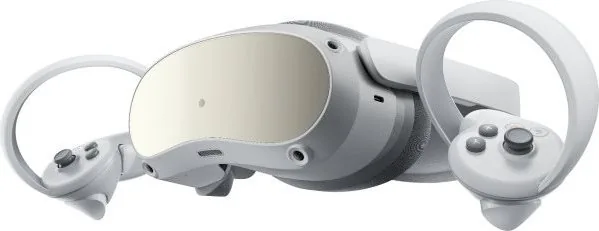
Welcome to the evolving landscape of virtual reality with the Pico Interactive Pico 4 headset. This standalone device offers an immersive experience designed for comfort. Users can enjoy six degrees of freedom, capturing translational and rotational movements for a seamless virtual environment that responds to actions. To ensure eye health during play, there is a dedicated eye protection mode certified by TÜV Rheinland that reduces blue light in three color channels, though this may make the screen appear yellowish.
Setup is straightforward for most users, accommodating various face shapes and eyewear. The headset supports most prescription glasses with frames under 150mm width. If needed, a glasses spacer can be installed to increase space between lenses and eyes, preventing pressure on the nose bridge. An interpupillary distance dial allows for fine-tuning in system settings to prevent eyestrain or ghosting effects. Guardian system defines safety boundaries. Two meters by two meters space is required.
The kit includes two controllers with lanyards for security during active play, plus high-speed USB-C cables and alkaline batteries for immediate power. Charging indicators show battery status via colored LED lights on the headset, distinguishing between charging levels and sleep modes. Blue lights indicate power state while red indicates low battery. For the enhanced experience, the Pro version includes dedicated eye and face tracking cameras for more realistic interaction. However, the device lacks a built-in myopia adjustment function, relying instead on glasses spacers for vision correction. Direct sunlight can damage the screen and is not covered by warranty.
Operating instructions are clear and detailed. The proximity sensor wakes the headset automatically when worn and puts it to sleep when removed. Controllers pair easily via the settings menu using the Home and Trigger buttons. Battery management involves standard AA alkaline cells which come in the box. Long sessions should include 30-minute breaks to avoid dizziness or eye fatigue. Whether you are gaming, watching media, or socializing, the Pico 4 delivers a robust solution for independent VR users. Access the Pico Interactive Pico 4 Manual for specific setup steps regarding controller pairing and IPD alignment to maximize enjoyment. Hardware resets can be performed by holding the power buttons for ten seconds if issues arise.
Notes
Read all safety guidelines. Keep out of reach of children under 12. Avoid direct sunlight.
Search for 67,706 Manuals online


Type-in Brand or Model