

Philips Hue White and Color Ambiance Centura Manual
PDF manual · 8 Pages
English



Quick check
Incorrect answer, please try again.
Chat with your Philips Hue White and Color Ambiance Centura manual using AI
Get instant AI answers from your Philips Hue White and Color Ambiance Centura manual
Ask anything about the Philips Hue White and Color Ambiance Centura. Answers come from this manual, with the pages they are based on.
Ask a Question
Do you recommend White and Color Ambiance Centura?
Yes NoFrequently Asked Questions
Download the Philips Hue app, ensure your bridge is connected to your router, and follow the on-screen prompts to add new lights. The app will automatically detect the Centura once powered on.
Is this answer helpful?
No, the Hue Bridge is required to enable smart features like remote access, voice control, and automation. Without it, you can only use local Bluetooth controls within a limited range.
Is this answer helpful?
The Centura produces over 16 million colors and millions of shades of white light ranging from warm to cool temperatures.
Is this answer helpful?
If you have experience with recessed lighting, it is manageable. However, always turn off power at the breaker and consider hiring an electrician if unsure about wiring connections.
Is this answer helpful?
Yes, it is fully compatible with Amazon Alexa, Google Assistant, and Apple HomeKit for hands-free voice control.
Is this answer helpful?
The integrated LED is designed to last approximately 25,000 hours under normal usage conditions.
Is this answer helpful?
Yes, you can dim or brighten the light using the Philips Hue app, voice commands, or by adding a Hue Dimmer switch to your setup.
Is this answer helpful?
Advantages and Disadvantages
Advantages

- Seamless integration with major smart home ecosystems for voice control
- Offers 16 million colors and adjustable white tones for versatile moods
- Energy-efficient 6-watt design reduces electricity costs significantly
- Available in multiple finishes to match diverse interior decors
- Adjustable beam angle allows precise light direction
Disadvantages

- Requires a separate Hue Bridge for full smart features and remote access
- Installation may require professional assistance if wiring is complex
- Higher upfront cost compared to traditional non-smart recessed lights
- Limited beam spread due to the 20-degree adjustable range
- Dependent on Wi-Fi stability for optimal app performance
Product Specification
Type
Recessed light, spotlight, downlight
Fixed LEDs
no
Socket
1x GU10
Light source
LED, 5.7W, warm white-daylight white (2000-6500K), RGBW, dimmable, 1050lm, 230V
Total power
5.7W
Total luminous flux
1050lm
Material
Plastic
Design
round
Features
dimmable, white color temperature control, RGB color control (up to 16 million different colors), sleep mode, wake-up mode, night mode, timer, programmable lighting settings, dimmer switch, includes Hue dimmer switch
Smart Home
App control (Bluetooth, ZigBee), voice assistant (Amazon Alexa, Apple Siri, Google Assistant, Microsoft Cortana, Samsung Bixby)
Protection class
IP20
Insulation class
2
Dimensions
3.54 in (dia.)
Note
For full functionality, a manufacturer gateway may be required. This may also change via a firmware update. Please note the manufacturer-specific details!
Product Description
Transform Your Space with the Philips Hue White and Color Ambiance Centura Recessed Light Round
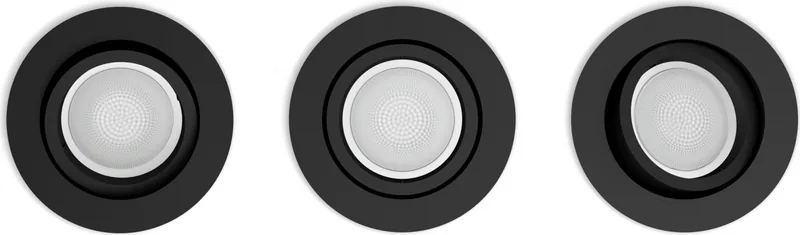
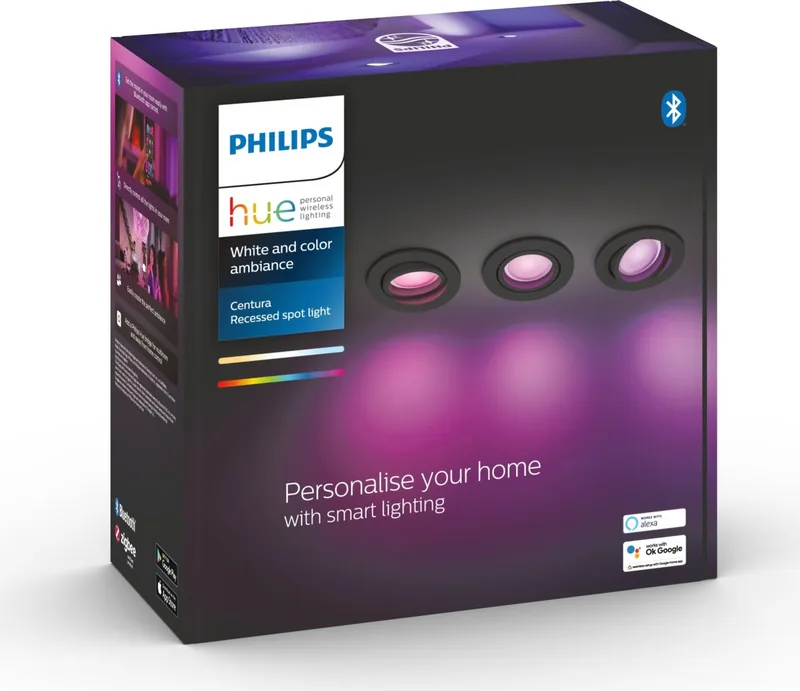
The Philips Hue White and Color Ambiance Centura Recessed Light Round is a premium lighting solution designed to seamlessly integrate into modern interiors. This recessed light fixture offers more than just illumination; it provides an immersive atmosphere that adapts to your mood, time of day, or specific activity. By combining sleek design with advanced smart technology, this product allows homeowners to take full control of their ambient lighting experience without compromising on aesthetics.
Installing the Centura is straightforward for those familiar with standard recessed lighting setups. The unit features a compact round design available in aluminum, black, and white finishes, ensuring it blends perfectly with various ceiling styles. Once installed, the true magic begins. Through the Philips Hue app, users can access over 16 million colors and thousands of shades of white light. Whether you need bright, cool light for focused work or warm, dimmed tones for a relaxing evening, this light delivers instantly.
The manual guide included with the product simplifies the initial setup process. It covers essential steps such as connecting the device to your Hue Bridge, pairing it with the app, and configuring basic scenes. The device supports up to 20 degrees of beam angle adjustment, allowing you to direct light precisely where needed. With a maximum power consumption of 6 watts, it is an energy-efficient choice that does not sacrifice brightness or color fidelity. The GU10 base compatibility ensures easy bulb replacement if necessary, although the integrated LED design promises long-lasting performance.
Beyond basic on and off functions, the Centura integrates with voice assistants like Amazon Alexa, Google Assistant, and Apple HomeKit. This means you can change colors, set timers, or create automation routines using simple voice commands. The ability to sync lights with movies, music, or games further enhances entertainment experiences, turning your living room into a dynamic visual stage. Safety features include protection against overheating and compliance with international electrical standards, making it a reliable addition to any home.
Key Notes
- Ensure the junction box is compatible with the recessed depth requirements before installation.
- Use the official Philips Hue Bridge for full functionality and remote access.
- Regular firmware updates via the app keep the device secure and feature-rich.
Pros and Cons
Pros
- Seamless integration with major smart home ecosystems for voice control.
- Offers 16 million colors and adjustable white tones for versatile moods.
- Energy-efficient 6-watt design reduces electricity costs significantly.
- Available in multiple finishes to match diverse interior decors.
- Adjustable beam angle allows precise light direction.
Cons
- Requires a separate Hue Bridge for full smart features and remote access.
- Installation may require professional assistance if wiring is complex.
- Higher upfront cost compared to traditional non-smart recessed lights.
- Limited beam spread due to the 20-degree adjustable range.
- Dependent on Wi-Fi stability for optimal app performance.
Frequently Asked Questions
How do I connect the Centura light to my smartphone? Download the Philips Hue app, ensure your bridge is connected to your router, and follow the on-screen prompts to add new lights. The app will automatically detect the Centura once powered on.
Can I use this light without a bridge? No, the Hue Bridge is required to enable smart features like remote access, voice control, and automation. Without it, you can only use local Bluetooth controls within a limited range.
What colors can this light produce? The Centura produces over 16 million colors and millions of shades of white light ranging from warm to cool temperatures.
Is the installation difficult for DIYers? If you have experience with recessed lighting, it is manageable. However, always turn off power at the breaker and consider hiring an electrician if unsure about wiring connections.
Does it work with Alexa and Google Home? Yes, it is fully compatible with Amazon Alexa, Google Assistant, and Apple HomeKit for hands-free voice control.
What is the lifespan of the LED bulb? The integrated LED is designed to last approximately 25,000 hours under normal usage conditions.
Can I adjust the brightness manually? Yes, you can dim or brighten the light using the Philips Hue app, voice commands, or by adding a Hue Dimmer switch to your setup.
Search for 67,706 Manuals online


Type-in Brand or Model